Theme
Updated
Setech
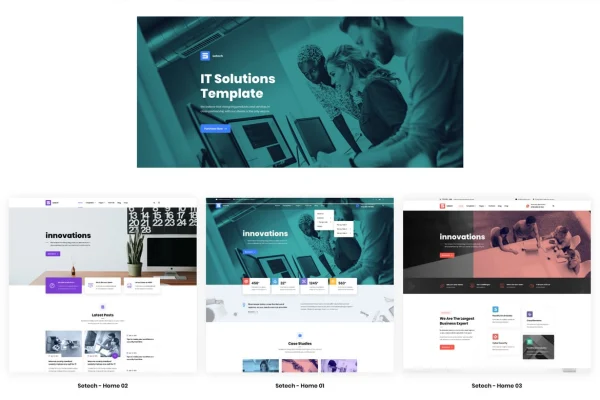
Setech is a WordPress theme by RB-Themes built for IT businesses, digital agencies and other tech-focused companies. It gives you a clean, modern design and ready-made layouts for presenting your services, team and client feedback on a professional website.
- Version
- 1.3.1
- Released
- Aug 18, 2026
- Developer
- RB-Themes
- Type
- WordPress theme
- Licence
- GPL
- Included in
- Every plan, or $3.99 on its own
What’s new in Setech 1.3.1
Version 1.3.1 · Aug 18, 2026
Latest
What it does
Tech and IT companies need a site that looks credible and explains their services clearly, and building one from scratch takes time. This theme starts you with a design made for that niche. You can import the demo content to get ready-made layouts and elements in place, then swap in your own text, images and branding. It suits software startups, consulting firms, marketing services and agencies that want pages for services, team members and testimonials.
The theme works with WPBakery Page Builder for editing layouts, and it is compatible with WooCommerce if you want to sell products and WPML if you need a multilingual site. It is built on Bootstrap, so the layout is responsive and adapts to desktops, tablets and phones, and it is retina-ready for sharp display on high-resolution screens. Designers get PSD files for mockups and tweaks, and documentation is included to help with setup and customization.
Best for
- IT companies and software startups
- Digital and marketing agencies presenting services
- Tech consultants needing multilingual or shop-enabled sites
Features
Design for tech businesses
A clean, modern look aimed at IT companies and digital agencies, with sections for services, team members and client testimonials.
Demo content import
Import the demo content to start with ready-made layouts and elements, then replace them with your own content instead of building every page from nothing.
WPBakery Page Builder support
Edit and arrange page layouts with WPBakery Page Builder, so you can adjust sections visually without writing code.
WooCommerce compatibility
The theme works with WooCommerce, which lets you add a shop to your agency or tech company site if you sell products.
Multilingual sites with WPML
Compatibility with WPML means you can translate your pages and run the site in more than one language.
Responsive, retina-ready layout
Built on Bootstrap, the layout adapts to desktops, tablets and smartphones, and graphics stay sharp on high-resolution retina screens.
PSD files included
Designers get PSD files for planning changes and mockups, along with HTML, CSS and JS for deeper customization.
Setup documentation
Included documentation walks through setup and customization, which helps users who have limited coding experience.
Setech older versions
- 1.2.1Nov 23, 2025
Members and buyers of this product can download older versions.
Questions about Setech
What kind of business is this theme designed for?
It is made for IT and tech-related businesses, including digital agencies, software startups, consulting firms and marketing services. The layouts are built around presenting services, team members and client testimonials in a clean, professional style.
Which page builder does Setech use?
Setech is compatible with WPBakery Page Builder, so you can edit and rearrange page layouts visually. Combined with the demo content import, this lets you start from ready-made layouts and adjust them to fit your brand.
Can I sell products or run a site in several languages?
Yes. The theme is compatible with WooCommerce for adding a store and with WPML for translating your content, so you can add a shop or serve visitors in multiple languages.
Will the site look right on phones and tablets?
The theme uses a Bootstrap-based, fully responsive layout that adapts to desktops, tablets and smartphones. It is also retina-ready, so images and graphics display sharply on high-resolution screens.
Is Setech free?
The code of Setech is licensed under the GPL, so anyone may use, change and share it. GPL Feast is a paid service: a plan or a single purchase gives you the download and automatic updates. The developer's own support, licence key and online services are not included.
Which version of Setech is this?
Version 1.3.1, released Aug 18, 2026. New versions appear here when the developer publishes them, and members get them as automatic updates.
How do I update Setech?
Install the free GPL Feast Updater on your site and connect it with your API key. It installs new versions of Setech automatically and keeps a backup, so you can roll back.
You might also like