Theme
Updated
Shefa
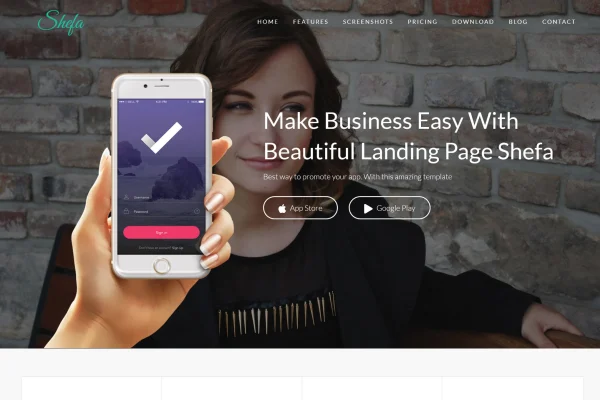
Shefa is a one-page WordPress theme built for presenting a mobile app, software product or startup. It gives you a responsive single-page layout with pre-built sections, smooth scrolling and animated effects, and you can adjust it with a drag-and-drop builder instead of writing code.
- Version
- 1.6
- Released
- Aug 9, 2026
- Developer
- themes_mountain
- Type
- WordPress theme
- Licence
- GPL
- Included in
- Every plan, or $3.99 on its own
What’s new in Shefa 1.6
Version 1.6 · Aug 9, 2026
Latest
What it does
Launching an app or a young startup usually calls for a focused website: one page that explains the product, shows what it does and points visitors to the next step. Shefa is designed around that format. Its one-page layout guides visitors through a sequence of content sections with simple navigation, so the product stays at the center of attention. The design leans minimal, with clean typography, modern color schemes and animations that draw attention to your content.
Building the page is mostly a matter of arranging and editing ready-made sections. The theme includes layouts suited to apps and startups, such as pricing tables, testimonials and download buttons, and its drag-and-drop builder lets you rearrange and customize them without coding skills. The layout is responsive across desktops, tablets and phones, and the theme is built to work in all major browsers. It suits founders and small teams who want a single landing page for a product.
Best for
- Mobile app and software product landing pages
- Startups that need a single-page company website
- Founders building a site without coding skills
Features
One-page layout
All of your content lives on a single page split into easy-to-read sections, with navigation that keeps visitors moving through your product story.
Drag-and-drop customization
A user-friendly drag-and-drop interface lets you adjust sections and match the design to your brand without writing any code.
Pre-built app and startup sections
Ready-to-use layouts cover common landing page needs such as pricing tables, testimonials and download buttons for your app.
Smooth scrolling and animations
Smooth scrolling between sections and animated effects add movement to the page as visitors explore your content.
Modern color schemes
Choose from a palette of modern, vivid colors to set the look of your site and match your brand identity.
Responsive design
The layout adapts to different screen sizes, so your page works on desktops, tablets and smartphones.
Clean, semantic code
The theme is built with a clean, semantic code structure, giving search engines a well-organized page to read.
Cross-browser compatibility
Shefa is built to function consistently across all major browsers, so visitors see the page as you designed it.
Shefa older versions
- 1.5Jun 7, 2024
Members and buyers of this product can download older versions.
Questions about Shefa
Can I use this theme for a multi-page website?
The theme is designed around a one-page layout, where all content sits on a single page divided into sections. It fits best when you want one focused page for an app or startup rather than a large site with many separate pages.
Do I need to know how to code to customize it?
No. The theme includes an intuitive drag-and-drop builder that lets you customize sections and adapt the design to your brand without coding skills. You can also pick from its modern color schemes to change the overall look.
What sections come ready to use?
It includes pre-built layouts aimed at apps and startups, including pricing tables, testimonials and download buttons. You can arrange these on your single page alongside other content sections to present your product.
Will the site work on phones and tablets?
Yes. The design is fully responsive, so the layout adjusts to desktops, tablets and smartphones. It is also built for compatibility with all major browsers.
Is Shefa free?
The code of Shefa is licensed under the GPL, so anyone may use, change and share it. GPL Feast is a paid service: a plan or a single purchase gives you the download and automatic updates. The developer's own support, licence key and online services are not included.
Which version of Shefa is this?
Version 1.6, released Aug 9, 2026. New versions appear here when the developer publishes them, and members get them as automatic updates.
How do I update Shefa?
Install the free GPL Feast Updater on your site and connect it with your API key. It installs new versions of Shefa automatically and keeps a backup, so you can roll back.
More from themes_mountain