Theme
Updated
Silvuple
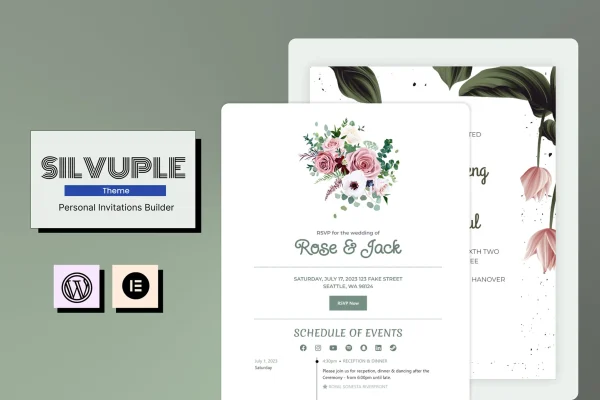
Silvuple is a WordPress theme for creating online invitations. It gives you customizable invitation pages with built-in RSVP handling, social sharing and action buttons, so you can send guests a web invitation for a wedding, birthday, corporate event or any other occasion.
- Version
- 1.4.1
- Released
- Aug 10, 2026
- Developer
- modeltheme
- Type
- WordPress theme
- Licence
- GPL
- Included in
- Every plan, or $3.99 on its own
What’s new in Silvuple 1.4.1
Version 1.4.1 · Aug 10, 2026
Latest
What it does
Paper invitations take time to print and mail, and tracking who is coming usually means a pile of texts and emails. Silvuple moves the whole thing onto a web page. You design an invitation page that matches the tone of your event, share it with guests, and collect their responses through built-in RSVP functionality. Attendance tracking lives in one place, which makes planning a lot easier to manage.
The theme works with Elementor and Elementor Pro, so you can adjust layouts with drag and drop editing and no coding. Pages are responsive and mobile friendly, and retina ready graphics keep visuals sharp on modern screens. You can add call-to-action buttons such as RSVP or contact email links, and connect invitations to social media for easy sharing. It suits event planners handling several celebrations as well as people organizing a single personal event.
Best for
- Couples creating online wedding invitations with RSVP
- Event planners managing invitations for multiple clients
- Hosts of birthdays, parties and corporate events
Features
Customizable invitation pages
Design personalized invitation layouts that match the theme and tone of your event, from a formal wedding to a casual birthday party.
Built-in RSVP functionality
Manage guest responses directly from your invitation, which keeps attendance tracking and guest communication in one place.
Social media sharing
Connect invitations to social media platforms so guests and hosts can share event details and spread the word more easily.
Call-to-action buttons
Add clear buttons such as RSVP or contact email links that prompt guests to reply and get in touch with the host.
Elementor and Elementor Pro editing
Customize your pages with the Elementor page builder using drag and drop controls, so you can build unique designs without writing code.
Responsive, mobile friendly layout
Invitation pages adapt to smartphones, tablets and desktops, which matters since many guests will open an invitation on their phone.
Retina ready graphics
Visuals stay crisp and high resolution on modern high-density screens, keeping photos and decorative elements looking clean.
Included documentation
Documentation is provided to guide you through setting up the theme and getting your first invitation page ready.
Silvuple older versions
- 1.1Dec 29, 2023
Members and buyers of this product can download older versions.
Questions about Silvuple
Can guests reply to the invitation online?
Yes. The theme includes built-in RSVP functionality, so guests can respond from the invitation page. You can also add call-to-action buttons such as RSVP or contact email links to prompt replies and make attendance tracking simpler.
What kinds of events does this theme work for?
It is designed for weddings, birthdays, corporate events and other special occasions. Because the invitation pages are customizable, you can adjust the layout and style to fit a formal ceremony, a company gathering or a casual celebration.
Do I need to know how to code to customize my invitations?
No. The theme is compatible with Elementor and Elementor Pro, which let you edit layouts with drag and drop controls. That makes it possible to create unique invitation designs without writing any code.
Will my invitation look good on phones?
The design is responsive and mobile friendly, so pages adjust to smartphones, tablets and desktops. Retina ready graphics also keep images sharp on high-resolution screens.
Is Silvuple free?
The code of Silvuple is licensed under the GPL, so anyone may use, change and share it. GPL Feast is a paid service: a plan or a single purchase gives you the download and automatic updates. The developer's own support, licence key and online services are not included.
Which version of Silvuple is this?
Version 1.4.1, released Aug 10, 2026. New versions appear here when the developer publishes them, and members get them as automatic updates.
How do I update Silvuple?
Install the free GPL Feast Updater on your site and connect it with your API key. It installs new versions of Silvuple automatically and keeps a backup, so you can roll back.
More from modeltheme