Theme
Updated
SixPack
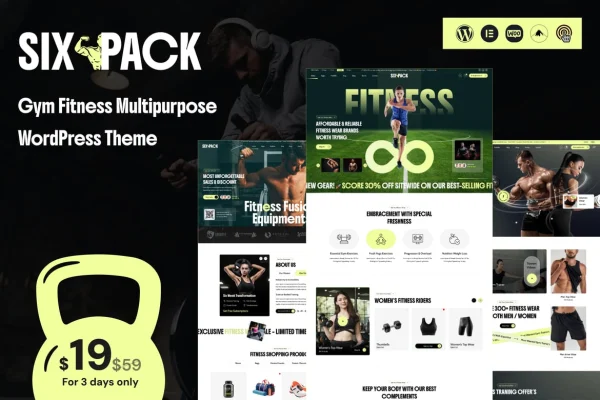
SixPack is a WordPress theme built for gyms, fitness studios and personal trainers. It gives you a responsive layout designed to present your services, classes and trainers, with pre-designed pages and page builder support so you can adjust the site without writing code.
- Version
- 1.0.2
- Released
- Aug 17, 2026
- Developer
- venusweb
- Type
- WordPress theme
- Licence
- GPL
- Included in
- Every plan, or $3.99 on its own
What’s new in SixPack 1.0.2
Version 1.0.2
Latest
- FixedFixes and Improvements
What it does
Fitness businesses need a website that tells visitors what they offer, who teaches and when classes run. This theme is shaped around exactly that content. It includes customizable homepage layouts for presenting services, classes and trainers, plus trainer profiles with bios and photos so prospective clients can get to know your team. A class schedule display lets you list your fitness programs in one place, and testimonials help you share client success stories.
The theme comes with multiple pre-designed inner pages, including About, Services, Pricing and Testimonials, and a one-click demo import that loads ready-made content and layouts as a starting point. From there, drag-and-drop page builder support lets you rearrange sections without coding. It is also compatible with WooCommerce, so you can add a shop for gym merchandise or class bookings, and social media integration helps connect the site to your channels.
Best for
- Gyms and fitness centers presenting classes and trainers
- Personal trainers building a professional profile site
- Fitness studios selling merchandise or class bookings
Features
Responsive gym layout
The modern, responsive design adapts to desktops, tablets and smartphones, so your gym's pages display properly on whatever device visitors use.
Customizable homepage layouts
Choose and adjust homepage layouts to present your gym's services, fitness classes and trainers in an organized way that suits your business.
Trainer profiles
Give each trainer a profile with a detailed bio and photos, helping potential clients learn about the people who will coach them.
Class schedule display
Show your fitness programs and class times on the site, making it simple for visitors to find the sessions that fit their week.
Pre-designed inner pages
Ready-made About, Services, Pricing and Testimonials pages cover the core content most gym and fitness websites need.
WooCommerce compatibility
Works with WooCommerce, so you can set up an online store to sell gym merchandise or take class bookings through your site.
Drag-and-drop page builder support
Edit and rearrange page layouts visually with a drag-and-drop page builder, with no coding knowledge required.
One-click demo import
Import the demo content and layouts in one step, giving you a finished-looking starting point that you can then edit.
SixPack older versions
- 1.0.1Sep 22, 20251 new, 1 improvement
Members and buyers of this product can download older versions.
Questions about SixPack
Can I show my trainers and their backgrounds on the site?
Yes. The theme includes trainer profiles with space for detailed bios and photos, so visitors can read about each member of your team before they decide to train with you.
Does the theme work with WooCommerce?
It does. SixPack is compatible with WooCommerce, which lets you set up an online store on your gym website to sell merchandise or handle class bookings.
Do I need coding skills to customize the layout?
No. The theme supports a drag-and-drop page builder, so you can change layouts visually. The customizable homepage layouts and pre-designed inner pages also give you a ready structure to edit.
What pages come ready to use?
The theme includes multiple pre-designed inner pages such as About, Services, Pricing and Testimonials. With the one-click demo import, you can load these along with sample content and then replace it with your own.
Is SixPack free?
The code of SixPack is licensed under the GPL, so anyone may use, change and share it. GPL Feast is a paid service: a plan or a single purchase gives you the download and automatic updates. The developer's own support, licence key and online services are not included.
Which version of SixPack is this?
Version 1.0.2, released Aug 17, 2026. New versions appear here when the developer publishes them, and members get them as automatic updates.
How do I update SixPack?
Install the free GPL Feast Updater on your site and connect it with your API key. It installs new versions of SixPack automatically and keeps a backup, so you can roll back.
More from venusweb