Theme
Updated
Solix
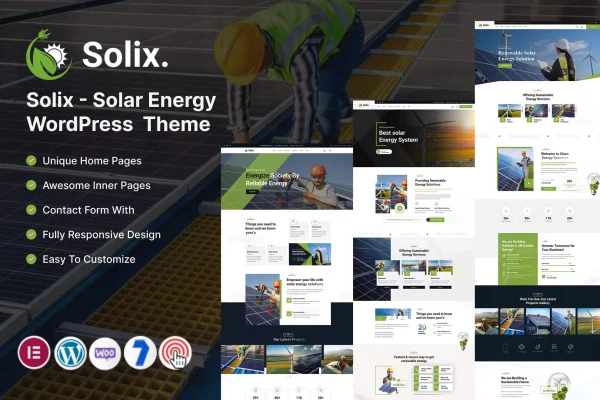
Solix is a WordPress theme built for solar energy providers, renewable energy companies and eco-conscious businesses. Made by KodeSolution, it gives you responsive layouts, service sections and project templates so you can present your solar products and green services clearly.
- Version
- 6.0
- Released
- Mar 1, 2026
- Developer
- KodeSolution
- Type
- WordPress theme
- Licence
- GPL
- Included in
- Every plan, or $3.99 on its own
What’s new in Solix 6.0
Version 6.0 · Mar 1, 2026
Latest
- ImprovedWooCommerce.
- ImprovedCore & Theme Plugins.
What it does
Solar and renewable energy companies need a site that explains their services, proves their track record and answers questions visitors have about clean energy. This theme is designed around that job. It includes customizable homepage layouts, dedicated sections for services and solar products, and pre-built templates for portfolios and case studies, so you can present completed installations and client stories without building every page from nothing.
Day-to-day changes happen in the theme options panel, where you can adjust colors, fonts and layouts without writing code. A blog lets you publish articles on renewable energy trends and tips, and WooCommerce compatibility means you can add a store for solar equipment or eco-products. The theme is also multilingual and RTL ready, which helps if you serve customers in more than one language.
Best for
- Solar panel installers and solar energy providers
- Renewable energy companies presenting projects and case studies
- Eco-friendly businesses selling green products online
Features
Responsive layouts
The design adapts to mobile and desktop screens, so visitors can browse your services and projects comfortably on whatever device they use.
Customizable homepage layouts
Shape your front page around your solar energy solutions and sustainability work by choosing and adjusting the homepage layout that fits your business.
Service and product sections
Dedicated sections let you present your eco-friendly services and solar products with clear, concise information for potential clients.
Theme options panel
Manage colors, fonts, layouts and other settings from one panel without coding, which makes it easier to match the site to your brand.
Portfolio and case study templates
Pre-built templates help you share completed solar projects and success stories, giving visitors concrete examples of the work you have done.
Blog for educational content
Publish articles on renewable energy trends, practical tips and industry news to keep your audience informed about the benefits of clean energy.
WooCommerce compatibility
Set up an online store with WooCommerce to sell solar equipment and eco-products directly from your website.
Multilingual and RTL ready
Support for multiple languages and right-to-left scripts lets you offer your site to audiences who read in different languages.
Questions about Solix
Can I sell solar equipment with this theme?
Yes. The theme is compatible with WooCommerce, so you can set up an online store and sell solar equipment or other eco-products directly from your site alongside your service pages.
Do I need coding skills to customize Solix?
No. The theme options panel lets you change colors, fonts, layouts and other settings without touching code. You can also pick and adjust homepage layouts to suit how you want to present your business.
Is there a way to show off completed solar installations?
Yes. Solix includes pre-built portfolio and case study templates for sharing finished projects and success stories, and you can add client testimonials to build credibility with new visitors.
Will the theme work for a site in Arabic or another RTL language?
The theme is described as multilingual and RTL ready, meaning it supports multiple languages and right-to-left scripts, so it can serve audiences who read in languages such as Arabic or Hebrew.
Is Solix free?
The code of Solix is licensed under the GPL, so anyone may use, change and share it. GPL Feast is a paid service: a plan or a single purchase gives you the download and automatic updates. The developer's own support, licence key and online services are not included.
Which version of Solix is this?
Version 6.0, released Mar 1, 2026. New versions appear here when the developer publishes them, and members get them as automatic updates.
How do I update Solix?
Install the free GPL Feast Updater on your site and connect it with your API key. It installs new versions of Solix automatically and keeps a backup, so you can roll back.
More from KodeSolution