Theme
Updated
SolTeck
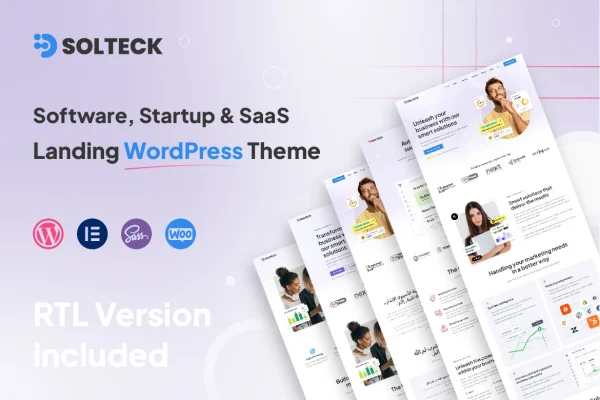
SolTeck is a WordPress theme built for software companies, startups and SaaS businesses. It gives you pre-designed landing page templates, a clean layout and responsive design, so you can present your product and services clearly on desktops, tablets and phones.
- Version
- 1.0.8
- Released
- Aug 16, 2026
- Developer
- reacthemes
- Type
- WordPress theme
- Licence
- GPL
- Included in
- Every plan, or $3.99 on its own
What’s new in SolTeck 1.0.8
Version 1.0.8 · Aug 16, 2026
Latest
What it does
Software and SaaS teams often need a landing site that explains a product quickly and gives visitors a clear next step. This theme is made for that job. It ships with multiple pre-designed templates aimed at software, startup and SaaS landing pages, so you start from a layout that already fits your type of business. The design is clean and minimal, with the focus on content clarity, which helps your product message stay easy to read.
Customization works through drag-and-drop editing with no coding required, which suits founders and marketers who are not developers. You can adjust color schemes and typography to match your brand, and the layout adapts to mobile, tablet and desktop screens. The theme includes call-to-action buttons and lead capture forms for gathering inquiries. It is also described as compatible with popular WordPress plugins, so you can add more functionality as your site grows.
Best for
- SaaS companies building a product landing site
- Early-stage startups presenting a new software product
- Software agencies and app developers promoting their services
Features
SaaS landing page templates
Multiple pre-designed templates for software, startup and SaaS landing pages give you a ready starting point for presenting your product and services.
Drag-and-drop customization
Edit layouts and content with drag-and-drop tools and no coding required, which makes the theme approachable for non-technical site owners.
Responsive layout
Pages adapt to mobile, tablet and desktop screens, so visitors get a readable layout no matter which device they use to browse.
Call-to-action buttons and forms
Built-in call-to-action buttons and lead capture forms let you prompt visitors to get in touch or sign up for more information.
Brand colors and typography
Flexible color schemes and typography options let you match the site to your brand identity without writing custom styles.
Clean, minimal design
A minimal design approach keeps attention on your content, helping product descriptions and service details stay clear and easy to scan.
React-based architecture
The theme is built on a React-based framework, which is the foundation it uses for its interface and page behavior.
SolTeck older versions
- 1.0.4Aug 25, 2025
- 1.0.3May 26, 2025
Members and buyers of this product can download older versions.
Questions about SolTeck
What kind of business is this theme designed for?
It is aimed at software companies, startups and SaaS businesses. The included templates are designed specifically for software, startup and SaaS landing pages, so the layouts suit product introductions, service descriptions and lead capture.
Can I customize the design without knowing how to code?
Yes. The theme offers drag-and-drop customization with no coding required. You can also change color schemes and typography options to match your brand, which makes it practical for founders and marketers who do not write code.
Does SolTeck include ways to collect leads from visitors?
It includes integrated call-to-action buttons and lead capture forms. You can place these on your landing pages to invite visitors to get in touch, request information or take the next step with your product.
Will my site display properly on phones and tablets?
The theme uses a fully responsive design that adapts to mobile, tablet and desktop screens. Your landing pages and templates adjust their layout to fit the device each visitor is using.
Is SolTeck free?
The code of SolTeck is licensed under the GPL, so anyone may use, change and share it. GPL Feast is a paid service: a plan or a single purchase gives you the download and automatic updates. The developer's own support, licence key and online services are not included.
Which version of SolTeck is this?
Version 1.0.8, released Aug 16, 2026. New versions appear here when the developer publishes them, and members get them as automatic updates.
How do I update SolTeck?
Install the free GPL Feast Updater on your site and connect it with your API key. It installs new versions of SolTeck automatically and keeps a backup, so you can roll back.