
Theme
Updated
StayBook
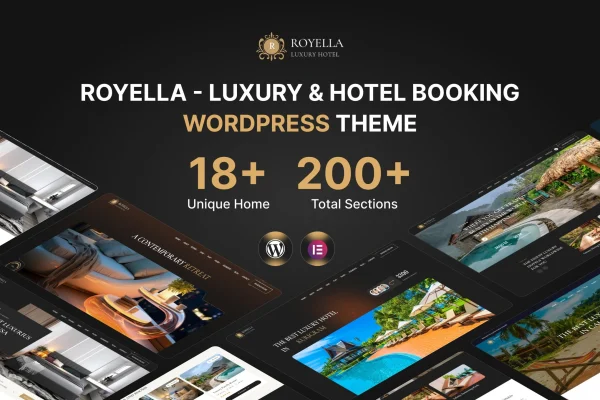
StayBook is a WordPress theme by Dreamit-Solution built for hotels, resorts, bed and breakfasts and other places to stay. It pairs a modern, responsive layout with a booking system, so guests can browse rooms, check availability and reserve directly on your site.
- Version
- 1.0.0
- Released
- Aug 15, 2026
- Developer
- Dreamit-Solution
- Type
- WordPress theme
- Licence
- GPL
- Included in
- Every plan, or $3.99 on its own
What’s new in StayBook 1.0.0
Version 1.0.0 · Aug 15, 2026
Latest
What it does
Accommodation sites need more than nice photos. Guests want to see what each room offers, check whether it is free on their dates and book without leaving the page. This theme brings those pieces together: room pages with descriptions, images and amenities, a real-time availability calendar that helps prevent double bookings, and a booking interface that handles availability, pricing and guest details in one place.
It suits anything from a small boutique inn to a larger hotel. Visitors can narrow results with search filters for dates, occupancy, price range or facilities, then pay through supported payment gateways. For international guests, the site can be presented in multiple languages and currencies. You can adjust colors, fonts and layouts in the WordPress Customizer without code, and the theme works with plugins such as WooCommerce and WPML.
Best for
- Hotels and resorts taking direct bookings online
- Bed and breakfasts and boutique inns
- Agencies building websites for accommodation clients
Features
Built-in booking system
Take reservations through a booking interface that manages room availability, pricing and guest details, so stays can be booked directly from your own website.
Real-time availability calendar
Show guests current room availability on a calendar, which keeps information up to date and helps prevent the same room being booked twice.
Detailed room pages
Present each room type with its own description, images and list of amenities so guests can compare options before they choose.
Customizable search filters
Let visitors find suitable rooms by filtering on dates, occupancy, price range or specific facilities offered at your property.
Payment gateway support
Accept booking payments on your site through multiple supported payment gateways, giving guests more than one way to pay.
Languages and currencies
Serve international travelers by presenting the site in multiple languages and showing prices in multiple currencies.
Customizer styling options
Change colors, fonts and layouts through the WordPress Customizer, with no coding needed to match the look of your property.
Contact forms included
Built-in contact forms give guests a direct way to send inquiries or special requests before or after they book.
Questions about StayBook
Can guests book and pay for rooms directly on my site?
Yes. The theme includes a booking system that handles availability, pricing and guest details, and it supports multiple payment gateways so guests can pay for their stay on your website.
Does it help avoid double bookings?
It includes a real-time availability calendar that shows guests which rooms are free on their dates. Keeping availability current in this way is meant to prevent the same room from being booked twice.
Can I run the site in more than one language?
Yes. The theme supports multiple languages and currencies for international travelers, and it is listed as compatible with WPML, a common plugin for multilingual WordPress sites.
Do I need coding skills to change the design?
No. Colors, fonts, layouts and other settings can be adjusted in the WordPress Customizer. The responsive design also adapts to desktops, tablets and smartphones without extra work.
Is StayBook free?
The code of StayBook is licensed under the GPL, so anyone may use, change and share it. GPL Feast is a paid service: a plan or a single purchase gives you the download and automatic updates. The developer's own support, licence key and online services are not included.
Which version of StayBook is this?
Version 1.0.0, released Aug 15, 2026. New versions appear here when the developer publishes them, and members get them as automatic updates.
How do I update StayBook?
Install the free GPL Feast Updater on your site and connect it with your API key. It installs new versions of StayBook automatically and keeps a backup, so you can roll back.