Theme
Updated
Sunrays
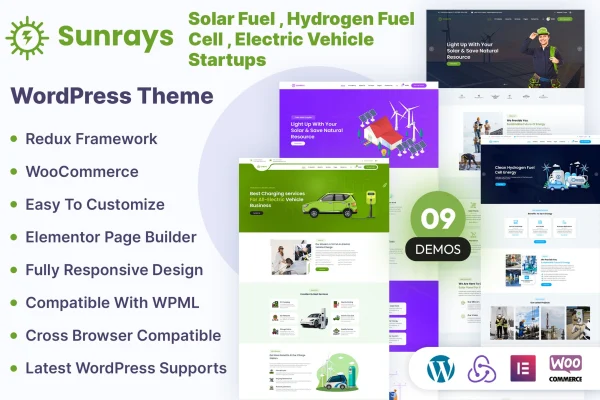
Sunrays is a WordPress theme built for solar power and green energy businesses. It gives renewable energy companies a clean, professional site for presenting services, projects and team members, with layouts suited to solar, wind, hydro, geothermal and biomass work.
- Version
- 1.1.0
- Released
- Jul 12, 2026
- Developer
- kamleshyadav
- Type
- WordPress theme
- Licence
- GPL
- Included in
- Every plan, or $3.99 on its own
What’s new in Sunrays 1.1.0
Version 1.1.0 · Jul 12, 2026
Latest
What it does
Renewable energy companies need a website that explains their services clearly and looks credible to clients who care about sustainability. This theme starts with layouts designed for that sector, so you spend less time adapting a general business design to fit topics like solar installation, wind projects or biofuel products. The clean, clutter-free layout keeps attention on your services, initiatives and products, and the responsive, retina-ready design adjusts to desktops, tablets and phones while keeping visuals sharp on high-resolution screens.
Under the hood, the theme is built on the Bootstrap framework and works with the Layers WP page builder for drag-and-drop page editing. If you want to sell solar panels or eco-friendly merchandise, it is compatible with WooCommerce, and WPML support lets you run the site in more than one language. Developers get the CSS, HTML and JS files for deeper branding changes, and documentation covers setup and customization.
Best for
- Solar panel installers and solar energy companies
- Wind, hydro, geothermal or biomass energy businesses
- Green energy shops selling eco-friendly products online
Features
Layouts for renewable energy
Page layouts are tailored to solar, wind, hydro, geothermal and biomass sectors, so your content fits the industry from the start.
Responsive and retina ready
The design adapts to desktops, tablets and smartphones, and images stay crisp on devices with high-resolution displays.
WooCommerce compatibility
Set up an online store on your site to sell solar panels, green energy products or eco-friendly merchandise using WooCommerce.
Multilingual sites with WPML
WPML compatibility lets you translate your site and present your energy services to visitors in several languages.
Layers WP page builder
Build custom page designs with drag-and-drop editing through the Layers WP page builder, which suits beginners who prefer not to write code.
Bootstrap framework
The theme is built on Bootstrap, giving it a flexible structure and solid cross-browser compatibility for your pages.
Editable CSS, HTML and JS
The included CSS, HTML and JS files let developers and advanced users adjust the theme to match specific branding needs.
Setup documentation
Detailed guides walk you through configuring and customizing the theme so you can get your energy company site in shape.
Sunrays older versions
- 1.0.7Nov 30, 2024
Members and buyers of this product can download older versions.
Questions about Sunrays
Can I sell products like solar panels with this theme?
Yes. The theme is compatible with WooCommerce, so you can add an online store to your site and sell solar panels, other green energy products or eco-friendly merchandise alongside your service pages.
Does Sunrays work for energy types other than solar?
It does. The layouts are tailored to several renewable energy sectors, including wind, hydro, geothermal and biomass, and the theme also suits organizations working with biofuels or other sustainable initiatives.
Can I build a multilingual website with it?
Yes. The theme supports WPML, which lets you translate your content and serve visitors in different languages. This is useful if your energy business operates in more than one market.
Do I need coding skills to customize the pages?
No. The theme works with the Layers WP page builder, which offers drag-and-drop editing for custom page designs. If you do code, the CSS, HTML and JS files are included for deeper changes.
Is Sunrays free?
The code of Sunrays is licensed under the GPL, so anyone may use, change and share it. GPL Feast is a paid service: a plan or a single purchase gives you the download and automatic updates. The developer's own support, licence key and online services are not included.
Which version of Sunrays is this?
Version 1.1.0, released Jul 12, 2026. New versions appear here when the developer publishes them, and members get them as automatic updates.
How do I update Sunrays?
Install the free GPL Feast Updater on your site and connect it with your API key. It installs new versions of Sunrays automatically and keeps a backup, so you can roll back.
More from kamleshyadav