Theme
Updated
Surince
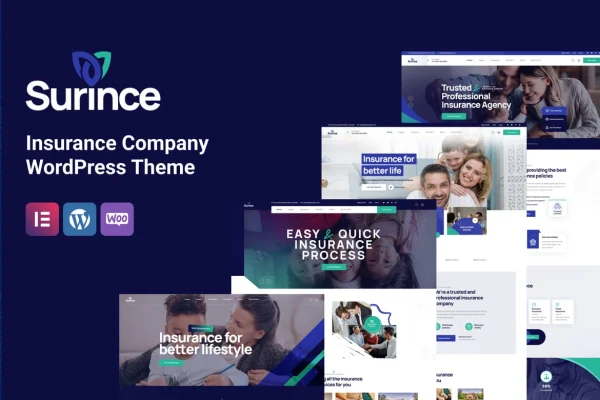
Surince is a WordPress theme built for insurance companies and agencies. It gives you a professional, modern website with quote request forms, service display layouts and ready-made pages, so you can present your policies clearly and let visitors ask for a quote.
- Version
- 1.1.8
- Released
- Sep 19, 2026
- Developer
- TPLabs
- Type
- WordPress theme
- Licence
- GPL
- Included in
- Every plan, or $3.99 on its own
What’s new in Surince 1.1.8
Version 1.1.8 · Sep 19, 2026
Latest
What it does
Insurance businesses need a site that explains their coverage options clearly and makes it simple for a visitor to ask for a quote. A general business theme often leaves you building those pieces yourself. This theme is designed around the insurance industry, with quote request forms, organized service sections and pre-designed pages made for insurance companies, so much of the structure is already in place when you start.
The layout is responsive, so pages adjust to desktops, tablets and smartphones. You can customize the design to match your brand, and the theme works with drag-and-drop page builders, which lets you edit pages without writing code. An integrated blog section gives you a place to publish industry news, tips and company updates. It suits small local agencies as well as larger insurance firms that want a clean, trustworthy web presence.
Best for
- Independent and local insurance agencies
- Larger insurance firms presenting multiple policy types
- Freelancers building websites for insurance clients
Features
Customizable quote request forms
Visitors can request an insurance quote directly from your website through forms you can adjust to fit the information your agency needs.
Service display layouts
Present your range of insurance products in clear, organized sections so visitors can see what coverage you offer and find the right option.
Responsive design
Pages adapt to desktops, tablets and smartphones, so your insurance site stays readable and usable on whatever device a visitor is using.
Page builder compatibility
Work with drag-and-drop page builders to design and rearrange pages visually, without needing any coding knowledge to make changes.
Pre-designed insurance templates
Start from a variety of ready-made pages and layouts created specifically for insurance companies, which cuts down the time spent on initial setup.
Integrated blog section
Publish industry news, practical tips and company updates in a built-in blog to keep clients informed and share your expertise.
Brand customization options
Adjust the design to reflect your company's look and personality, so the site feels like your own agency rather than a generic template.
Surince older versions
- 1.1.7Aug 18
- 1.1.4Nov 15, 2025
- 1.1.3May 24, 2025
- 1.0.2Dec 12, 2023
Members and buyers of this product can download older versions.
Questions about Surince
Can visitors request a quote through the site?
Yes. The theme includes customizable quote request forms, so potential clients can ask for an insurance quote directly from your website. You can adjust the forms to collect the details your team needs to follow up.
Do I need to know how to code to customize it?
No. The theme is compatible with drag-and-drop page builders, so you can design and edit pages visually. It also comes with pre-designed insurance pages you can adapt instead of building layouts from scratch.
Will my site work well on phones and tablets?
The theme uses a responsive design that adjusts to desktops, tablets and smartphones. Your service sections, quote forms and blog posts reflow to fit smaller screens so visitors can browse and get in touch on any device.
Can I publish articles and company news?
Yes. There is an integrated blog section where you can share industry news, tips for policyholders and company updates, giving visitors useful content alongside your service pages.
Is Surince free?
The code of Surince is licensed under the GPL, so anyone may use, change and share it. GPL Feast is a paid service: a plan or a single purchase gives you the download and automatic updates. The developer's own support, licence key and online services are not included.
Which version of Surince is this?
Version 1.1.8, released Sep 19, 2026. New versions appear here when the developer publishes them, and members get them as automatic updates.
How do I update Surince?
Install the free GPL Feast Updater on your site and connect it with your API key. It installs new versions of Surince automatically and keeps a backup, so you can roll back.