Theme
Updated
Tali
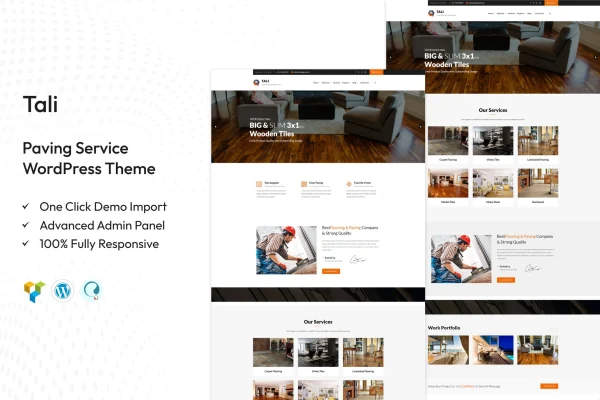
Tali is a WordPress theme built for paving service businesses and contractors. It gives you a ready layout for presenting your services, displaying completed projects and making it easy for visitors to get in touch or request a quote.
- Version
- 1.9
- Released
- Aug 15, 2026
- Developer
- TonaTheme
- Type
- WordPress theme
- Licence
- GPL
- Included in
- Every plan, or $3.99 on its own
What’s new in Tali 1.9
Version 1.9 · Aug 15, 2026
Latest
What it does
Paving companies need a website that explains what they do, shows the quality of past jobs and gives customers a simple way to reach out. This theme is designed around those needs. It includes customizable service pages for describing each type of paving work you offer, plus a project portfolio with image galleries and descriptions so prospects can see finished driveways, lots and walkways before they call.
Setup starts with a one-click demo import that loads pre-built content you can edit to match your business. From there you can adjust color schemes and typography to fit your brand, add contact forms for quote requests, and embed Google Maps to show your location and service areas. The responsive layout adapts to desktops, tablets and phones, and a sticky navigation menu keeps links within reach as visitors scroll. It also works with plugins such as WooCommerce and WPML.
Best for
- Local paving contractors building their first website
- Larger paving companies with multiple services and service areas
- Agencies creating sites for construction and paving clients
Features
Customizable service pages
Present each paving service with its own tailored layout, so visitors can clearly understand the work you offer and what sets your crew apart.
Project portfolio
Display past jobs with image galleries and written descriptions, giving potential clients a clear look at the quality of your completed paving work.
One-click demo import
Load pre-built demo content in one step, then swap in your own text, photos and details instead of building every page from scratch.
Built-in contact forms
Ready-to-use contact forms let visitors request quotes or ask questions directly from your site without needing to hunt for a phone number.
Google Maps embedding
Embed maps to show your business location and the areas you serve, helping local customers quickly see whether you cover their neighborhood.
Brand colors and typography
Adjust color schemes and fonts with flexible design controls so the site matches your company logo, trucks and existing marketing materials.
Sticky navigation menu
The main menu stays visible as visitors scroll, keeping links to services, projects and contact details accessible on long pages.
Responsive layout
Pages adapt to desktops, tablets and smartphones, so customers can browse your portfolio or contact you from whatever device they have on hand.
Questions about Tali
Can I show photos of driveways and other jobs we have completed?
Yes. The theme includes a project portfolio where you can add image galleries along with descriptions for each job. This gives prospective customers a clear view of your past work and the kinds of projects you take on.
How can customers ask for a quote through the site?
Tali comes with ready-to-use contact forms that visitors can fill out to request quotes or ask questions. You can pair these with an embedded Google Map showing your location and service areas so customers know you work in their area.
Will I have to design every page myself?
No. A one-click demo import loads pre-built content, including layouts for services and projects. You then replace the demo text and images with your own and adjust the colors and typography to fit your brand.
Does the theme work with WooCommerce or a multilingual setup?
The theme is described as compatible with popular plugins, including WooCommerce and WPML, as well as newsletter tools. That lets you add a shop or translate your site if your business needs those options.
Is Tali free?
The code of Tali is licensed under the GPL, so anyone may use, change and share it. GPL Feast is a paid service: a plan or a single purchase gives you the download and automatic updates. The developer's own support, licence key and online services are not included.
Which version of Tali is this?
Version 1.9, released Aug 15, 2026. New versions appear here when the developer publishes them, and members get them as automatic updates.
How do I update Tali?
Install the free GPL Feast Updater on your site and connect it with your API key. It installs new versions of Tali automatically and keeps a backup, so you can roll back.