Theme
Updated
Techogy
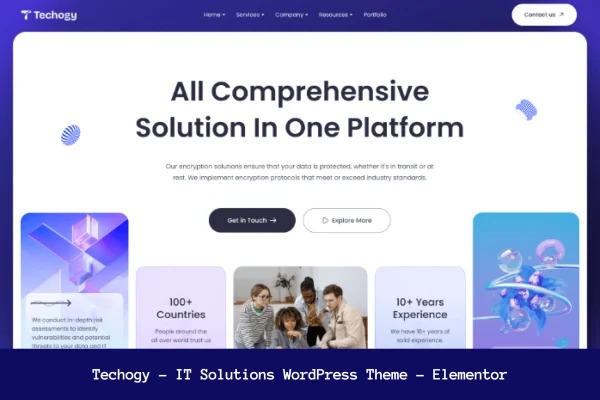
Techogy is a WordPress theme made for IT solution providers, digital agencies, startups and freelancers in the tech sector. It gives you a clean, modern design for presenting your services, projects and case studies, and it uses the Elementor page builder so you can edit pages by drag and drop.
- Version
- 1.0
- Developer
- Gossip-Themes
- Type
- WordPress theme
- Licence
- GPL
- Included in
- Every plan, or $3.99 on its own
What’s new in Techogy 1.0
Version 1.0
Latest
What it does
Tech businesses need a site that explains what they offer and shows past work in a professional way. This theme handles that with layouts aimed at service pages, project presentations and case studies. The design is clean and contemporary, which suits companies selling software, IT support or digital services. Because it is fully responsive and retina ready, pages adapt to phones, tablets and high-resolution screens, and it is built to work across major browsers.
Editing happens mainly through Elementor, so you can rearrange sections, change colors and adjust fonts without writing code while previewing changes in real time. Techogy also works with Elementor Pro and Bootstrap if you want more design options. Global settings live in a Codestar Framework options panel inside the WordPress dashboard, where you can switch layouts and skins. The theme follows SEO best practices in its markup, and documentation is included to help beginners set things up.
Best for
- IT service providers and managed support companies
- Digital agencies and tech startups presenting services
- Freelance developers sharing projects and case studies
Features
Elementor drag and drop editing
Build and adjust pages visually with the Elementor page builder, changing layouts, colors and fonts with a live preview and no coding required.
Customizable layouts and skins
Switch between layouts and custom skins, then fine tune colors and fonts to give your IT company site its own look.
Codestar Framework options panel
Manage theme settings from a lightweight Codestar Framework panel inside the WordPress admin dashboard, keeping appearance controls in one place.
Responsive and retina ready
Pages adjust to different devices and screen sizes, and graphics stay sharp on high-resolution displays such as modern phones and laptops.
Elementor Pro and Bootstrap compatible
The theme works with Elementor Pro and the Bootstrap framework, giving you extra design and development options when you need them.
SEO-minded code
Techogy is built following common SEO practices, giving search engines a clean structure to read on your service and project pages.
Cross-browser compatibility
The theme is built to display correctly across all major browsers, so visitors see a consistent site whichever browser they use.
Documentation included
Bundled documentation walks you through setting up and customizing the theme, which helps if you are new to WordPress.
Questions about Techogy
Do I need to know how to code to customize this theme?
No. The theme uses the Elementor page builder, so you can edit layouts, colors and fonts by drag and drop with a real-time preview. Global options are handled in a Codestar Framework panel in the WordPress dashboard.
Will it work with Elementor Pro?
Yes. The theme is described as compatible with Elementor Pro, as well as the Bootstrap framework, so you can use those tools to extend your design and layout options.
Is the theme suitable for showing case studies and projects?
Yes. It is aimed at tech businesses that want to present their services, projects and case studies with a clean, professional design that fits technology and IT audiences.
How does the theme look on mobile devices?
It is fully responsive and retina ready, so layouts adapt to phones, tablets and desktops, and visuals stay crisp on high-resolution screens. It is also built to work across major browsers.
Is Techogy free?
The code of Techogy is licensed under the GPL, so anyone may use, change and share it. GPL Feast is a paid service: a plan or a single purchase gives you the download and automatic updates. The developer's own support, licence key and online services are not included.
Which version of Techogy is this?
Version 1.0. New versions appear here when the developer publishes them, and members get them as automatic updates.
How do I update Techogy?
Install the free GPL Feast Updater on your site and connect it with your API key. It installs new versions of Techogy automatically and keeps a backup, so you can roll back.