Theme
Updated
Tejal
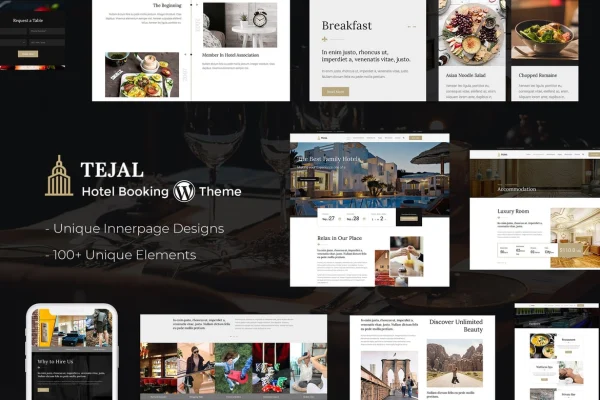
Tejal is a WordPress theme built for resorts, hotels and other hospitality businesses. It gives you a responsive site with a built-in booking system, so guests can browse your rooms, check availability and reserve a stay directly on your website.
- Version
- 3.4
- Released
- Apr 2, 2026
- Developer
- designthemes
- Type
- WordPress theme
- Licence
- GPL
- Included in
- Every plan, or $3.99 on its own
What’s new in Tejal 3.4
Version 3.4 · Apr 2, 2026
Latest
- FixedPortfolio security updated
- ImprovedCompatible with latest WordPress Version
What it does
Hotels and resorts need a website that does two jobs at once: present the property well and take reservations without sending guests elsewhere. This theme covers both. It includes a booking system where guests check availability and book rooms, plus room pages with descriptions, images and amenity lists. Support for multiple payment gateways lets guests complete checkout on your site, which keeps the whole reservation process in one place.
The theme suits boutique hotels as well as larger resorts. Layouts are responsive, so pages adapt to desktops, tablets and phones. A drag-and-drop page builder lets you adjust layouts without code, and typography and color options help you match your brand. You can promote packages, deals and events, and the theme is compatible with WPML if you want to offer your content in more than one language.
Best for
- Boutique hotels taking direct online bookings
- Resorts promoting packages, events and special offers
- Hospitality sites serving guests in multiple languages
Features
Built-in booking system
Guests can check room availability and book directly from your site, while you manage reservations from one place instead of relying on an outside booking tool.
Detailed room listings
Present rooms and suites with detailed descriptions, images and amenity lists so guests can compare options before they book a stay.
Multiple payment gateways
Support for several payment gateways lets guests pay during checkout, keeping the booking and payment steps together on your website.
Drag-and-drop page builder
Rearrange and customize page layouts visually without writing code, so you can shape pages around your property and brand.
Event and offer management
Promote special deals, packages and events directly on your site, giving returning and new guests a clear view of what is on offer.
Multilingual and WPML compatible
The theme works with WPML, so you can publish your site content in multiple languages for international guests.
Typography and color options
Adjust fonts and color schemes throughout the theme to give your hotel or resort site a look that fits your brand identity.
Responsive layouts
Pages adapt to desktops, tablets and smartphones, so guests can browse rooms and make bookings from whatever device they use.
Tejal older versions
- 3.2Nov 12, 20251 new, 2 improvements
- 3.1Aug 12, 20251 improvement
- 2.8Feb 27, 20252 improvements
Members and buyers of this product can download older versions.
Questions about Tejal
Can guests book rooms directly on my website?
Yes. The theme includes a built-in booking system where guests check availability and reserve rooms on your site. It also supports multiple payment gateways, so guests can complete checkout without leaving your website.
Do I need coding skills to customize the layouts?
No. Tejal includes a drag-and-drop page builder for adjusting layouts visually, along with typography and color options for fonts and color schemes. You can personalize pages to match your brand without writing code.
Can I run my hotel website in more than one language?
Yes. The theme is multilingual ready and compatible with WPML, which lets you offer your site content in multiple languages for guests from different countries.
Can I promote seasonal deals and events?
Yes. The theme has event and offer management, so you can promote special deals, packages and events directly on your site alongside your room listings.
Is Tejal free?
The code of Tejal is licensed under the GPL, so anyone may use, change and share it. GPL Feast is a paid service: a plan or a single purchase gives you the download and automatic updates. The developer's own support, licence key and online services are not included.
Which version of Tejal is this?
Version 3.4, released Apr 2, 2026. New versions appear here when the developer publishes them, and members get them as automatic updates.
How do I update Tejal?
Install the free GPL Feast Updater on your site and connect it with your API key. It installs new versions of Tejal automatically and keeps a backup, so you can roll back.