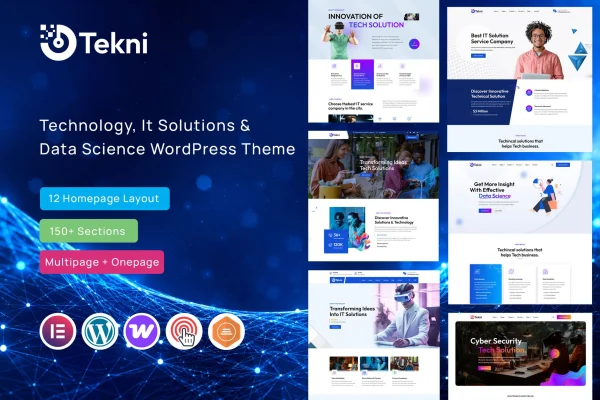
Theme
Updated
Tekni
Tekni is a WordPress theme built for IT solutions companies, startups and technology service providers. It gives tech businesses a clean, modern site with ready-made sections for services, projects, team members and company expertise, plus a one-click demo import to get the layout in place quickly.
- Version
- 1.1
- Released
- Feb 11, 2025
- Developer
- validthemes
- Type
- WordPress theme
- Licence
- GPL
- Included in
- Every plan, or $3.99 on its own
What’s new in Tekni 1.1
Version 1.1 · Feb 11, 2025
Latest
What it does
Technology firms often need a site that explains fairly technical services in a clear way, presents past projects and introduces the people behind the work. Tekni is designed around that need. Its clean, modern layout keeps attention on what the company offers, and its pre-built sections cover the pages a typical IT business uses, such as service listings, project portfolios and team profiles. Responsive layouts adjust to desktops, tablets and phones, so the same content works across screen sizes.
Getting started is simple: the one-click demo import loads ready-made content, which you then replace with your own text, images and projects. Typography and color options let you match fonts and color schemes to your brand without writing code. The theme is compatible with Elementor, WPML, Contact Form 7 and WooCommerce, so you can build pages visually, run a multilingual site, add contact forms or sell products if your business needs that.
Best for
- IT solutions companies presenting services and projects
- Tech startups building their first company website
- Agencies creating sites for technology service clients
Features
One-click demo import
Load ready-made demo content in one step, giving you a complete starting layout that you can edit with your own services, projects and company details.
Customizable homepage sections
Adjust homepage elements, service blocks, team profiles and project portfolios so each section reflects your brand identity and the way you present your work.
Responsive layouts
Pages adapt to desktops, tablets and smartphones, so visitors see a properly arranged site whatever device they use to browse.
Typography and color options
Change fonts and color schemes from the theme settings to line the site up with your company's existing branding and visual style.
Elementor compatibility
Works with the Elementor page builder, so you can edit and build pages visually using a drag and drop approach.
Multilingual and form support
Compatible with WPML for translated content and Contact Form 7 for contact and inquiry forms, both common needs for service businesses.
WooCommerce ready
Supports WooCommerce, which lets an IT company add a shop for products, software packages or service bundles alongside its main site.
Questions about Tekni
What kind of business is Tekni designed for?
Tekni is aimed at IT companies, technology startups and tech service providers. Its sections focus on presenting services, project portfolios, team profiles and technical expertise, which suits businesses that sell IT solutions or consulting.
Can I build my pages with Elementor?
Yes. The theme is compatible with Elementor, so you can edit layouts visually. It also works with WPML, Contact Form 7 and WooCommerce if you need translations, forms or a shop.
Will my site look like the demo right away?
The one-click demo import loads ready-made content so your site starts with a complete layout. From there you swap in your own text, images, services and projects, and adjust fonts and colors to fit your brand.
Does the theme work on mobile devices?
Yes. The layouts are responsive and adapt to desktops, tablets and smartphones, so your service pages and portfolio remain readable and well arranged on smaller screens.
Is Tekni free?
The code of Tekni is licensed under the GPL, so anyone may use, change and share it. GPL Feast is a paid service: a plan or a single purchase gives you the download and automatic updates. The developer's own support, licence key and online services are not included.
Which version of Tekni is this?
Version 1.1, released Feb 11, 2025. New versions appear here when the developer publishes them, and members get them as automatic updates.
How do I update Tekni?
Install the free GPL Feast Updater on your site and connect it with your API key. It installs new versions of Tekni automatically and keeps a backup, so you can roll back.