Theme
Updated
Think AI
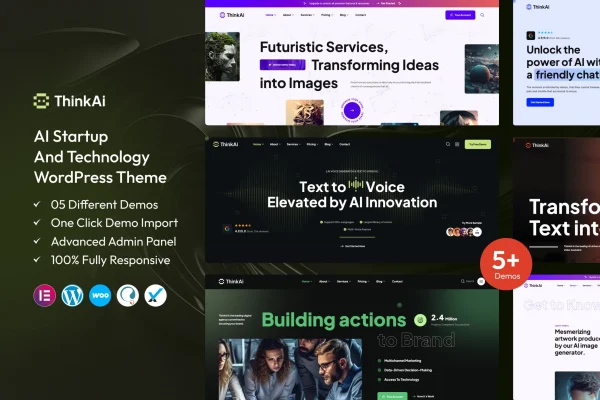
Think AI by ThemeKalia is a WordPress theme built for AI startups and technology businesses. It gives you a modern, clean design with pre-built pages and sections for presenting services, teams and projects, plus customization options that do not require code.
- Version
- 1.1
- Released
- Aug 15, 2026
- Developer
- ThemeKalia
- Type
- WordPress theme
- Licence
- GPL
- Included in
- Every plan, or $3.99 on its own
What’s new in Think AI 1.1
Version 1.1 · Aug 15, 2026
Latest
What it does
Tech companies often need a site that looks current and explains complex products clearly, without spending weeks on custom design. Think AI handles much of that groundwork. It ships with pre-built pages and sections made for tech businesses, covering service displays, team introductions, portfolio layouts and blog pages. You can present AI solutions, machine learning projects or other technology work using layouts already shaped for that kind of content.
Customization happens through drag and drop options, so you can adjust pages without writing code. Header and footer styles are flexible, and multiple color schemes plus typography and font controls help you match the site to your brand. The layout is responsive, so pages adapt to phones, tablets and desktops. The theme also works with popular plugins such as WooCommerce, Contact Form 7 and Elementor, which lets you add a shop, contact forms or extra page building as your site grows.
Best for
- AI startups building their first company website
- Technology consultancies and software service providers
- Agencies creating sites for machine learning or tech clients
Features
Design for AI and tech
A modern, clean visual style aimed at AI and technology startups, giving your site a professional look suited to software, data and tech services.
Pre-built tech business pages
Ready-made pages and sections for service displays, team introductions, portfolio displays and blog layouts, so you start with structure instead of a blank page.
Drag and drop customization
Easy customization options with drag and drop functionality let you personalize layouts and content without touching any code.
Responsive layout
The fully responsive, mobile-friendly layout adjusts your pages to fit different screen sizes, from phones to large desktop monitors.
Plugin compatibility
Integration support for popular plugins including WooCommerce, Contact Form 7 and Elementor lets you add selling, contact forms and page building to your site.
Header, footer and colors
Flexible header and footer styles along with multiple color schemes help you match the theme to your existing brand identity.
Typography controls
Advanced typography controls and font options let you set how headings and body text look across your site for readability.
Organized code structure
Clean, well-organized code follows WordPress standards, which keeps the theme easier to work with for developers who want to make adjustments.
Questions about Think AI
Can I customize the theme without knowing how to code?
Yes. The theme includes drag and drop customization options, so you can rearrange and personalize pages without writing code. You can also change header and footer styles, pick from multiple color schemes and adjust typography through the built-in controls.
What kinds of pages come with the theme?
It includes pre-built pages and sections made for tech businesses. These cover service displays, team introductions, portfolio displays and blog layouts, giving you a starting point for the main parts of a startup or technology company website.
Does it work with WooCommerce and Elementor?
The theme has integration support for popular plugins, and WooCommerce, Contact Form 7 and Elementor are named among them. That means you can add an online store, build contact forms or edit pages with Elementor alongside the theme's own layouts.
Will my site look right on mobile devices?
Yes. The theme uses a fully responsive, mobile-friendly layout, so pages adapt to the screen they are viewed on. Visitors on phones, tablets and desktop computers should all see a layout that fits their device properly.
Is Think AI free?
The code of Think AI is licensed under the GPL, so anyone may use, change and share it. GPL Feast is a paid service: a plan or a single purchase gives you the download and automatic updates. The developer's own support, licence key and online services are not included.
Which version of Think AI is this?
Version 1.1, released Aug 15, 2026. New versions appear here when the developer publishes them, and members get them as automatic updates.
How do I update Think AI?
Install the free GPL Feast Updater on your site and connect it with your API key. It installs new versions of Think AI automatically and keeps a backup, so you can roll back.
More from ThemeKalia