Theme
Updated
TownsVille
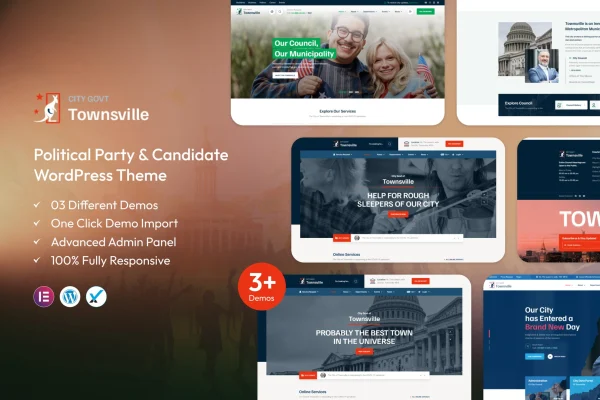
TownsVille is a WordPress theme by ThemeKalia built for political parties, campaigns and advocacy groups. It gives you ready-made layouts for candidate profiles, events, donation drives and news, so you can present your platform and keep supporters informed without writing code.
- Version
- 1.2
- Released
- Feb 11, 2025
- Developer
- ThemeKalia
- Type
- WordPress theme
- Licence
- GPL
- Included in
- Every plan, or $3.99 on its own
What’s new in TownsVille 1.2
Version 1.2 · Feb 11, 2025
Latest
What it does
Political organizations need a website that explains who they are, what they stand for and how people can get involved. TownsVille covers that ground with homepage sections for campaign priorities, team members, latest news and upcoming events. Candidate profiles hold images, bios and social media links, and the events calendar lets you promote rallies, debates and community gatherings in one place.
The theme is set up for people who would rather not touch code. You can start from demo content tailored for political campaigns using a one-click import, then adjust colors, typography and layouts in the theme customizer while previewing changes live. Layouts are responsive across desktops and phones, donation sections work with popular donation plugins, and the theme is compatible with translation plugins for sites that serve communities in more than one language.
Best for
- Political parties building a central website
- Election campaigns promoting a candidate
- Advocacy groups organizing events and fundraising
Features
Customizable homepage layouts
Multiple homepage sections let you present campaign priorities, team members, latest news and upcoming events in the order that suits your organization.
Candidate profiles
Introduce your leadership team or party representatives with customizable profiles that include photos, written bios and links to their social media accounts.
Events calendar
Promote rallies, debates and community gatherings through an events calendar so visitors can see what is coming up and plan to attend.
Donation plugin support
Donation sections work with popular donation plugins, giving supporters a simple way to contribute to your campaign funds from the website.
Live theme customizer
Change colors, typography and layouts in real time through the theme customizer, with no coding needed to adjust the look of your site.
One-click demo import
Import ready-made demo content tailored for political campaigns in one step, then replace the sample text and images with your own material.
Responsive design
Pages adapt to different screen sizes, so your campaign content displays and works properly on desktops, tablets and smartphones.
Translation plugin compatibility
The theme works with translation plugins, letting you publish your message in multiple languages for the diverse communities you want to reach.
Questions about TownsVille
Can I use this theme for a single candidate's campaign?
Yes. The theme is designed for political parties and campaigns alike. Candidate profiles with photos, bios and social links work well for one candidate, and the homepage sections can focus on that person's priorities, news and upcoming events.
Does the theme handle donations on its own?
The theme includes donation sections and support for popular donation plugins. You would add a donation plugin of your choice to process contributions, and the theme's layouts give supporters a clear place to give.
Do I need coding skills to customize the design?
No. The theme customizer lets you change colors, typography and layouts with a live preview. You can also start from the one-click demo import and simply swap in your own text, images and campaign details.
Can I run the site in more than one language?
Yes. TownsVille is compatible with translation plugins, so you can offer your pages in multiple languages and reach voters and supporters across different communities.
Is TownsVille free?
The code of TownsVille is licensed under the GPL, so anyone may use, change and share it. GPL Feast is a paid service: a plan or a single purchase gives you the download and automatic updates. The developer's own support, licence key and online services are not included.
Which version of TownsVille is this?
Version 1.2, released Feb 11, 2025. New versions appear here when the developer publishes them, and members get them as automatic updates.
How do I update TownsVille?
Install the free GPL Feast Updater on your site and connect it with your API key. It installs new versions of TownsVille automatically and keeps a backup, so you can roll back.
More from ThemeKalia