Theme
Updated
Trevlo
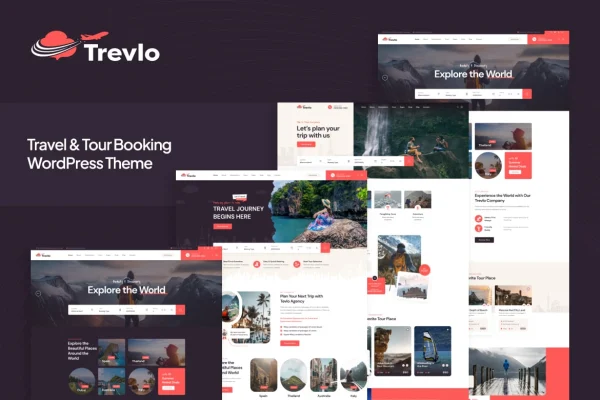
Trevlo is a WordPress theme by Layerdrops built for travel and tour websites. It gives travel agencies, tour operators and travel bloggers ready-made layouts for tour packages, itineraries and stories, along with booking forms, maps and a blog section.
- Version
- 1.2.1
- Released
- May 17, 2024
- Developer
- Layerdrops
- Type
- WordPress theme
- Licence
- GPL
- Included in
- Every plan, or $3.99 on its own
What’s new in Trevlo 1.2.1
Version 1.2.1 · May 17, 2024
Latest
- FixedSearch Page Date Form.
- FixedMinor Bug fixing.
What it does
Travel businesses need a site that presents destinations, prices and day-by-day plans clearly, and that lets visitors ask to book without hunting for a contact page. This theme is designed around that job. It includes pre-built travel package templates that highlight destinations, prices and itineraries, plus built-in booking forms you can customize. A drag-and-drop page builder lets you adjust layouts and see changes in real time without writing code, so you can shape pages around your own tours.
You can start from importable demo content with one click and then swap in your own photos, packages and brand style. Interactive Google Maps support helps visitors picture routes and destinations, and a blog and news section gives you a place for travel tips and updates. The layout is responsive and retina ready for phones, tablets and desktops. Multi-language and RTL support suit agencies serving international audiences, and WooCommerce compatibility lets you sell items such as tickets, guides or travel accessories.
Best for
- Travel agencies presenting tour packages and itineraries
- Tour operators taking booking requests online
- Travel bloggers sharing stories and destination guides
Features
Drag-and-drop page builder
Adjust page layouts visually and watch changes in real time, so you can build and edit travel pages without touching any code.
Travel package templates
Ready-made layouts present each tour with its destination, price and itinerary, giving your packages a consistent and organized look across the site.
Built-in booking forms
Collect reservation requests from customers through booking forms that you can customize and manage to match how your tours are sold.
Google Maps support
Add interactive maps customized to your tours so visitors can see travel routes and destinations while they read about a trip.
Multi-language and RTL support
Create multilingual travel websites, including full support for right-to-left languages, for agencies that serve travelers in different regions.
One-click demo import
Load the demo content in one step, then replace the sample text, images and packages with your own to match your brand.
WooCommerce compatible
Works with WooCommerce, so you can add a shop to sell tickets, travel guides or accessories alongside your tour listings.
Blog and news section
Publish travel tips, company updates and trip stories in a dedicated blog area that keeps returning visitors informed.
Questions about Trevlo
Can I show prices and itineraries for each tour?
Yes. The theme includes pre-built travel package templates designed to highlight destinations, prices and itineraries, so each tour page can lay out what the trip includes and what it costs.
Does Trevlo let customers make bookings?
It includes built-in booking forms that customers can use to submit reservations. You can customize these forms and manage the requests, which suits agencies and operators who want visitors to reserve directly from a tour page.
Can I build a site in more than one language?
Yes. The theme supports multilingual travel websites and includes full right-to-left language compatibility, which helps if your audience reads languages such as Arabic or Hebrew alongside others.
Can I sell products like tickets or guides?
The theme is compatible with WooCommerce, so you can add an online shop to sell items such as tickets, travel guides or accessories next to your tour content.
Is Trevlo free?
The code of Trevlo is licensed under the GPL, so anyone may use, change and share it. GPL Feast is a paid service: a plan or a single purchase gives you the download and automatic updates. The developer's own support, licence key and online services are not included.
Which version of Trevlo is this?
Version 1.2.1, released May 17, 2024. New versions appear here when the developer publishes them, and members get them as automatic updates.
How do I update Trevlo?
Install the free GPL Feast Updater on your site and connect it with your API key. It installs new versions of Trevlo automatically and keeps a backup, so you can roll back.