Theme
Updated
Tulip
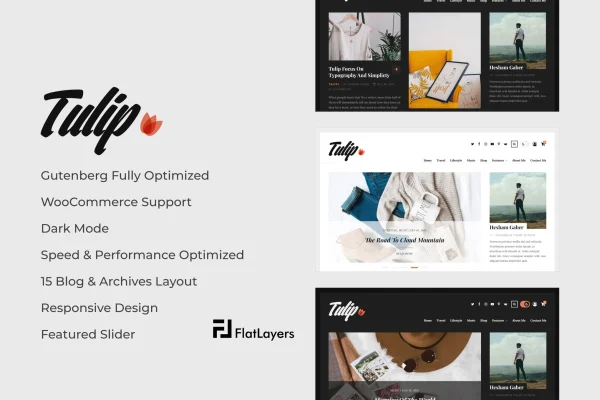
Tulip by FlatLayers is a responsive WordPress blog theme with a clean, minimalist look. It is built for writers, photographers, artists and other creatives who want their articles, photos, galleries and videos to take center stage, with layout and style changes handled through the WordPress Customizer.
- Version
- 2.4
- Released
- Mar 11, 2023
- Developer
- FlatLayers
- Type
- WordPress theme
- Licence
- GPL
- Included in
- Every plan, or $3.99 on its own
What’s new in Tulip 2.4
Version 2.4 · Mar 11, 2023
Latest
- FixedFix minor WooCommerce CSS Issue.
- NewAdd built in WooCommerce lightbox and magnifier.
- ImprovedUpdate dark mode to automatically detect user preferred color scheme.
- ImprovedUpdate documentation.
What it does
Many blog themes either look cluttered or require code to adjust. This theme takes a minimalist approach that keeps attention on your content, whether that is long-form writing, photo galleries or embedded video. The layout is fully responsive, so posts adapt to desktops, tablets and phones, and Retina-ready graphics keep visuals sharp on high-resolution screens. A dark mode option gives readers a different viewing choice, and more than 15 blog, category and archive layouts let you pick grid, masonry or sidebar arrangements for your posts.
Customization runs through the native WordPress Customizer, where you can adjust colors, fonts and layouts without writing code. The theme is optimized for the Gutenberg block editor, so you can build richer post layouts with blocks. It is also WooCommerce compatible, which suits creatives who want to sell handmade products or services from the same site as their blog. Developers can work in a child theme to keep changes safe, and translation readiness supports multilingual sites.
Best for
- Personal bloggers and writers wanting a minimalist design
- Photographers and artists sharing galleries and video
- Creatives selling handmade products through WooCommerce
Features
Over 15 blog layouts
Choose from more than 15 blog, category and archive layouts, including grid, masonry and sidebar configurations, to present posts in the style that fits your site.
Fully responsive design
Pages adjust to desktops, tablets and smartphones, so your posts, galleries and videos remain readable and usable on any screen size.
Dark mode support
A dark mode option offers readers an eye-friendly way to browse, adapting to their viewing preferences.
WordPress Customizer settings
Personalize colors, fonts, layouts and more through the built-in WordPress Customizer, with no coding knowledge required to change how your site looks.
Gutenberg block editor support
The theme is optimized for the WordPress block editor, so you can build rich post and page layouts using blocks.
WooCommerce compatibility
Add an online store with WooCommerce to sell products or services, such as handmade goods, directly alongside your blog content.
Retina-ready graphics
Visuals stay crisp and sharp on high-resolution displays, which helps photography and artwork look as intended.
Child theme and translation ready
Extend the theme safely with a child theme, and localize it for multilingual websites thanks to its translation-ready setup.
Questions about Tulip
Can I sell products on a blog built with this theme?
Yes. The theme is compatible with WooCommerce, so you can add an online store to your blog. That makes it a reasonable fit for creatives who want to sell handmade products or services from the same site where they publish posts and galleries.
How much can I change the look without coding?
Most visual changes happen in the WordPress Customizer, where you can adjust colors, fonts, layouts and other settings. You can also choose from more than 15 blog, category and archive layouts. For deeper changes, the theme is child theme ready.
Does Tulip work with the block editor?
Yes. Tulip is optimized for Gutenberg, the WordPress block editor, so you can create posts and pages with block-based layouts and mix text, images, galleries and video in your content.
Is the theme suitable for a multilingual site?
The theme is translation ready, meaning it is prepared for localization. This lets you translate its text and run it on multilingual websites aimed at readers in different languages.
Is Tulip free?
The code of Tulip is licensed under the GPL, so anyone may use, change and share it. GPL Feast is a paid service: a plan or a single purchase gives you the download and automatic updates. The developer's own support, licence key and online services are not included.
Which version of Tulip is this?
Version 2.4, released Mar 11, 2023. New versions appear here when the developer publishes them, and members get them as automatic updates.
How do I update Tulip?
Install the free GPL Feast Updater on your site and connect it with your API key. It installs new versions of Tulip automatically and keeps a backup, so you can roll back.
You might also like