Theme
Updated
Versaille
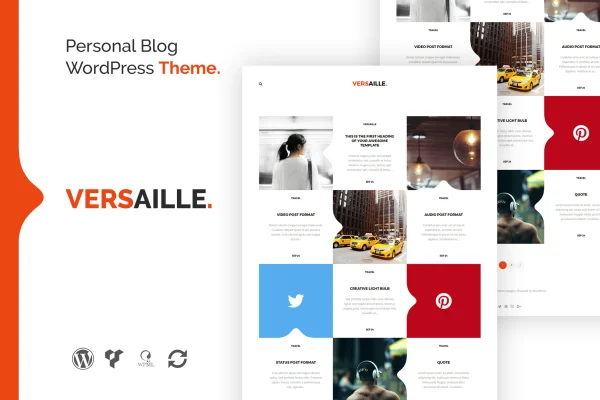
Versaille is a personal blog WordPress theme built for bloggers, artists and creatives who want a clean place to publish stories, artwork or ideas. Its signature detail is a set of curve shapes at the top and bottom of the site, paired with a filterable portfolio page and simple color customization.
- Version
- 1.4.1
- Developer
- themeton
- Type
- WordPress theme
- Licence
- GPL
- Included in
- Every plan, or $3.99 on its own
What’s new in Versaille 1.4.1
Version 1.4.1
Latest
What it does
Many blog themes look alike, with the same boxy header and plain footer. Versaille gives a personal blog a more distinctive frame by adding curved shapes at the top and bottom of the layout. The clean design keeps attention on your writing and images, and multiple post formats and widgets give you different ways to present content. It suits people who share personal stories, creative portfolios or artistic galleries and want the site to feel personal.
Customization is handled through the live customizer, so you can preview changes before publishing them. Brand colors are set through Less-based CSS, where one adjustment updates the color across the theme. For layout work, Visual Composer integration gives you a drag-and-drop page builder. The theme is retina ready and responsive across screen sizes, and it is compatible with WPML for multilingual blogs and WooCommerce if you want to sell products from your site.
Best for
- Personal bloggers sharing stories and everyday writing
- Artists and creatives displaying portfolios or galleries
- Bloggers who want to sell products through WooCommerce
Features
Curved top and bottom shapes
Distinct curve shapes frame the top and bottom of the site, giving your blog a look that differs from the usual straight-edged layouts.
Filterable portfolio page
A portfolio page with a filter system lets visitors sort through your artwork or blog posts by category, which makes browsing larger collections easier.
One-step brand color changes
Less-based CSS lets you change the theme's brand color with a single adjustment, so your accent color updates consistently across the site.
Visual Composer page building
Integration with the Visual Composer drag-and-drop page builder lets you arrange layouts and content without writing code.
Live customizer preview
Theme options in the live customizer show your changes as you make them, so you can check the result before it goes public.
Retina ready and responsive
High-resolution support keeps visuals sharp on Retina displays, and the responsive layout adapts from phones to large desktop monitors.
Multilingual and shop compatibility
The theme works with WPML for translating your blog and with WooCommerce for adding an online store alongside your posts.
Post formats and widgets
Multiple post formats and widget areas give you several ways to present different kinds of content and extra information to readers.
Questions about Versaille
Do I need to know code to customize Versaille?
No. You can adjust settings in the live customizer with an instant preview, build layouts with the Visual Composer drag-and-drop builder, and change your brand color through a single adjustment thanks to the Less-based CSS setup.
Can I show my artwork as well as blog posts?
Yes. The theme includes a portfolio page with a filter system, so visitors can sort your artwork or posts by category. This makes it a reasonable fit for artists and creatives who mix writing with visual work.
Will the theme work for a multilingual blog?
The theme is compatible with WPML, the multilingual plugin, so you can translate and localize your posts and pages for readers in different languages.
Can I add a store to my blog with this theme?
Yes. The theme is compatible with WooCommerce, so you can sell products directly from your blog while keeping the same design throughout the site.
Is Versaille free?
The code of Versaille is licensed under the GPL, so anyone may use, change and share it. GPL Feast is a paid service: a plan or a single purchase gives you the download and automatic updates. The developer's own support, licence key and online services are not included.
Which version of Versaille is this?
Version 1.4.1. New versions appear here when the developer publishes them, and members get them as automatic updates.
How do I update Versaille?
Install the free GPL Feast Updater on your site and connect it with your API key. It installs new versions of Versaille automatically and keeps a backup, so you can roll back.