Theme
Updated
Videoly
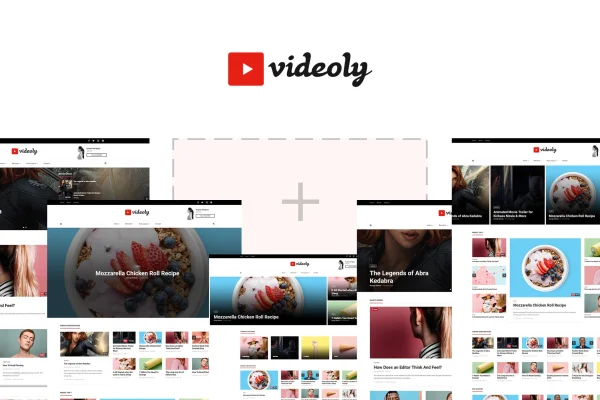
Videoly by ThemeBubble is a WordPress theme built for video bloggers, YouTubers, vloggers and other video content creators. It gives you ready-made, video-focused templates and a drag-and-drop page builder so you can set up a video blog, magazine, portfolio or entertainment site without writing code.
- Version
- 1.3
- Developer
- theme_bubble
- Type
- WordPress theme
- Licence
- GPL
- Included in
- Every plan, or $3.99 on its own
What’s new in Videoly 1.3
Version 1.3
Latest
- FixedMinor Bugs
What it does
Running a video site on a general-purpose theme often means fighting layouts that were made for text posts. This theme starts from the other direction, with more than 9 pre-built templates designed around video content. They cover video blogs, channels, magazines, portfolios and entertainment portals, and there are also demo sites you can preview and import as a starting point, so you can pick a layout close to what you need and adjust from there.
Customization happens in two places. Visual Composer, a drag-and-drop page builder, handles page layouts, so you can rearrange sections and build new pages visually. The admin panel covers site-wide styling such as colors, fonts and layouts, which helps you match your branding. The design is responsive and retina ready, and the theme works with WPML for multilingual sites and with Easy Digital Downloads if you want to sell digital products alongside your videos.
Best for
- YouTubers and vloggers who want a home base for their videos
- Video magazines and entertainment portals
- Creators building a video portfolio site
Features
Video-focused templates
More than 9 ready-made templates built for video blogs, channels, magazines and similar sites give you a working layout to start from.
Importable demo sites
Preview and import thematic demo sites to get a full site structure in place, then replace the sample content with your own videos.
Visual Composer page builder
Build and rearrange page layouts through a drag-and-drop editor, so you can create custom pages without touching code.
Admin panel styling
Control site colors, fonts and layouts from the theme's admin panel to bring the design in line with your brand.
Responsive and retina ready
Layouts adapt to desktops, tablets and phones, and visuals stay sharp on high-resolution screens across different browsers.
WPML compatible
Works with WPML, so you can translate your content and run a multilingual video site for viewers in different languages.
Easy Digital Downloads support
Integrates with Easy Digital Downloads, letting you sell digital products such as video files or courses from the same site.
Questions about Videoly
What kinds of video sites can I build with this theme?
The templates are designed for video blogs, YouTube channel sites, video magazines, portfolios and entertainment portals. You can start from one of the pre-built templates or an imported demo site and then adjust the layout and styling to fit your content.
Do I need coding skills to customize the layouts?
No. Page layouts are edited with Visual Composer, a drag-and-drop page builder, and site-wide settings like colors, fonts and layouts are handled in the theme's admin panel. Both let you make changes without writing code.
Can I run my video site in more than one language?
Yes. Videoly is compatible with WPML, the multilingual plugin for WordPress, so you can translate your pages and posts and serve your audience in several languages.
Can I sell digital products from a site using this theme?
The theme supports Easy Digital Downloads, a plugin for selling digital goods. That lets you offer items such as downloadable videos or other digital files alongside your regular video posts.
Is Videoly free?
The code of Videoly is licensed under the GPL, so anyone may use, change and share it. GPL Feast is a paid service: a plan or a single purchase gives you the download and automatic updates. The developer's own support, licence key and online services are not included.
Which version of Videoly is this?
Version 1.3. New versions appear here when the developer publishes them, and members get them as automatic updates.
How do I update Videoly?
Install the free GPL Feast Updater on your site and connect it with your API key. It installs new versions of Videoly automatically and keeps a backup, so you can roll back.
You might also like