Theme
Updated
Virtable
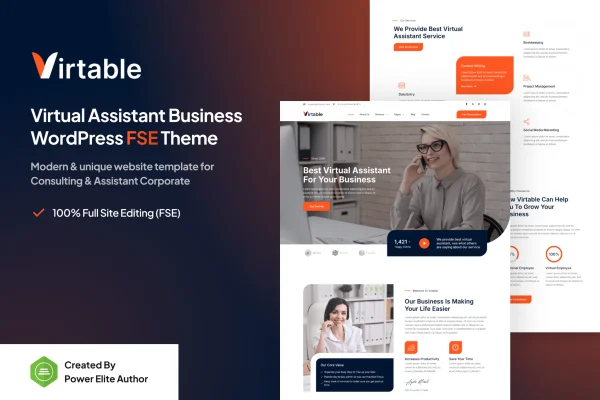
Virtable is a WordPress theme by Jegtheme built for virtual assistant businesses. It gives solo assistants and remote teams a clean, modern site with niche layouts for presenting services, past work, client reviews and contact details.
- Version
- 1.0.2
- Released
- Aug 14, 2026
- Developer
- jegtheme
- Type
- WordPress theme
- Licence
- GPL
- Included in
- Every plan, or $3.99 on its own
What’s new in Virtable 1.0.2
Version 1.0.2
Latest
- FixedFixed content width issue
What it does
Virtual assistants sell trust and organization, so their website needs to explain services clearly and make it simple for clients to reach out. A general business theme often leaves you adapting layouts that were never planned for this kind of work. Virtable starts from the virtual assistant niche, with layouts arranged around the services you offer, the skills you bring and the proof that clients can rely on you.
The theme works with drag and drop page builders, so you can adjust the look and structure of pages without writing code. It includes portfolio and testimonial sections, contact forms and appointment booking options, and a responsive design that adapts to phones, tablets and desktops. Translation-ready files and multilingual support make it a fit for assistants who work with clients in more than one language.
Best for
- Freelance virtual assistants launching their first website
- Virtual assistant agencies managing teams of remote professionals
- Remote admin and support service providers serving international clients
Features
Virtual assistant layouts
Dedicated page layouts designed around virtual assistant businesses, giving you ready structures for presenting your services and skills to prospective clients.
Page builder compatibility
Works with drag and drop page builders, so you can change the look and feel of your pages without any coding knowledge.
Portfolio and testimonial sections
Pre-built sections for displaying past projects and client reviews, helping visitors see the kind of work you do and what clients say about it.
Contact forms and booking
Integrated contact forms and appointment booking options let clients get in touch and schedule your services directly through your site.
Responsive design
The layout adapts to smartphones, tablets and desktops, so visitors get a readable, well arranged site on whatever device they use.
Translation ready
Includes translation-ready files and multilingual support, making it practical to present your business to clients who speak different languages.
Plugin compatibility
Built to work with popular WordPress plugins, so you can add extra functionality to your site as your business needs change.
Virtable older versions
- 1.0.1Jul 3, 20251 improvement
Members and buyers of this product can download older versions.
Questions about Virtable
Can I build pages with Virtable without knowing how to code?
Yes. The theme is compatible with drag and drop page builders, so you can adjust layouts, sections and styling visually. Its niche layouts also give you a starting structure for service and contact pages.
Does the theme let clients book appointments with me?
The theme includes integrated contact forms and appointment booking options. Clients can get in touch or schedule your services directly from your website instead of arranging everything over separate messages.
Is it suitable for a team, or only a solo virtual assistant?
It is designed for both. Solo assistants can use it to present their services and testimonials, and agencies running teams of remote professionals can use the same layouts to present a wider range of services.
Can I run my site in another language?
Yes. Virtable comes with translation-ready files and multilingual support, so you can translate the theme text and present your business to clients in other languages.
Is Virtable free?
The code of Virtable is licensed under the GPL, so anyone may use, change and share it. GPL Feast is a paid service: a plan or a single purchase gives you the download and automatic updates. The developer's own support, licence key and online services are not included.
Which version of Virtable is this?
Version 1.0.2, released Aug 14, 2026. New versions appear here when the developer publishes them, and members get them as automatic updates.
How do I update Virtable?
Install the free GPL Feast Updater on your site and connect it with your API key. It installs new versions of Virtable automatically and keeps a backup, so you can roll back.