Theme
Updated
Vivian
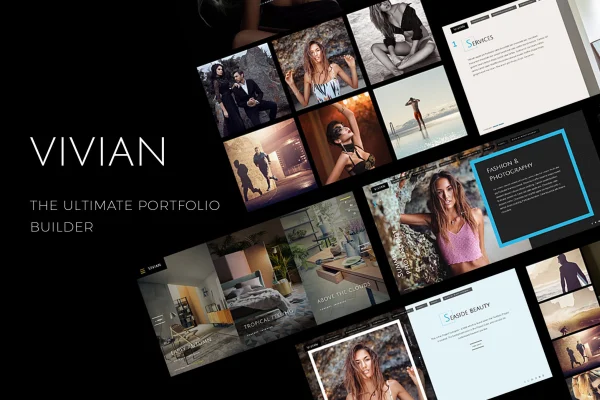
Vivian is a multi-purpose WordPress theme built for creative portfolios in design, photography and the arts. It gives you a clean, minimal layout, a filterable portfolio and demo content you can import in one click, so your projects get the attention.
- Version
- 1.1.6
- Developer
- subsolar
- Type
- WordPress theme
- Licence
- GPL
- Included in
- Every plan, or $3.99 on its own
What’s new in Vivian 1.1.6
Version 1.1.6
Latest
What it does
Creative work needs a site that stays out of the way. This theme uses a clean and minimalistic design so images and projects stay the focal point. You can present work in several aspect ratios, including 1:1, 16:9 and 4:3, which helps when your portfolio mixes photos, video stills and design pieces. A filterable portfolio lets visitors sort projects by type and find what interests them without scrolling through everything.
Getting started is quick with one-click demo content import, which brings in pre-designed layouts you can then adjust. The theme is built on Bootstrap 3 and is fully responsive across desktops, tablets and phones. You can choose between two menu types and social icon positions, pick from over 700 Google Fonts and add your own styles through a custom CSS field. Blog and contact templates cover the rest of a typical portfolio site, and WPML support with POT files helps with multilingual setups.
Best for
- Designers presenting client and personal projects
- Photographers who need flexible image aspect ratios
- Creative agencies building a multilingual portfolio site
Features
Filterable portfolio
Organize projects with interactive filters so visitors can narrow the portfolio down to the kind of work they want to see.
Multiple aspect ratios
Display your visual work in a range of aspect ratios, including 1:1, 16:9 and 4:3, to suit each piece.
One-click demo import
Import the demo content and pre-designed layouts in one step, then customize them to fit your own work and brand.
Two menu styles
Choose from two types of menu and different social icon positions to shape navigation and how your social links appear.
Over 700 Google Fonts
Pick typography from more than 700 Google Fonts to match the tone of your creative style with clean, readable text.
Responsive Bootstrap 3 build
The theme is built on the Bootstrap 3 framework and adapts its layout to desktops, tablets and smartphones.
Translation and WPML support
Included POT files and WPML support make it possible to translate the theme and run a multilingual portfolio site.
Custom CSS field
Add your own CSS through a dedicated field to adjust the design without editing the theme's core files.
Questions about Vivian
Can I sort my portfolio projects by category?
Yes. Vivian includes a filterable portfolio with interactive filters, so visitors can pick a category and see only the projects that match. This is helpful when you show several types of work, such as branding, photography and illustration, on the same site.
Will my photos display well if they have different shapes?
The theme supports multiple aspect ratios, including 1:1, 16:9 and 4:3, among others. That lets you present square images, widescreen shots and standard photos in a format that fits each piece instead of forcing everything into one shape.
Can I build a site in another language or more than one language?
Yes. The theme is translation ready with included POT files and supports WPML, so you can translate the interface text and run a multilingual site for visitors in different regions.
Does it include pages beyond the portfolio?
It comes with various blog and contact templates, so you can publish posts and updates and give visitors a way to reach you. Combined with the demo layouts, that covers the main pages most portfolio sites need.
Is Vivian free?
The code of Vivian is licensed under the GPL, so anyone may use, change and share it. GPL Feast is a paid service: a plan or a single purchase gives you the download and automatic updates. The developer's own support, licence key and online services are not included.
Which version of Vivian is this?
Version 1.1.6. New versions appear here when the developer publishes them, and members get them as automatic updates.
How do I update Vivian?
Install the free GPL Feast Updater on your site and connect it with your API key. It installs new versions of Vivian automatically and keeps a backup, so you can roll back.
You might also like