Theme
Updated
Wallox
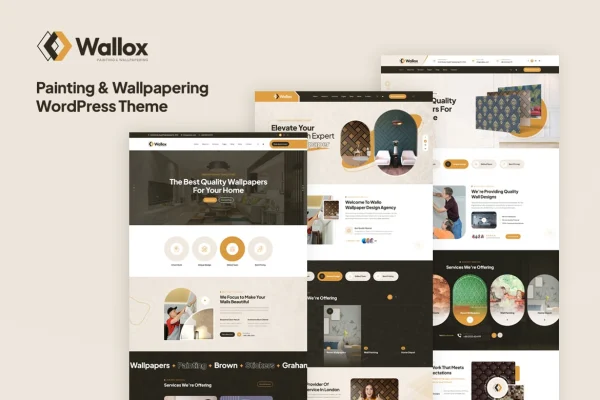
Wallox is a WordPress theme built for painting and wallpapering businesses. It gives contractors and decorators a ready-made website structure with pre-built templates, service sections, project galleries and forms for quote requests, all adjustable through a theme options panel.
- Version
- 1.0.0
- Released
- Feb 11, 2025
- Developer
- Layerdrops
- Type
- WordPress theme
- Licence
- GPL
- Included in
- Every plan, or $3.99 on its own
What’s new in Wallox 1.0
Version 1.0 · May 12, 2015
Latest
- NewInitial release.
What it does
Painting and wallpapering companies need a website that explains their services, displays finished work and makes it simple for a homeowner to ask for a quote. Building that from a general-purpose theme takes time. This theme starts with templates designed around this trade, so the main pages already have a sensible layout for presenting services, completed projects and client testimonials. You replace the sample content with your own and adjust the look to match your brand.
Customization happens through an options panel where you can change colors, fonts, layouts and other settings without editing code. The design is responsive, so pages adapt to desktops, tablets and smartphones. Contact and booking forms let visitors request a quote or book an appointment directly from the site. It fits painting contractors, wallpaper installers, interior decorators and similar home improvement service providers who want a site focused on their work.
Best for
- Painting contractors and house painting companies
- Wallpaper installers and interior decorating businesses
- Home improvement service providers presenting past projects
Features
Pre-built trade templates
Ready-to-use templates designed for painting and wallpapering businesses give you a starting layout for your pages, which you can then customize with your own content.
Theme options panel
Adjust colors, fonts, layouts and other design settings from an options panel so the site matches your brand identity.
Portfolio gallery layouts
Present completed painting and wallpapering projects in gallery layouts that let visitors look through examples of your workmanship.
Dedicated service sections
List the range of painting and wallpapering services you offer in dedicated sections, making it easier for visitors to find what they need.
Quote and booking forms
Built-in contact and booking forms let visitors request a quote or book an appointment directly from your website.
Responsive layout
Pages adapt to desktops, tablets and smartphones, so customers can browse your services and projects on whatever device they use.
Client testimonial areas
Display feedback from past clients alongside your services and portfolio so new visitors can read about other customers' experiences.
Questions about Wallox
Is this theme only suitable for painting companies?
It is designed for painting and wallpapering businesses, and its templates, service sections and portfolio layouts are arranged around that trade. Interior decorators and other home improvement service providers with a similar mix of services and project photos could also find the structure a good match.
Can I change the colors and fonts to match my brand?
Yes. The theme includes an options panel where you can customize colors, fonts, layouts and other design settings. This lets you adapt the pre-built templates to your own brand identity without starting your design from scratch.
Can customers request a quote through the site?
Yes. Wallox includes contact and booking forms that let visitors request quotes or book appointments directly from your website, so potential customers can reach you as soon as they find a service they want.
Will my site work on phones and tablets?
The theme uses a responsive design, so its layouts adjust to desktops, tablets and smartphones. Visitors can browse your services, view your project galleries and fill out forms on any of these devices.
Is Wallox free?
The code of Wallox is licensed under the GPL, so anyone may use, change and share it. GPL Feast is a paid service: a plan or a single purchase gives you the download and automatic updates. The developer's own support, licence key and online services are not included.
Which version of Wallox is this?
Version 1.0.0, released Feb 11, 2025. New versions appear here when the developer publishes them, and members get them as automatic updates.
How do I update Wallox?
Install the free GPL Feast Updater on your site and connect it with your API key. It installs new versions of Wallox automatically and keeps a backup, so you can roll back.