Theme
Updated
Wesecure
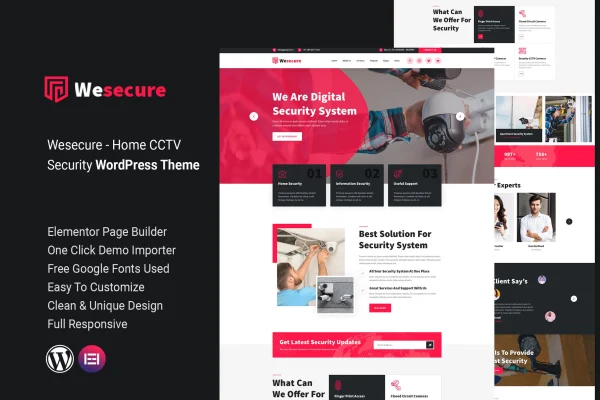
Wesecure is a WordPress theme by zcubethemes built for home security service providers. It gives alarm, camera and home automation companies a professional site where they can present their services, share client feedback and publish safety tips.
- Version
- 1.1.0
- Released
- Feb 11, 2025
- Developer
- zcubethemes
- Type
- WordPress theme
- Licence
- GPL
- Included in
- Every plan, or $3.99 on its own
What’s new in Wesecure 1.1.0
Version 1.1.0 · Feb 11, 2025
Latest
What it does
Home security companies need a website that looks trustworthy and explains their services clearly. This theme is designed around that job, with a modern layout aimed at businesses that sell or install alarm systems, surveillance cameras and home automation security. Prebuilt homepage sections cover service listings, client testimonials and call-to-action areas, so you start with a page structure that already fits the industry instead of building one from a blank canvas.
Customization happens through options for colors, fonts and layouts, so you can match the site to your brand without writing code. The layout is responsive and adapts to phones, tablets and desktops. It works with Elementor and Contact Form 7, which helps with page editing and contact forms. A dedicated blog layout lets you post security tips and company news, and the theme is translation-ready for sites that serve clients in more than one language.
Best for
- Home security and alarm installation companies
- Surveillance camera and CCTV service providers
- Home automation security businesses
Features
Security industry design
A modern, clean layout built for home security services, suited to companies offering alarms, surveillance cameras or home automation security.
Prebuilt homepage sections
Ready sections for service listings, client testimonials and call-to-action areas give your homepage a clear structure from the start.
No-code customization
Adjust colors, fonts and layouts through the theme options, so you can match your brand without touching any code.
Responsive layout
Pages adapt to smartphones, tablets and desktops, so visitors can read about your services on whatever device they use.
Elementor and Contact Form 7
The theme works with Elementor for page editing and Contact Form 7 for building contact and inquiry forms on your site.
Dedicated blog layout
A blog layout for publishing home security tips, company news and industry updates to keep clients and your community informed.
Translation ready
Multilingual and translation-ready support lets you present your site in other languages for a broader range of clients.
Questions about Wesecure
What kind of business is this theme designed for?
It is built for home security service providers. The layout and sections suit companies that offer alarm systems, surveillance cameras or home automation security and want a professional site that presents their services and builds client trust.
Can I change the colors and fonts without coding?
Yes. The theme includes customization options for colors, fonts and layouts, so you can tailor the look of your site to your brand without writing any code.
Does Wesecure work with Elementor?
Yes. The theme integrates with Elementor, and it also works with Contact Form 7, which you can use to add contact and inquiry forms for potential clients.
Can I run a blog on it?
Yes. There is a dedicated blog layout for sharing home security tips, company news and industry updates. The theme is also translation-ready if you want to publish in more than one language.
Is Wesecure free?
The code of Wesecure is licensed under the GPL, so anyone may use, change and share it. GPL Feast is a paid service: a plan or a single purchase gives you the download and automatic updates. The developer's own support, licence key and online services are not included.
Which version of Wesecure is this?
Version 1.1.0, released Feb 11, 2025. New versions appear here when the developer publishes them, and members get them as automatic updates.
How do I update Wesecure?
Install the free GPL Feast Updater on your site and connect it with your API key. It installs new versions of Wesecure automatically and keeps a backup, so you can roll back.