Theme
Updated
WETA
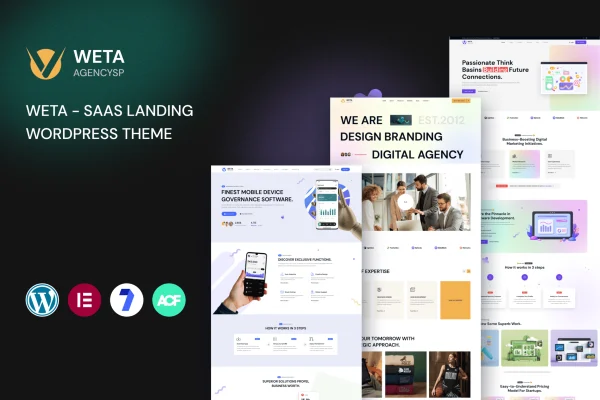
WETA is a WordPress theme by RRdevs built for SaaS businesses that need a clean landing page. It gives you customizable sections for presenting software features, pricing plans, FAQs and customer testimonials, all in a modern, responsive layout.
- Version
- 1.0.5
- Released
- Aug 9, 2026
- Developer
- RRdevs
- Type
- WordPress theme
- Licence
- GPL
- Included in
- Every plan, or $3.99 on its own
What’s new in WETA 1.0.5
Version 1.0.5 · Aug 9, 2026
Latest
What it does
A SaaS product usually needs a landing page that explains what the software does, shows what it costs and gives visitors reasons to trust it. Building that from scratch takes time, especially without coding skills. This theme starts you off with a clean, modern design and ready-to-use sections aimed at software businesses, so you can put together a professional page for a new product launch or an existing platform.
The layout is responsive and built mobile first, so pages adapt to smartphones, tablets and desktops. Sections and elements are editable, which lets you adjust the page to match your brand and the services you offer. The theme works with popular WordPress plugins for things like SEO, forms and analytics, and the interface is designed so you can set up and manage the site without writing code.
Best for
- SaaS startups launching a new software product
- Software companies needing a dedicated landing page
- Freelancers building sites for SaaS clients
Features
Clean SaaS-focused design
A modern, clean look intended for software businesses, giving your landing page a professional appearance that suits SaaS products and services.
Responsive mobile-first layout
Built with a mobile-first approach so your pages adapt to smartphones, tablets and desktop screens without separate designs for each device.
Customizable sections
Flexible layout options and editable elements let you adjust each part of the landing page to match your brand identity and offering.
Ready-made pricing tables
Includes pre-built sections for pricing tables, so you can lay out your plans and tiers clearly for visitors comparing options.
Feature and FAQ sections
Ready-to-use sections for listing software features and answering common questions help you explain your product without designing layouts from scratch.
Testimonial sections
Pre-built testimonial sections give you a place to display customer feedback alongside your feature and pricing content.
Works with popular plugins
Compatible with popular WordPress plugins for SEO, forms, analytics and more, so you can add extra functionality to your site.
No coding required
A user-friendly interface lets you set up and manage the website without technical expertise or writing any code.
WETA older versions
- 1.0.0Jun 10, 2024
Members and buyers of this product can download older versions.
Questions about WETA
Can I show pricing plans on my landing page with this theme?
Yes. The theme includes ready-to-use pricing table sections, along with sections for features, FAQs and testimonials. You can edit these sections to list your own plans and details so visitors can compare options on the page.
Do I need to know how to code to build my site?
No. The theme is designed with a user-friendly interface so you can set up and manage the website without coding or technical expertise. Layouts and elements are editable, letting you customize the page through the theme's options.
Will my landing page look right on phones and tablets?
The theme uses a fully responsive layout built with a mobile-first approach. Your pages adapt to smartphones, tablets and desktops, so visitors get a consistent experience whichever device they use.
Can I add forms, analytics or SEO tools?
The theme is compatible with popular WordPress plugins for SEO, forms, analytics and more. You can pair it with the plugins you already prefer to add those functions to your SaaS site.
Is WETA free?
The code of WETA is licensed under the GPL, so anyone may use, change and share it. GPL Feast is a paid service: a plan or a single purchase gives you the download and automatic updates. The developer's own support, licence key and online services are not included.
Which version of WETA is this?
Version 1.0.5, released Aug 9, 2026. New versions appear here when the developer publishes them, and members get them as automatic updates.
How do I update WETA?
Install the free GPL Feast Updater on your site and connect it with your API key. It installs new versions of WETA automatically and keeps a backup, so you can roll back.