Theme
Updated
Woffice Theme
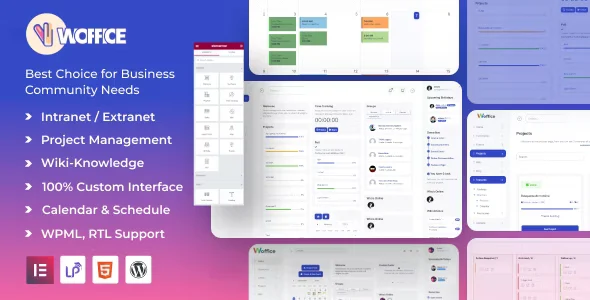
Woffice Theme is a WordPress theme for building an intranet or extranet. It brings project management, file sharing, member directories, activity streams and personal dashboards into one private online hub for a business, school or community group.
- Version
- 5.4.41
- Released
- Sep 21, 2026
- Type
- WordPress theme
- Licence
- GPL
- Included in
- Every plan, or $5.59 on its own
What’s new in Woffice Theme 5.4.41
Version 5.4.41 · Sep 21, 2026
Latest
- NewAdded a setting to enable or disable AI generation actions.
- ImprovedWooCommerce compatibility.
- FixedMinor bugs.
What it does
Many organizations end up spreading their internal work across separate tools: one for tasks, another for files, a spreadsheet for staff contacts and email for announcements. Woffice gathers those jobs into a single WordPress site. Team members can follow projects, find colleagues, share documents and keep up with updates in one place, and administrators decide who sees what through access permissions.
The theme works as an intranet for internal staff or as an extranet that opens selected areas to clients, students or community members. Each user gets a dashboard showing their own tasks, information and notifications. Administrators manage settings through an admin panel without writing code, and the theme can be extended with compatible WordPress plugins for calendars, events, forums and learning management. It is responsive, retina ready and translation ready for multilingual teams.
Best for
- Companies building a private staff intranet
- Schools and educational institutions sharing internal resources
- Community organizations running a members-only hub
Features
Project management
Organize and track projects with task assignments, deadlines and progress indicators so everyone on the team can see where work stands.
File sharing and documents
Upload, share and manage documents so the files your organization relies on stay in one place that members can reach.
Member directories
Searchable directories with detailed profiles help people find and contact colleagues or community users, arranged to match your structure.
Activity streams
Activity updates, announcements and conversations appear in a stream, giving members a running view of what is happening across the network.
Personal user dashboards
Each user can have a customizable dashboard that displays relevant information, assigned tasks and notifications in one view.
Access control and permissions
Granular permissions let you limit sensitive information so users only see the data they are authorized to access.
Plugin compatibility
Add calendars, events, forums or learning management by pairing the theme with compatible WordPress plugins built for those jobs.
Responsive and translation ready
The retina ready layout adapts to desktops and smartphones, and translation support lets you localize the site for teams working in other languages.
Woffice Theme older versions
- 5.4.40Sep 12 new, 4 improvements, 1 fix
- 5.4.39Jul 211 improvement, 1 fix
- 5.4.38Jul 71 improvement, 1 fix
- 5.4.37Jun 9
- 5.4.36Jun 5
- 5.4.35Apr 14
- 5.4.34Mar 2
- 5.4.33Dec 25, 2025
- 5.4.32Nov 20, 2025
- 5.4.31Oct 31, 2025
Members and buyers of this product can download older versions.
63 older versions in all. If you need one that is not listed, ask support.
Questions about Woffice Theme
Can I use this theme for an extranet with outside users?
Yes. The theme is designed for both intranet and extranet use. Its access control lets you set granular permissions, so external users such as clients or community members can reach certain areas while sensitive information stays visible only to authorized people.
Does it include tools for managing projects and tasks?
It does. The built-in project management lets you assign tasks, set deadlines and track progress indicators. Users can also see their own tasks and notifications on their personal dashboards, which helps keep a team aligned on shared work.
Can I add calendars, forums or courses?
The theme works with compatible WordPress plugins for calendars, events, forums and learning management systems. You add those features by pairing it with a suitable plugin, rather than relying on the theme alone to supply them.
Will my team be able to use it in other languages?
Yes. The theme is multilingual and translation ready, so you can localize the interface for teams or audiences that work in different languages. The responsive design also means members can use it on phones as well as desktops.
Is Woffice Theme free?
The code of Woffice Theme is licensed under the GPL, so anyone may use, change and share it. GPL Feast is a paid service: a plan or a single purchase gives you the download and automatic updates. The developer's own support, licence key and online services are not included.
Which version of Woffice Theme is this?
Version 5.4.41, released Sep 21, 2026. New versions appear here when the developer publishes them, and members get them as automatic updates.
How do I update Woffice Theme?
Install the free GPL Feast Updater on your site and connect it with your API key. It installs new versions of Woffice Theme automatically and keeps a backup, so you can roll back.
You might also like