Theme
Updated
Wowtube
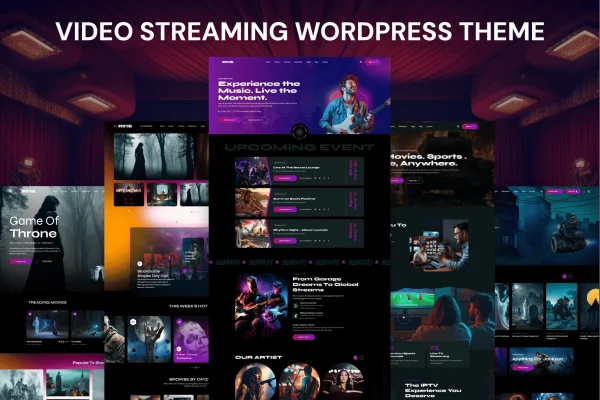
Wowtube is a WordPress theme by Gramentheme for building an OTT platform or a video-focused website. It gives you ready-made page templates, tools for organizing a video library and built-in options for member accounts and subscription plans, so you can run your own streaming service on WordPress.
- Version
- 1.0.0
- Released
- Feb 11, 2025
- Developer
- Gramentheme
- Type
- WordPress theme
- Licence
- GPL
- Included in
- Every plan, or $3.99 on its own
What’s new in Wowtube 1.0.0
Version 1.0.0 · Feb 11, 2025
Latest
What it does
Putting together a streaming site on WordPress usually means combining a theme, a video manager and a membership system, then making them look consistent. Wowtube packs these pieces into one theme. You can upload, organize and categorize videos, play self-hosted files or embed content from external platforms such as YouTube and Vimeo, and manage member accounts and subscription plans for paid access.
The look of the site is handled through multiple ready-made page templates and drag-and-drop customization, so you can match your brand without writing code. The layout is responsive and adapts to desktops, tablets and phones. It suits creators publishing original films, businesses hosting recorded events and anyone curating a large video library who wants viewers to browse by category and sign up for access.
Best for
- Creators launching their own subscription video service
- Businesses publishing recorded events or training videos
- Sites curating large libraries of films or clips
Features
Video library management
Upload, organize and categorize your videos from WordPress, which keeps a large catalog of films, episodes or clips easier to manage and browse.
Multiple video sources
Play self-hosted videos or pull in content from external platforms such as YouTube and Vimeo, so you can choose how each video is delivered.
Membership and subscriptions
Built-in tools let you manage member accounts and subscription plans, giving you a way to offer paid access to your streaming content.
Ready-made page templates
Start from multiple prebuilt page templates designed for a streaming site, then adjust them to fit your content and brand.
Drag-and-drop customization
Change layouts and styling through drag-and-drop options, which lets you shape a branded streaming site without writing any code.
Responsive layout
Pages adapt to desktops, tablets and smartphones, so viewers can browse and watch your videos on whatever device they use.
Social media connections
Connect your platform with popular social networks so visitors can share videos and pages with their own followers.
Setup documentation
Detailed guides walk you through configuring the theme, from setting up templates to organizing your video content.
Questions about Wowtube
Can I use videos hosted on YouTube or Vimeo?
Yes. Wowtube works with self-hosted videos and with external platforms including YouTube and Vimeo. You can mix sources, hosting some files yourself while embedding others, depending on how you want to deliver each piece of content.
Can I charge viewers for access to my videos?
The theme includes built-in tools for managing member accounts and subscription plans. This gives you the structure to offer paid memberships so subscribers can access your streaming content.
Do I need to know how to code to customize the design?
No coding is needed for typical changes. The theme comes with multiple ready-made page templates and drag-and-drop customization options, so you can adjust layouts and match your branding through a visual interface.
Will the site work on phones and tablets?
Yes. The design is fully responsive, so pages and video listings adjust to desktops, tablets and smartphones, letting viewers browse and watch on the device they prefer.
Is Wowtube free?
The code of Wowtube is licensed under the GPL, so anyone may use, change and share it. GPL Feast is a paid service: a plan or a single purchase gives you the download and automatic updates. The developer's own support, licence key and online services are not included.
Which version of Wowtube is this?
Version 1.0.0, released Feb 11, 2025. New versions appear here when the developer publishes them, and members get them as automatic updates.
How do I update Wowtube?
Install the free GPL Feast Updater on your site and connect it with your API key. It installs new versions of Wowtube automatically and keeps a backup, so you can roll back.