Theme
Updated
XenHost
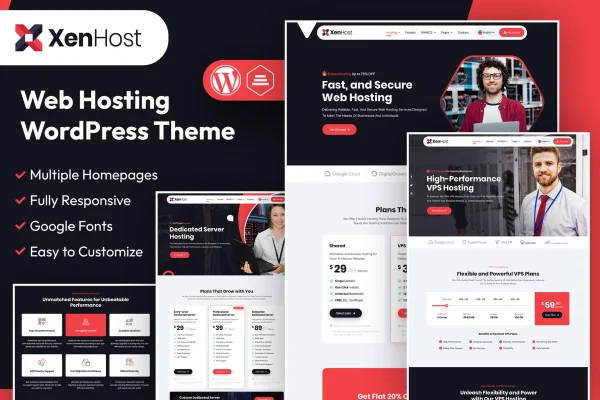
XenHost is a WordPress theme by designingmedia built for web hosting businesses. It pairs a marketing website with WHMCS integration, so you can present hosting plans and handle client accounts and billing from one place.
- Version
- 1.4
- Released
- Feb 11, 2025
- Developer
- designingmedia
- Type
- WordPress theme
- Licence
- GPL
- Included in
- Every plan, or $3.99 on its own
What’s new in XenHost 1.4
Version 1.4 · Feb 11, 2025
Latest
What it does
Running a hosting company usually means keeping a marketing site in one system and orders, billing and client accounts in another. This theme brings the two closer together by integrating with WHMCS, so your WordPress site can sit alongside client account management and automated billing. It suits startups, resellers and established hosting firms that want one platform for selling plans and serving customers.
The theme includes ready-made templates for hosting plans, pricing tables and service details, which gives you a starting point for presenting shared hosting, VPS or dedicated server offers. You can adjust headers, footers, colors and fonts without writing code, and build custom pages with page builders such as Elementor. The layout is responsive, and visitors can check domain availability right on your site.
Best for
- Web hosting companies using WHMCS for billing
- Hosting resellers launching a new brand
- Providers selling shared, VPS or dedicated server plans
Features
WHMCS integration
Connects your WordPress site with WHMCS so you can manage client accounts and automate billing alongside your marketing pages.
Pre-built hosting service pages
Ready-made templates for hosting plans, pricing tables and service details give you a head start when building out your offer pages.
Domain search
Visitors can check domain availability directly on your site without leaving to use a separate tool.
Customizable headers and footers
Change headers, footers, colors and fonts to match your brand identity, all without needing to write any code.
Page builder support
Build custom pages with drag-and-drop page builders such as Elementor when the included templates need adjusting or extending.
Responsive layout
Pages adapt to desktops, tablets and smartphones, so plan comparisons and pricing tables stay readable on any screen size.
Multi-language and RTL support
Run your site in multiple languages and support right-to-left scripts for customers who read languages such as Arabic or Hebrew.
Questions about XenHost
Does XenHost work with WHMCS?
Yes. The theme is designed to integrate with WHMCS, letting you manage client accounts and automate billing while your WordPress site handles the marketing side, such as plan pages and pricing tables.
Can I show different types of hosting plans?
Yes. Pre-built templates cover hosting plans, pricing tables and service details, and they work well for presenting shared hosting, VPS solutions or dedicated servers. You can adjust them or build new pages with a page builder like Elementor.
Can visitors search for domain names on my site?
Yes. The theme includes a domain search feature that lets visitors check domain availability directly on your website, which is useful if you sell domains alongside hosting.
Will it work for a site in a right-to-left language?
Yes. The theme supports multiple languages and right-to-left scripts, so you can serve customers in regions that use languages written from right to left.
Is XenHost free?
The code of XenHost is licensed under the GPL, so anyone may use, change and share it. GPL Feast is a paid service: a plan or a single purchase gives you the download and automatic updates. The developer's own support, licence key and online services are not included.
Which version of XenHost is this?
Version 1.4, released Feb 11, 2025. New versions appear here when the developer publishes them, and members get them as automatic updates.
How do I update XenHost?
Install the free GPL Feast Updater on your site and connect it with your API key. It installs new versions of XenHost automatically and keeps a backup, so you can roll back.