Theme
Updated
Zella
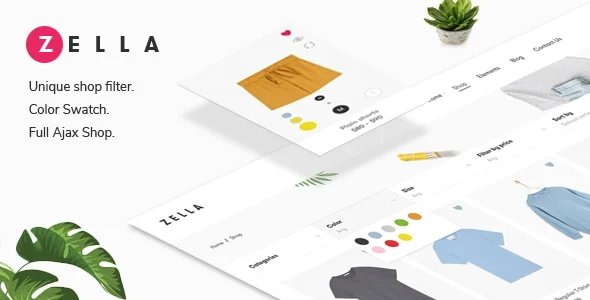
Zella is a WordPress theme built for WooCommerce shops. Its main job is to give your store a clean, modern look while letting shoppers filter products in real time with AJAX, so results update without a full page reload.
- Version
- 2.4.0
- Released
- Mar 18, 2022
- Type
- WordPress theme
- Licence
- GPL
- Included in
- Every plan, or $5.59 on its own
What’s new in Zella 2.4.0
Version 2.4.0 · Mar 18, 2022
Latest
- ImprovedCOMPATIBLE: Revolution Slider 6.5.19.
- ImprovedCOMPATIBLE: WooCommerce 6.3.1.
- ImprovedCOMPATIBLE: WordPress 5.9.2.
What it does
Large catalogs can be tiring to browse when every filter click reloads the whole page. Zella handles this with real-time AJAX filtering, so shoppers can narrow product choices and see the results update in place. The theme pairs that with a modern, clean design meant to keep attention on your products, and a responsive layout that adapts to desktops, tablets and phones.
Zella works with WooCommerce for managing products, carts and checkout, so it fits stores already running on that plugin. It also includes full right-to-left language support, which suits shops serving Arabic, Hebrew or Persian speakers. Multiple homepage and shop layouts let you pick a starting structure and adjust it to your brand, and the theme includes documentation to guide setup and customization.
Best for
- WooCommerce stores with large product catalogs
- Shops selling to Arabic, Hebrew or Persian speakers
- Store owners wanting a clean, modern shop design
Features
Real-time AJAX filtering
Shoppers can filter products and see updated results instantly, without waiting for the page to reload after each choice.
Modern, clean design
A professional, uncluttered layout keeps the focus on product images and details across your shop pages.
Full RTL support
Right-to-left languages such as Arabic, Hebrew and Persian are supported, so the store reads correctly for those audiences.
Responsive, mobile-friendly layout
The store adjusts to different screen sizes, from desktop monitors down to smartphones, so shoppers can browse on any device.
WooCommerce integration
Built to work with WooCommerce, letting you manage products, carts and checkout through the store tools you already use.
Multiple homepage and shop layouts
Choose from several homepage and shop layouts, then tailor them to match your brand's style and requirements.
Setup documentation
Detailed guides are included to walk you through setting up the theme and customizing your store.
Questions about Zella
Does Zella need WooCommerce?
Zella is designed as a WooCommerce theme, and its shop features, such as product management, carts, checkout and AJAX filtering, are built around WooCommerce. If you plan to run an online store with it, you will want WooCommerce in place.
How does the AJAX filtering work for shoppers?
When a shopper picks a filter on your shop pages, the product results update in real time without a full page reload. This lets people narrow choices quickly and keep browsing without losing their place.
Can I use this theme for a right-to-left language store?
Yes. The theme includes full RTL support, so stores in languages such as Arabic, Hebrew and Persian display in the correct reading direction.
Can I change the look of my homepage and shop?
The theme offers multiple homepage and shop layouts. You can start from one of them and tailor it to your brand's style, with documentation available to guide the customization.
Is Zella free?
The code of Zella is licensed under the GPL, so anyone may use, change and share it. GPL Feast is a paid service: a plan or a single purchase gives you the download and automatic updates. The developer's own support, licence key and online services are not included.
Which version of Zella is this?
Version 2.4.0, released Mar 18, 2022. New versions appear here when the developer publishes them, and members get them as automatic updates.
How do I update Zella?
Install the free GPL Feast Updater on your site and connect it with your API key. It installs new versions of Zella automatically and keeps a backup, so you can roll back.
You might also like