Plugin
Updated
BuddyBoss Course Quizzes
BuddyBoss Course Quizzes is a WordPress plugin built for the BuddyBoss platform. It lets educators and course creators add quizzes to their existing courses, grade them automatically and give learners immediate feedback when they finish.
- Version
- 1.3.0
- Released
- Oct 16, 2026
- Developer
- BuddyBoss
- Type
- WordPress plugin
- Licence
- GPL
- Included in
- Every plan, or $1.03 on its own
What’s new in BuddyBoss Course Quizzes 1.3.0
Version 1.3.0 · Oct 16, 2026
Latest
What it does
Courses work better when learners can check what they have understood, and course creators need a way to see who is keeping up. This plugin adds a quiz component to BuddyBoss courses so you can run quick knowledge checks or longer assessments inside the site your learners already use. Quizzes follow your existing site design, so the testing step feels like part of the course instead of a separate tool.
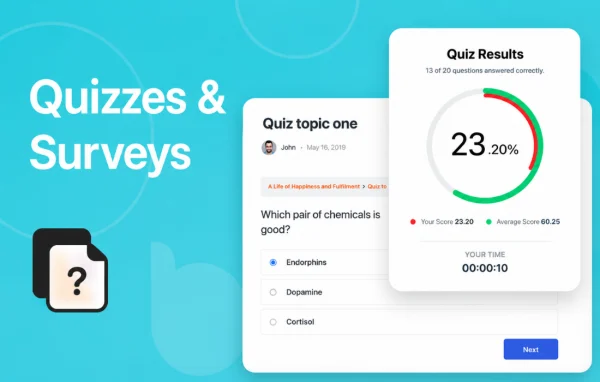
You build quizzes with a drag-and-drop creator, choosing from multiple-choice, true/false and fill-in-the-blank questions, and you can add images, audio and video to questions. Scoring runs automatically against criteria you set, and learners see detailed feedback once they submit. You can set time limits, cap attempts, and decide what happens after completion, such as redirecting to a page, showing a certificate or sending an email. Progress reports help you spot knowledge gaps.
Best for
- Online course sites built on BuddyBoss
- Educators who want auto-graded knowledge checks
- Training programs that issue certificates after assessments
Features
Several question formats
Build quizzes with multiple-choice, true/false and fill-in-the-blank questions so each assessment matches the material and your teaching style.
Drag-and-drop quiz creator
Set up and manage quizzes through a drag-and-drop interface designed so educators without technical experience can build them.
Automatic grading
Scores are calculated instantly from criteria you define, so you can evaluate learners without marking each quiz by hand.
Feedback on completion
Learners get immediate, detailed feedback when they finish a quiz, which helps reinforce lessons and clear up misunderstandings.
Time limits and attempt caps
Set a time limit for each quiz and limit how many attempts each learner gets, giving you more control over how assessments are taken.
Multimedia in questions
Add images, audio and video directly to questions when a visual or listening element makes the question clearer.
Progress tracking and reports
Monitor learner performance through analytics and progress reports to see where people are struggling with the course material.
Post-quiz actions
Configure what happens after a quiz, including redirecting to a specific page, showing a certificate or triggering an email.
BuddyBoss Course Quizzes older versions
- 1.2.0Aug 28
Members and buyers of this product can download older versions.
Questions about BuddyBoss Course Quizzes
What kinds of questions can I create?
You can write multiple-choice, true/false and fill-in-the-blank questions. Questions can also include images, audio and video, which is useful for subjects where learners need to look at or listen to something before answering.
Do I have to grade quizzes manually?
No. Grading is automatic and scores are calculated from the criteria you set. Learners receive detailed feedback as soon as they complete a quiz, and you can review results through the progress reports.
Can I stop learners from retaking a quiz endlessly?
Yes. You can limit the number of attempts each learner gets and set a time limit for each quiz. Together these settings give you more control over how assessments are taken.
Will quizzes work for learners on phones?
The quizzes use a mobile-optimized design, so learners can take assessments on smartphones and tablets as well as on desktop computers.
Is BuddyBoss Course Quizzes free?
The code of BuddyBoss Course Quizzes is licensed under the GPL, so anyone may use, change and share it. GPL Feast is a paid service: a plan or a single purchase gives you the download and automatic updates. The developer's own support, licence key and online services are not included.
Which version of BuddyBoss Course Quizzes is this?
Version 1.3.0, released Oct 16, 2026. New versions appear here when the developer publishes them, and members get them as automatic updates.
How do I update BuddyBoss Course Quizzes?
Install the free GPL Feast Updater on your site and connect it with your API key. It installs new versions of BuddyBoss Course Quizzes automatically and keeps a backup, so you can roll back.
More from BuddyBoss