Plugin
Updated
Gravity Forms Tooltips
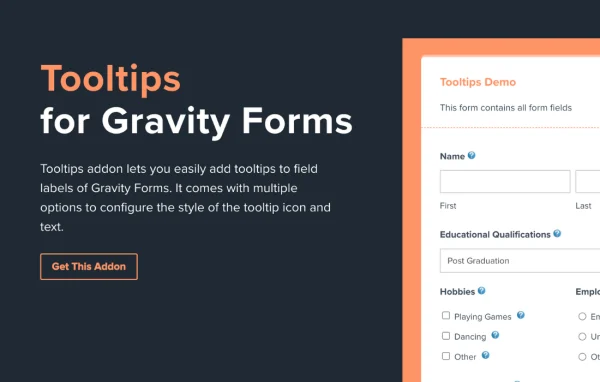
Gravity Forms Tooltips is a WordPress plugin by Sushil Kumar that adds helpful tooltips to fields in Gravity Forms. You write a short message for a field, and visitors see it right where they are typing, so they know what information you need.
- Version
- 5.1
- Released
- Nov 2, 2025
- Developer
- WPMonks
- Type
- WordPress plugin
- Licence
- GPL
- Included in
- Every plan, or $3.99 a year on its own
What’s new in Gravity Forms Tooltips 3.6
Version 3.6 · Oct 5, 2023
Latest
- FixedFixed minor bug
What it does
Forms often confuse people. A label like "ID number" or "Reference code" can leave visitors guessing, and guesses lead to wrong entries. This add-on lets you attach a tooltip to any Gravity Forms field, so the explanation sits next to the input instead of in a paragraph above the form. You can write the message to answer a common question or warn about a frequent mistake, and no coding is needed to set it up.
The tooltips stay hidden until a visitor needs them, which keeps the form tidy. You choose whether each tooltip appears above, below or beside its field, so it fits your layout. The tooltips also adjust to different screen sizes, so mobile visitors get the same guidance as desktop users. It works as an add-on to Gravity Forms, so it fits sites already using that form builder for contact, registration, order or application forms.
Best for
- WordPress sites already using Gravity Forms
- Developers building long or complex forms for clients
- Businesses collecting detailed registrations or applications
Features
Tooltips on any field
Attach a tooltip to any Gravity Forms field without writing code, so visitors get guidance exactly where they enter information.
Custom tooltip messages
Write your own text for each tooltip to explain what a field needs, answer common questions or point out frequent input mistakes.
Flexible positioning
Place each tooltip above, below or beside its form field so it suits your form design and stays easy to read.
Responsive on all screens
Tooltips adapt to different screen sizes, giving visitors on phones, tablets and desktops the same clear instructions while filling out a form.
Clean, unobtrusive display
Tooltips appear only when needed, which keeps forms free of long blocks of instructions and maintains a clean, professional look.
Built for Gravity Forms
Works as an add-on to Gravity Forms, so you add tooltips inside the form builder you already use on your WordPress site.
Gravity Forms Tooltips older versions
- 5.0Jul 23, 2025
- 4.7Feb 18, 2025
- 4.6Dec 16, 2024
- 4.5Aug 25, 2024
- 4.4Jul 24, 2024
- 3.6Oct 6, 2023
- 3.5Oct 5, 20231 improvement
- 3.3.1Apr 18, 20231 fix
Members and buyers of this product can download older versions.
Questions about Gravity Forms Tooltips
Do I need Gravity Forms to use this add-on?
Yes. This is an add-on for Gravity Forms, and it adds tooltips to fields in forms built with that plugin. Without Gravity Forms on your site, there are no forms for it to work with.
Can I control where the tooltip shows up?
Yes. You can position each tooltip above, below or beside its form field. That lets you match the tooltip placement to your form layout and keep the guidance readable without covering other fields.
Will the tooltips work for visitors on mobile phones?
The tooltips are responsive and adapt to different screen sizes. Visitors on phones and tablets see the same guidance as people filling out the form on a desktop computer.
Do I need coding skills to add tooltips?
No. You can add tooltips to Gravity Forms fields and write the message for each one without coding, which makes it practical for site owners as well as developers.
Is Gravity Forms Tooltips free?
The code of Gravity Forms Tooltips is licensed under the GPL, so anyone may use, change and share it. GPL Feast is a paid service: a plan or a single purchase gives you the download and automatic updates. The developer's own support, licence key and online services are not included.
Which version of Gravity Forms Tooltips is this?
Version 5.1, released Nov 2, 2025. New versions appear here when the developer publishes them, and members get them as automatic updates.
How do I update Gravity Forms Tooltips?
Install the free GPL Feast Updater on your site and connect it with your API key. It installs new versions of Gravity Forms Tooltips automatically and keeps a backup, so you can roll back.
More from WPMonks
Plugin
Plugin
Plugin
Plugin
Plugin
Plugin
Plugin