Plugin
Updated
WPEverest Customize My Account
WPEverest Customize My Account is an add-on plugin by WPEverest for the User Registration plugin. It gives you control over the default My Account page, so you can add, reorder, hide and style tabs from one screen without writing code.
- Version
- 1.2.18
- Released
- Oct 12, 2026
- Developer
- WPEverest
- Type
- WordPress plugin
- Licence
- GPL
- Included in
- Every plan, or $4.79 on its own
What’s new in WPEverest Customize My Account 1.2.18
Version 1.2.18 · Oct 12, 2026
Latest
- FixedTinyMCE script error and invalid jQuery selector warning on the Settings page.
What it does
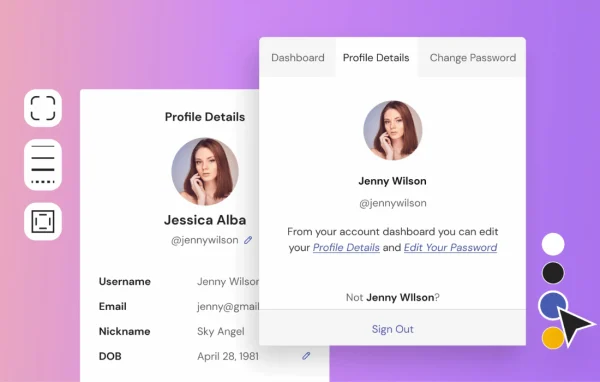
The default My Account page on a WordPress site is often plain and fixed, which makes it hard to match your brand or add the links and content your users need. This add-on turns that page into something you can shape yourself. You can create as many custom tabs as you like, give each one its own endpoint slug, label, icon and content, or point a tab to a link URL. Tabs can be shown only to certain user roles, so different groups see the options that apply to them.
Everything is managed from a single interface. You drag tabs into the order you want, hide or disable them temporarily, and delete custom tabs with one click while the default tabs stay in place. Styling settings cover background color, border width, padding and buttons, and you can pick from several navigation styles and text hover effects. Developers who want more control can use the optional CSS editor. It works alongside the User Registration plugin and its custom registration and login forms.
Best for
- Sites using the User Registration plugin for signups
- Site owners wanting a branded My Account page
- Communities that show different account tabs per user role
Features
Unlimited custom tabs
Add as many new tabs to the My Account page as you need, each holding its own content for logged-in users.
Detailed tab settings
Set the endpoint slug, link URL, label and icon for every tab to control how navigation and content appear in the account area.
Role-based tab visibility
Show or hide individual tabs for specific user roles so each group of users only sees the tabs meant for them.
Drag-and-drop reordering
Rearrange tabs by dragging them into place, with changes applied without page reloads, so the menu order matches how users move through their account.
Hide, disable or delete tabs
Temporarily hide or disable any tab, or remove custom tabs with one click. Default tabs are protected from deletion.
Styling without code
Adjust background color, border width, padding and button appearance so the account page fits the rest of your site design.
Navigation styles and hover effects
Choose between multiple navigation styles and apply text hover effects to give the account menu a cleaner, more polished look.
Optional CSS editor
Developers can add their own CSS through the built-in editor for design changes that go beyond the standard styling settings.
WPEverest Customize My Account older versions
- 1.2.17Jul 231 fix
- 1.2.16Jun 261 security fix
- 1.2.15Mar 182 fixes
- 1.2.14Feb 2
- 1.2.13Jan 16
- 1.2.12Jan 12
- 1.2.11Oct 11, 2025
- 1.2.10Sep 12, 2025
- 1.2.8Apr 23, 2025
- 1.2.7Feb 26, 2025
Members and buyers of this product can download older versions.
18 older versions in all. If you need one that is not listed, ask support.
Questions about WPEverest Customize My Account
Do I need the User Registration plugin to use this?
Yes. This is an add-on for the User Registration plugin by WPEverest. It works with that plugin's My Account page and its custom registration and login forms, so you should have User Registration on your site.
Can I show certain tabs only to some users?
Yes. Each tab has role-based visibility settings, so you can display or hide it for specific user roles. This lets you give different groups of users a My Account page that only contains the tabs relevant to them.
Do I need to know CSS to change how the account page looks?
No. Background color, border width, padding, buttons, navigation styles and text hover effects can all be set through the plugin's settings. An optional CSS editor is available if you want to go further with custom code.
Can I remove the default My Account tabs?
Default tabs cannot be deleted, but you can hide or disable them. Custom tabs you create can be deleted with one click, and all tabs can be reordered with drag and drop.
Is WPEverest Customize My Account free?
The code of WPEverest Customize My Account is licensed under the GPL, so anyone may use, change and share it. GPL Feast is a paid service: a plan or a single purchase gives you the download and automatic updates. The developer's own support, licence key and online services are not included.
Which version of WPEverest Customize My Account is this?
Version 1.2.18, released Oct 12, 2026. New versions appear here when the developer publishes them, and members get them as automatic updates.
How do I update WPEverest Customize My Account?
Install the free GPL Feast Updater on your site and connect it with your API key. It installs new versions of WPEverest Customize My Account automatically and keeps a backup, so you can roll back.
More from WPEverest