Theme
Updated
Altitude Pro Theme
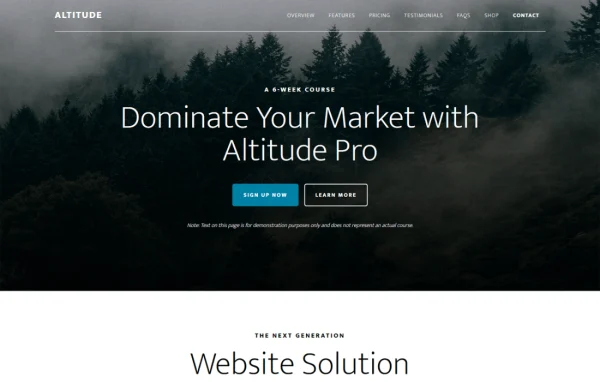
Altitude Pro Theme is a WordPress theme by StudioPress, built on the Genesis Framework. It gives businesses, creatives and bloggers a clean, modern layout with parallax scrolling, a widget-driven homepage and styling for the block editor and WooCommerce.
- Version
- 1.5.3
- Released
- May 5, 2026
- Developer
- StudioPress
- Type
- WordPress theme
- Licence
- GPL
- Included in
- Every plan, or $4.79 a year on its own
What’s new in Altitude Pro Theme 1.5.3
Version 1.5.3 · May 5, 2026
Latest
What it does
Many site owners want a professional look without building every page from scratch. This theme handles that with a homepage made of seven widget areas, so you can stack sections like an introduction, services or featured content in the order that suits your brand. Parallax scrolling adds a sense of depth as visitors move down the page, and the layout adjusts to desktops, tablets and phones so your content stays readable on any screen.
Because it runs on the Genesis Framework, the theme works as a child theme on top of that foundation. It is styled for the Gutenberg block editor, which lets you build reusable content modules that keep fonts, colors and layout consistent across pages. A theme options panel and the live WordPress Customizer let you adjust colors, background images and header settings while previewing the result. It also includes pre-styled WooCommerce pages, so it suits a simple landing page, a multi-page business site or a small online store.
Best for
- Small businesses and entrepreneurs needing a professional website
- Personal and creative blogs that want a modern layout
- Genesis Framework users building landing pages or small stores
Features
Parallax scrolling
Background sections move at a different pace than the content as visitors scroll, giving the homepage a layered look without extra setup.
Seven homepage widget areas
Fill seven separate widget zones on the front page to arrange content blocks and vary the design to match your brand.
Gutenberg optimized styling
Built for the block editor, so you can create reusable modules that keep font, color and layout choices consistent across your site.
Live theme customizer
Change colors, background images, content and other elements in the WordPress Customizer and preview each change before it goes live.
Theme options panel
Simple settings let you adjust the appearance and behavior of the theme with a few clicks, which helps you get a site running quickly.
Pre-styled WooCommerce pages
Shop, product and cart pages are styled to match the rest of the theme, so an online store looks consistent with your other pages.
Custom header options
Upload your own logo image or use a text-based logo for a quicker setup, giving the header a branded look.
Mobile responsive layout
The design adapts to different screen sizes so pages display properly on desktops, tablets and smartphones.
Altitude Pro Theme older versions
- 1.5.2Mar 26, 2025
- 1.5.1Apr 18, 2023
Members and buyers of this product can download older versions.
Questions about Altitude Pro Theme
Do I need the Genesis Framework to use this theme?
Yes. Altitude Pro is built on the Genesis Framework from StudioPress, so it runs as a child theme on top of Genesis. The framework provides the underlying structure, while this theme supplies the design, the homepage widget areas and the styling options.
Can I run an online store with it?
You can. The theme includes pre-styled WooCommerce integration, so your shop and product pages match the look of the rest of the site. You would add the WooCommerce plugin to handle products, carts and checkout.
How is the homepage put together?
The front page is built from seven widget areas. You place content into each zone, such as text, images or calls to action, and arrange them to suit your brand. Parallax scrolling adds depth between the sections as visitors scroll.
Does it work with the block editor?
Yes. The theme is optimized for the Gutenberg block editor and supports reusable content modules. These help you keep fonts, colors and layout consistent across posts and pages while building new content more quickly.
Is Altitude Pro Theme free?
The code of Altitude Pro Theme is licensed under the GPL, so anyone may use, change and share it. GPL Feast is a paid service: a plan or a single purchase gives you the download and automatic updates. The developer's own support, licence key and online services are not included.
Which version of Altitude Pro Theme is this?
Version 1.5.3, released May 5, 2026. New versions appear here when the developer publishes them, and members get them as automatic updates.
How do I update Altitude Pro Theme?
Install the free GPL Feast Updater on your site and connect it with your API key. It installs new versions of Altitude Pro Theme automatically and keeps a backup, so you can roll back.
More from StudioPress