Theme
Updated
Anymag Theme
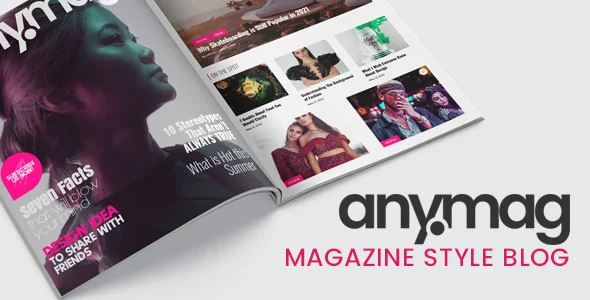
Anymag is a WordPress theme for building magazine-style blogs and publishing sites. It gives you pre-built layouts, support for several post formats and adjustable color schemes, so you can present articles, images and media in a clean, organized way without writing code.
- Version
- 2.9.7
- Released
- Jul 22, 2024
- Type
- WordPress theme
- Licence
- GPL
- Included in
- Every plan, or $3.99 on its own
What’s new in Anymag Theme 2.9.7
Version 2.9.7 · Jul 22, 2024
Latest
What it does
Running a blog that publishes a lot of content can get messy fast if the theme only offers a single list of posts. A magazine-style layout helps readers scan headlines, spot featured stories and move between topics. This theme is built for that kind of site, whether it covers news, lifestyle subjects or a specific niche. You pick from several magazine layouts and choose how each post is presented, from standard articles to video, audio, gallery and quote formats.
Setup is handled through theme options and drag-and-drop widgets, so you can adjust the look of the site without touching code. Colors can be changed to match your brand, and widget areas let you add social media links, ad spots and trending posts. The design is responsive and retina-ready, so it adapts to desktops, tablets and phones. Built-in social sharing gives readers an easy way to pass your articles along on social platforms.
Best for
- Bloggers who want a magazine-style layout
- News, lifestyle and niche magazine websites
- Online publishers who post video, audio and gallery content
Features
Multiple magazine layouts
Choose from a range of pre-built magazine-style layouts to arrange your homepage and content the way that suits your publication.
Several post formats
Publish posts as standard, video, audio, gallery or quote formats, so each story can be presented in the style that fits its content.
Custom color schemes
Adjust the theme's colors to set the mood of your site and keep it in line with your brand or blog identity.
Responsive, retina-ready design
Layouts adapt to desktops, tablets and smartphones, and the design is prepared for high-resolution retina screens.
No-code theme options
Intuitive theme options and drag-and-drop widgets let you set up and customize the site without any coding knowledge.
Flexible widget areas
Add widgets for social media, advertising, trending posts and more to the theme's widget areas to fill out your sidebars and sections.
Integrated social sharing
Built-in sharing options let readers post your articles to major social platforms directly from your site.
Anymag Theme older versions
- 2.9.6Jul 9, 2024
- 2.9.5Jul 3, 2024
- 2.9.4Jun 23, 2024
- 2.9.3Jun 12, 2024
- 2.9.2Jun 10, 2024
- 2.9.0Mar 27, 2024
- 2.8.9Mar 18, 2024
- 2.8.8Mar 8, 2024
- 2.8.7Feb 23, 2024
- 2.8.6Aug 3, 2023
Members and buyers of this product can download older versions.
13 older versions in all. If you need one that is not listed, ask support.
Questions about Anymag Theme
What kinds of sites is this theme a good fit for?
It is designed for magazine-style websites, including news sites, lifestyle blogs and niche magazines. If you publish regularly and want readers to browse many articles, images and media posts from one organized layout, it suits that kind of site well.
Do I need coding skills to customize Anymag?
No. The theme uses intuitive theme options and drag-and-drop widgets, so you can change layouts, colors and widget areas without writing code. That makes it a reasonable choice for bloggers who are comfortable with WordPress but are not developers.
Can I publish video and audio posts with Anymag Theme?
Yes. The theme supports several post formats, including video, audio, gallery, standard and quote. Each format gives a post its own presentation, which helps when you mix written articles with multimedia content.
Will my site look right on phones?
The design is responsive, so it adjusts to different screen sizes from desktops to smartphones. It is also retina-ready, which keeps visuals sharp on high-resolution displays.
Is Anymag Theme free?
The code of Anymag Theme is licensed under the GPL, so anyone may use, change and share it. GPL Feast is a paid service: a plan or a single purchase gives you the download and automatic updates. The developer's own support, licence key and online services are not included.
Which version of Anymag Theme is this?
Version 2.9.7, released Jul 22, 2024. New versions appear here when the developer publishes them, and members get them as automatic updates.
How do I update Anymag Theme?
Install the free GPL Feast Updater on your site and connect it with your API key. It installs new versions of Anymag Theme automatically and keeps a backup, so you can roll back.
You might also like