Theme
Updated
Avante Theme
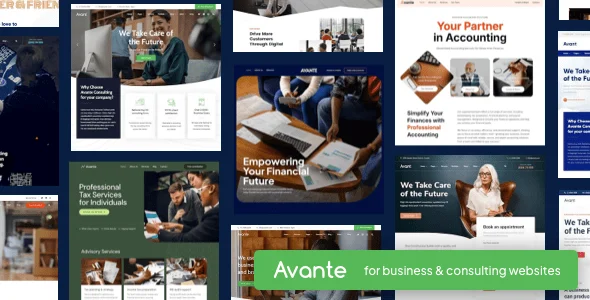
Avante Theme is a WordPress theme built for business consulting firms. It gives you ready-made demo content, multiple layouts and dedicated sections for services, case studies and team profiles, so you can put together a professional consulting website without writing code.
- Version
- 3.0
- Released
- Dec 21, 2024
- Type
- WordPress theme
- Licence
- GPL
- Included in
- Every plan, or $4.79 on its own
What’s new in Avante Theme 3.0
Version 3.0 · Dec 21, 2024
Latest
What it does
Consulting firms need a website that explains what they do, who does it and what results they have delivered. This theme is organized around exactly those needs. It includes sections for services and case studies, plus team member profiles, so the core pages of a consulting site are already planned out. A one-click demo import fills your site with sample content that you then replace with your own text, images and details.
Customization happens through a drag-and-drop page builder, so you can create and change pages without coding. You can pick from multiple layouts and adjust typography and colors to match your brand guidelines. The design is responsive and retina-ready, which keeps pages sharp on desktops, tablets and phones, and it is built for consistent display across major browsers. It suits small advisory practices and larger consulting agencies that want a clean, business-focused site.
Best for
- Business consulting firms building a professional website
- Advisory agencies presenting services, team and case studies
- Freelancers creating sites for consulting clients
Features
Multiple customizable layouts
Choose from several layout options and adjust them to fit your consulting brand, giving you control over how each part of the site looks.
One-click demo import
Load ready-made demo content in one step, then edit the sample pages to describe your own firm, services and people.
Drag-and-drop page builder
Build and modify pages by dragging elements into place, so you can create new layouts without any coding knowledge.
Service and case study sections
Present the services you offer and the projects you have completed in dedicated sections designed for consulting work.
Team member profiles
Introduce your consultants with detailed profiles so prospective clients can see the people behind the firm.
Typography and color options
Set fonts, colors and styles to follow your company's branding guidelines across the whole site.
Responsive, retina-ready design
Pages adapt to desktops, tablets and smartphones and display crisply on high-resolution screens.
Cross-browser compatibility
The theme is built to look and behave consistently across all major web browsers your visitors might use.
Avante Theme older versions
- 2.8.1Oct 8, 2024
- 2.7.9Sep 14, 2023
- 2.7.8May 3, 2023
- 2.7.7Apr 18, 2023
Members and buyers of this product can download older versions.
Questions about Avante Theme
Do I need coding skills to build pages with this theme?
No. The theme includes a drag-and-drop page builder, so you can create and modify pages visually. Layout, typography and color options are also adjustable without code, which makes it workable for people of different skill levels.
Can I show my consulting team and past projects?
Yes. Avante Theme includes team member profiles for introducing your consultants, along with dedicated service and case study sections where you can describe what you offer and highlight completed work for prospective clients.
How do I get started with a finished-looking site?
The one-click demo import loads ready-made demo content into your site. From there you replace the sample text and images with your own and adjust layouts, fonts and colors to match your brand.
Will the site look right on phones and tablets?
The design is responsive and retina-ready, so pages adjust to desktops, tablets and smartphones and stay sharp on high-resolution screens. It is also built for consistent appearance across major web browsers.
Is Avante Theme free?
The code of Avante Theme is licensed under the GPL, so anyone may use, change and share it. GPL Feast is a paid service: a plan or a single purchase gives you the download and automatic updates. The developer's own support, licence key and online services are not included.
Which version of Avante Theme is this?
Version 3.0, released Dec 21, 2024. New versions appear here when the developer publishes them, and members get them as automatic updates.
How do I update Avante Theme?
Install the free GPL Feast Updater on your site and connect it with your API key. It installs new versions of Avante Theme automatically and keeps a backup, so you can roll back.
You might also like