
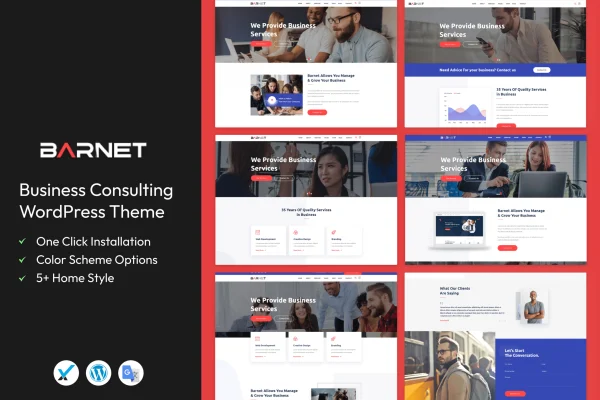
Theme
Updated
Barnet
Barnet is a business consulting WordPress theme built for consultants, corporate agencies and business professionals. It gives you customizable layouts, service pages and a testimonials section so you can present what you offer and why clients trust you, with a demo import to get the structure in place quickly.
- Version
- 1.9
- Released
- Sep 17, 2022
- Developer
- template_path
- Type
- WordPress theme
- Licence
- GPL
- Included in
- Every plan, or $3.99 on its own
What’s new in Barnet 1.9
Version 1.9 · Sep 17, 2022
Latest
- ChangedVersion 1.9
What it does
Consulting firms need a site that explains their services clearly and shows proof that they deliver. This theme is designed around that job. It includes dedicated services pages with several layout choices, a built-in testimonials section for client reviews and success stories, and contact forms with call-to-action buttons placed to encourage visitors to get in touch. The design is clean and modern, and it responds to different screen sizes, so the site works on desktops, tablets and phones.
You start by importing a demo with one click, which loads pre-built templates you can then edit. From there, a drag-and-drop page builder lets you change layouts without writing code, and typography and color options help you match the site to your brand. The design is retina-ready and built to display consistently across major browsers. It suits a consultant launching a first site as well as an agency replacing an older one.
Best for
- Independent business consultants
- Corporate consulting agencies
- Professional services firms presenting services and client reviews
Features
One-click demo import
Load the pre-built demo templates in a single step, giving you a complete starting site that you can edit with your own content and branding.
Drag-and-drop page building
The theme works with a drag-and-drop page builder, so you can rearrange sections and adjust pages without touching any code.
Dedicated services pages
Services pages come with several layouts, letting you describe each consulting offering and area of expertise in a clear, organized way.
Testimonials section
A built-in testimonials area lets you feature client reviews and success stories, giving visitors evidence of the results you have delivered.
Multiple customizable layouts
Choose from several layouts and adjust them to fit your branding and the way you want to present your consulting business.
Typography and color options
Set fonts and colors across the site so the look matches your brand identity, with no need to edit stylesheets by hand.
Contact forms and call-to-action buttons
Contact forms and call-to-action buttons are placed throughout the design to give interested visitors an easy way to reach you.
Responsive, retina-ready design
Layouts adapt to desktops, tablets and smartphones, display sharply on high-resolution screens and are built for consistent results in major browsers.
Questions about Barnet
Do I need coding skills to customize this theme?
No. The theme integrates with a drag-and-drop page builder, and it includes typography and color options, so you can change layouts, fonts and colors through visual controls instead of editing code.
Can I start from a ready-made design?
Yes. A one-click demo import loads pre-built templates, giving you a finished site structure. You then replace the sample text and images with your own services, testimonials and contact details.
Is there a place to display client testimonials?
Yes. Barnet includes an integrated testimonials section for client reviews and success stories. It sits alongside dedicated services pages, so you can pair descriptions of your work with feedback from the people you have helped.
Will the site look right on phones and tablets?
The design is responsive and retina-ready, so layouts adjust to smaller screens and stay sharp on high-resolution displays. It is also built for consistent appearance across major browsers.
Is Barnet free?
The code of Barnet is licensed under the GPL, so anyone may use, change and share it. GPL Feast is a paid service: a plan or a single purchase gives you the download and automatic updates. The developer's own support, licence key and online services are not included.
Which version of Barnet is this?
Version 1.9, released Sep 17, 2022. New versions appear here when the developer publishes them, and members get them as automatic updates.
How do I update Barnet?
Install the free GPL Feast Updater on your site and connect it with your API key. It installs new versions of Barnet automatically and keeps a backup, so you can roll back.






