Theme
Updated
Beeta
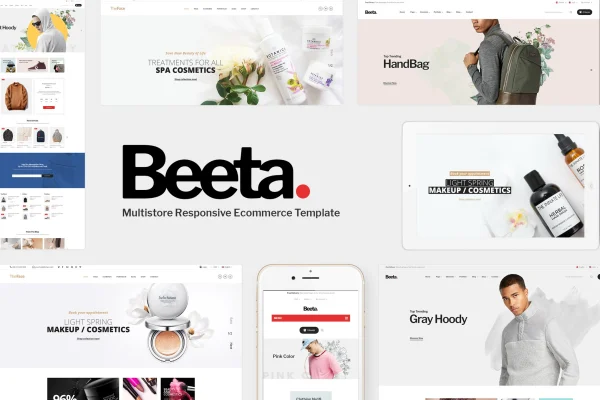
Beeta is a multipurpose WooCommerce theme by Plaza-Themes, built for eCommerce sites selling fashion, cosmetics, clothing and accessories. It pairs a clean white and black design with shop tools like product sliders, sale countdowns and quick view popups, so you can run a polished store without writing code.
- Version
- 1.1.6
- Released
- Aug 13, 2026
- Developer
- Plaza-Themes
- Type
- WordPress theme
- Licence
- GPL
- Included in
- Every plan, or $3.99 on its own
What’s new in Beeta 1.1.6
Version 1.1.6 · Aug 13, 2026
Latest
What it does
Running an online store means juggling product displays, promotions and navigation while keeping the look consistent with your brand. This theme handles much of that through a theme options panel where you adjust fonts, backgrounds and layout settings. Its design uses crisp white backgrounds, black text and dark footers, which keeps attention on product photos. The layout is responsive and retina ready, so pages adapt to different screen sizes and display sharply on high-resolution displays.
On the store side, it works with WooCommerce for product management, carts and checkout. You can build pages with the Visual Composer drag and drop builder, add large banners with Revolution Slider and organize navigation with mega menus. Sale labels, countdown timers and quick view popups help shoppers spot deals and check products without leaving the page. WPML compatibility lets you run a multilingual shop, and blog and testimonial sections give you room for news and customer feedback. It is also built on the Bootstrap framework.
Best for
- Fashion and clothing stores built on WooCommerce
- Cosmetics and beauty product shops
- Accessories retailers selling in multiple languages
Features
Theme options panel
Adjust fonts, backgrounds and layout settings from the theme options so the store matches your brand, with no coding required.
Visual Composer page building
Design pages with the Visual Composer drag and drop builder, arranging content and layouts visually instead of editing code.
WooCommerce store support
Works with WooCommerce for product management, shopping carts and checkout, giving you the core pieces of an online shop.
Product sliders
Create product sliders for promotions and bestselling items, managed directly from the theme's admin options panel.
Sale labels and countdowns
Mark discounted products with sale badges and add countdown timers so shoppers can see which offers are running and when they end.
Quick view popup
Shoppers can preview product details in a popup without leaving the current page, which keeps browsing simple on category pages.
Mega menus and banners
Organize navigation with mega menus for links like About Us, Blog and Contact, and add large banners through Revolution Slider.
Multilingual with WPML
WPML compatibility lets you build a multilingual version of your store for customers who shop in different languages.
Questions about Beeta
What kinds of stores is Beeta designed for?
It is aimed at eCommerce sites, especially fashion, cosmetics, clothing and accessories stores. As a multipurpose theme it can also suit other product types, such as electronics, thanks to its customizable layouts and WooCommerce support.
Can I customize the design without coding?
Yes. The theme options panel lets you change fonts, backgrounds and layout settings, and the Visual Composer drag and drop builder lets you arrange page content visually. Product sliders are also managed from the options panel.
Does the theme support a multilingual shop?
It is compatible with WPML, so you can create a multilingual website and present your store in more than one language to reach customers in different markets.
Will the store look good on phones and tablets?
The design is responsive, adjusting automatically to different devices and screen sizes. It is also retina ready, so images and interface elements stay sharp on high-resolution screens.
Is Beeta free?
The code of Beeta is licensed under the GPL, so anyone may use, change and share it. GPL Feast is a paid service: a plan or a single purchase gives you the download and automatic updates. The developer's own support, licence key and online services are not included.
Which version of Beeta is this?
Version 1.1.6, released Aug 13, 2026. New versions appear here when the developer publishes them, and members get them as automatic updates.
How do I update Beeta?
Install the free GPL Feast Updater on your site and connect it with your API key. It installs new versions of Beeta automatically and keeps a backup, so you can roll back.