Theme
Updated
Bijoux
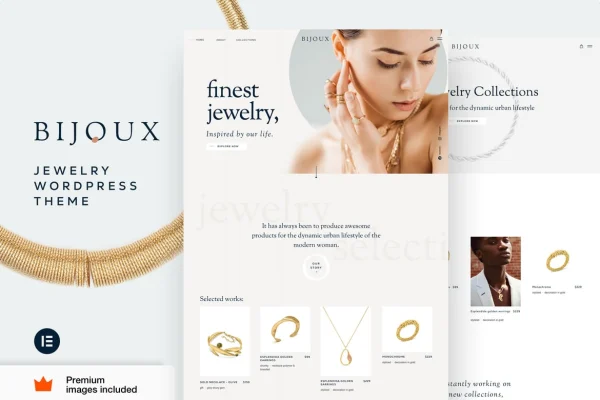
Bijoux by Vamtam is a WordPress theme built for online jewelry shops. It works with WooCommerce and Elementor to give rings, necklaces and other pieces a refined storefront, with layouts aimed at product detail, filtering and promotion.
- Version
- 52
- Released
- Sep 9, 2026
- Developer
- Vamtam
- Type
- WordPress theme
- Requires
- Elementor
- Licence
- GPL
- Included in
- Every plan, or $3.99 on its own
What’s new in Bijoux 52
Version 52 · Sep 9, 2026
Latest
What it does
Selling jewelry online means buyers need to see small details clearly and narrow down choices by things like metal or stone. A general-purpose theme often leaves you building that from scratch. This theme starts from a jewelry-focused design, with shop and homepage layouts meant to present pieces in a clean, refined way. Image galleries include zoom, so customers can look closely at craftsmanship, gemstones and finishes before they add an item to the cart.
The theme runs on WooCommerce, which handles inventory, payments and order tracking, and it requires Elementor for page building. You can adjust the homepage and shop layouts without writing code, add promotional banners and sliders for new arrivals or special offers, and set up filters by category, price, metal type and gemstone. The layout is responsive, so the store adapts to phones, tablets and desktops. It suits new sellers opening a first shop as well as established jewelers moving online.
Best for
- Independent jewelers opening an online store
- Handmade jewelry and accessories brands
- Agencies building WooCommerce shops for jewelry clients
Features
Jewelry-focused design
A refined, stylish look made for jewelry stores, with layouts planned around presenting individual pieces and collections to shoppers.
WooCommerce store support
Built to work with WooCommerce, so you can manage inventory, process payments and track orders from the standard WooCommerce tools.
Filters by metal and gemstone
Product filtering and search let customers narrow results by category, price, metal type and gemstone to find the piece they want.
Zoomable image galleries
Customizable product galleries with zoom let shoppers inspect fine details such as settings, stones and craftsmanship up close.
Editable homepage and shop layouts
Change the look of your homepage and shop pages without coding, keeping the store consistent with your own brand.
Promotional banners and sliders
Flexible banners and sliders help you feature special offers, new arrivals or bestsellers in prominent spots on your pages.
Responsive layout
The theme adapts its layout to different screen sizes, so the store works on mobile phones, tablets and desktop computers.
Bijoux older versions
- 50Aug 21
- 48Aug 3
- 45Jul 6
- 36Dec 15, 2025
- 35Oct 26, 2025
- 34Oct 13, 2025
- 14.3Feb 22, 2025
Members and buyers of this product can download older versions.
Questions about Bijoux
Does Bijoux work with WooCommerce?
Yes. The theme is designed around WooCommerce, which handles your product inventory, payment processing and order tracking. The theme supplies the jewelry-focused storefront design, galleries and filtering on top of it.
Do I need Elementor to use this theme?
Yes, the theme requires Elementor. Its homepage and shop layouts can be customized without coding, so you can adjust the store's look to match your brand.
Can customers filter products by metal or stone?
They can. The theme includes product filtering and search with options for category, price, metal type and gemstone, which helps shoppers narrow a large catalog down to the pieces they care about.
Is it suitable for someone setting up a first online shop?
The theme is described as easy to set up for beginners, while still offering layout and promotional options that established sellers will use. A jewelry-focused starting design means less building from a blank page.
Is Bijoux free?
The code of Bijoux is licensed under the GPL, so anyone may use, change and share it. GPL Feast is a paid service: a plan or a single purchase gives you the download and automatic updates. The developer's own support, licence key and online services are not included.
Which version of Bijoux is this?
Version 52, released Sep 9, 2026. New versions appear here when the developer publishes them, and members get them as automatic updates.
How do I update Bijoux?
Install the free GPL Feast Updater on your site and connect it with your API key. It installs new versions of Bijoux automatically and keeps a backup, so you can roll back.
What does Bijoux need?
Bijoux needs Elementor installed and active.
More from Vamtam