Theme
Updated
Brewhub
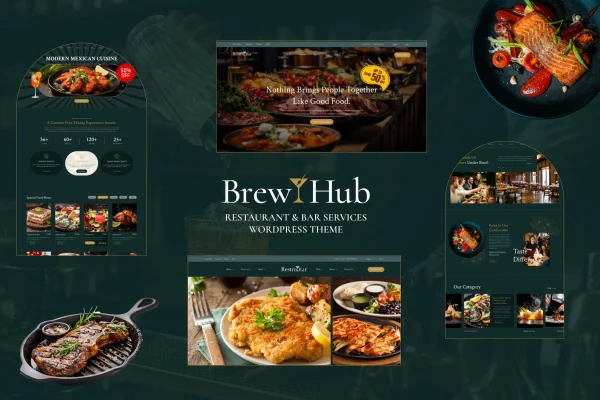
Brewhub is a WordPress theme by BuddhaThemes made for bars, pubs and restaurants. It gives food and drink venues a ready layout for presenting menus, upcoming events and special offers, and you can adjust the design to match your brand without writing code.
- Version
- 1.0.3
- Released
- Aug 15, 2026
- Developer
- BuddhaThemes
- Type
- WordPress theme
- Licence
- GPL
- Included in
- Every plan, or $3.99 on its own
What’s new in Brewhub 1.0.3
Version 1.0.3
Latest
- ImprovedCompatible with latest Elementor Version.
- ImprovedCompatible with latest WordPress Version.
- FixedMinor Bugs From Theme and Plugins.
What it does
Running a bar or restaurant leaves little time for building a website from scratch. This theme covers the pages a venue usually needs: a menu section for food and drinks, an events area for happy hours, live music or theme nights, and space to feature seasonal specials and deals. Customization options and a drag and drop builder let you change layouts and create new pages through a visual interface, so you can keep things current without touching code.
The design is responsive and retina ready, so pages adapt to desktops, tablets and phones. You can pick from several header and footer styles to set the overall look, connect your social media profiles, and translate the site for guests who speak other languages. WooCommerce compatibility means you can add a shop for merchandise or take online orders if your venue wants to sell through the site. It suits craft breweries, cafes, pubs and restaurants alike.
Best for
- Bars, pubs and craft breweries promoting events
- Restaurants and cafes presenting food and drink menus
- Venues wanting to sell merchandise or take orders online
Features
Menu layouts for food and drinks
Present your food and drink offerings in designed menu layouts that make it simple for visitors to browse what you serve.
Dedicated events section
Promote upcoming happy hours, live music and special theme nights in an events area that keeps regulars informed about what is coming up.
Special offers and promotions
Give seasonal specials, discounts and exclusive deals a prominent place on your pages so visitors notice them right away.
Drag and drop page building
Customize pages through a visual drag and drop interface, building unique layouts for your venue without needing any coding knowledge.
Responsive, retina ready design
Layouts adjust to different screen sizes and display sharply on high resolution screens, from desktop monitors to smartphones.
WooCommerce compatibility
Works with WooCommerce, so you can add online ordering or sell merchandise directly from your bar or restaurant website.
Multiple header and footer styles
Choose from several header and footer designs to shape a look that fits the personality of your brand.
Social media and translation
Connect your social profiles for easy sharing, and translate the site to serve guests who speak different languages.
Questions about Brewhub
Can I show my full food and drink menu with this theme?
Yes. The theme includes designed menu layouts for food and drink offerings, so you can list what you serve in a format that is easy for visitors to browse. You can adjust the presentation using the theme's customization options.
Do I need coding skills to customize the design?
No. Brewhub comes with customization options and a drag and drop builder, so you can change layouts, build new pages and match the design to your brand through a visual interface instead of editing code.
Can I sell merchandise or take orders through my site?
The theme is compatible with WooCommerce, which lets you add online ordering or merchandise sales to your website. This is handy for venues that sell branded goods or want guests to order directly.
Will the site work on phones and tablets?
Yes. The design is responsive and retina ready, so pages adapt to different screen sizes and look sharp on high resolution displays, including desktops, tablets and smartphones.
Is Brewhub free?
The code of Brewhub is licensed under the GPL, so anyone may use, change and share it. GPL Feast is a paid service: a plan or a single purchase gives you the download and automatic updates. The developer's own support, licence key and online services are not included.
Which version of Brewhub is this?
Version 1.0.3, released Aug 15, 2026. New versions appear here when the developer publishes them, and members get them as automatic updates.
How do I update Brewhub?
Install the free GPL Feast Updater on your site and connect it with your API key. It installs new versions of Brewhub automatically and keeps a backup, so you can roll back.