Theme
Updated
Brickox
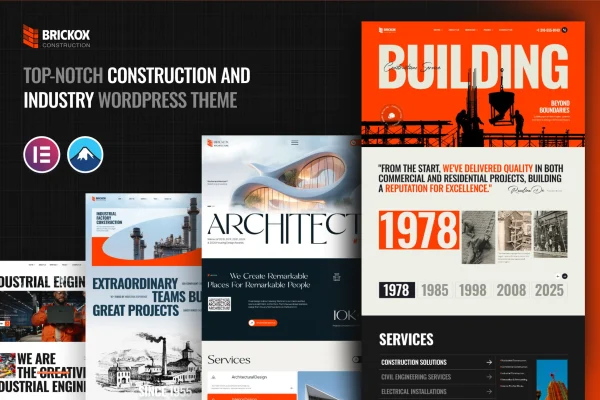
Brickox is a WordPress theme built for construction and industrial businesses. It gives builders, architects and contractors ready-made page templates and layouts for presenting projects, services and client testimonials, and you can customize it without writing code.
- Version
- 1.0.0
- Released
- Feb 11, 2025
- Developer
- XpressBuddy
- Type
- WordPress theme
- Licence
- GPL
- Included in
- Every plan, or $3.99 on its own
What’s new in Brickox 1.0.0
Version 1.0.0 · Feb 11, 2025
Latest
What it does
Construction and industrial companies usually need a site that does a few specific jobs: show finished work, explain the services on offer and make it easy for a prospective client to get in touch. A general-purpose theme leaves you to build those pieces yourself. Brickox comes with an industry-focused design and pre-built homepage and inner page templates, so you start from layouts that already suit a contractor or industrial service provider.
From there you adjust colors, fonts, headers and sections to match your brand. Project portfolio areas let you present completed jobs with galleries and case studies, while service listing sections pair descriptions with icons. Built-in contact forms handle inquiries, the layouts are responsive across devices, and the theme is compatible with WooCommerce if you also want to sell products or services from the same site.
Best for
- Construction companies and general contractors
- Architects presenting completed building projects
- Industrial service providers and manufacturing firms
Features
Industry-focused design
Layouts and visual elements are tailored to construction and industrial businesses, giving builders and contractors a starting point that already fits their trade.
Pre-built page templates
Ready-made homepage and inner page templates let you put together a full site quickly instead of designing each page from a blank screen.
Customizable layouts
Change colors, fonts, headers and sections to match your brand identity, with no coding skills needed to make these adjustments.
Project portfolio sections
Present completed projects with galleries and case studies so potential clients can see the kind of work your company delivers.
Service listings with icons
Describe each construction or industrial service in detail, with icons that help visitors scan your offerings and find what they need.
Built-in contact forms
Integrated contact forms give clients a direct way to send inquiries about a project or service from your site.
Responsive layouts
Pages adapt to phones, tablets and desktops, so your projects and services display properly on whatever device a visitor uses.
WooCommerce compatible
The theme works with WooCommerce, so you can add a shop if you want to sell products or services directly from your site.
Questions about Brickox
Can I show my past construction projects with this theme?
Yes. The theme includes project portfolio sections where you can present completed work using galleries and case studies. This gives potential clients a clear look at the jobs you have finished and the kind of projects you take on.
Do I need coding skills to customize the design?
No. You can change colors, fonts, headers and sections through the theme's customization options, and the pre-built homepage and inner page templates give you finished layouts to start from, so you can shape the site without writing code.
Can I sell products or services on a site built with Brickox?
Yes. Brickox is compatible with WooCommerce, so you can add a store alongside your portfolio and service pages if you want to sell products or services directly from your website.
Does the theme include a way for clients to contact me?
It does. Built-in contact forms let visitors send inquiries straight from your site, and service listing sections with descriptions and icons help them understand what you offer before they reach out.
Is Brickox free?
The code of Brickox is licensed under the GPL, so anyone may use, change and share it. GPL Feast is a paid service: a plan or a single purchase gives you the download and automatic updates. The developer's own support, licence key and online services are not included.
Which version of Brickox is this?
Version 1.0.0, released Feb 11, 2025. New versions appear here when the developer publishes them, and members get them as automatic updates.
How do I update Brickox?
Install the free GPL Feast Updater on your site and connect it with your API key. It installs new versions of Brickox automatically and keeps a backup, so you can roll back.