
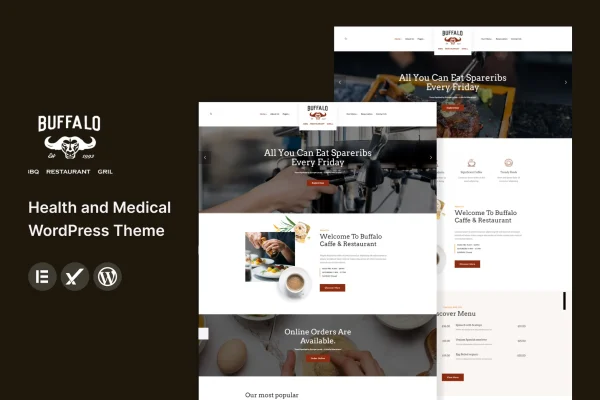
Theme
Updated
Buffalo
Buffalo is a WordPress theme built for cafes, restaurants and other food businesses. It gives you a clean, modern layout, customizable menu displays and a built-in reservation system, so guests can browse your dishes and book a table from one site.
- Version
- 2.0
- Released
- Dec 15, 2022
- Developer
- template_path
- Type
- WordPress theme
- Licence
- GPL
- Included in
- Every plan, or $3.99 on its own
What’s new in Buffalo 2.0
Version 2.0 · Dec 15, 2022
Latest
- ChangedMaintenance release.
What it does
Food businesses need a website that shows the menu clearly, explains what the place is like and lets people book a table. This theme covers those jobs with menu layouts that combine dish images, descriptions and pricing, plus a reservation system built into the theme. It suits a coffee shop, a bistro or a fine dining restaurant, and the responsive design adapts the layout to desktops, tablets and phones.
Setup starts with a one-click demo import that loads sample content you can then replace with your own photos, dishes and text. From there you can pick among multiple header and footer styles and adjust typography and colors to match your brand, all without writing code. The theme works with WooCommerce, Contact Form 7 and WPML, so you can add a shop, contact forms or translated pages if your business needs them.
Best for
- Cafes and coffee shops wanting an online menu
- Restaurants and bistros that take table reservations online
- Freelancers building websites for food business clients
Features
Customizable menu layouts
Display your dishes with images, descriptions and pricing, so visitors can see what you serve and what it costs before they arrive.
Built-in reservation system
Guests can reserve a table online through the theme's own booking feature, which helps you manage reservations from your website.
One-click demo import
Load the demo content in one step, then swap in your own menu items, photos and text to match your cafe or restaurant.
Multiple header and footer styles
Choose from several header and footer designs to give your site a layout that fits the character of your business.
Typography and color options
Adjust fonts and colors across the site so the design reflects your brand without needing to edit any code.
Responsive, retina ready design
Layouts adapt to desktops, tablets and smartphones, and graphics are prepared to look sharp on high-resolution displays.
Popular plugin compatibility
Works with WooCommerce, Contact Form 7 and WPML, letting you add online sales, contact forms or multilingual content.
Social media integration
Connect your website to your social channels so visitors can find and follow your cafe or restaurant elsewhere.
Questions about Buffalo
Can customers book a table through the site?
Yes. The theme includes a built-in reservation system, so guests can reserve a table online from your website. This helps you handle bookings without relying only on phone calls.
Can I show prices and photos for each dish?
Yes. The customizable menu layouts let you display dishes with images, descriptions and pricing. You can arrange your menu so visitors can browse what you offer before they visit.
Will it work if I want to sell products or run a multilingual site?
The theme is compatible with WooCommerce, which you can use to sell products, and with WPML for translated content. It also works with Contact Form 7 for adding contact forms to your pages.
Do I need coding skills to change the design?
No. You can start from the demo import, pick from multiple header and footer styles, and change typography and colors through the theme options without writing code.
Is Buffalo free?
The code of Buffalo is licensed under the GPL, so anyone may use, change and share it. GPL Feast is a paid service: a plan or a single purchase gives you the download and automatic updates. The developer's own support, licence key and online services are not included.
Which version of Buffalo is this?
Version 2.0, released Dec 15, 2022. New versions appear here when the developer publishes them, and members get them as automatic updates.
How do I update Buffalo?
Install the free GPL Feast Updater on your site and connect it with your API key. It installs new versions of Buffalo automatically and keeps a backup, so you can roll back.






