Theme
Updated
Cafert
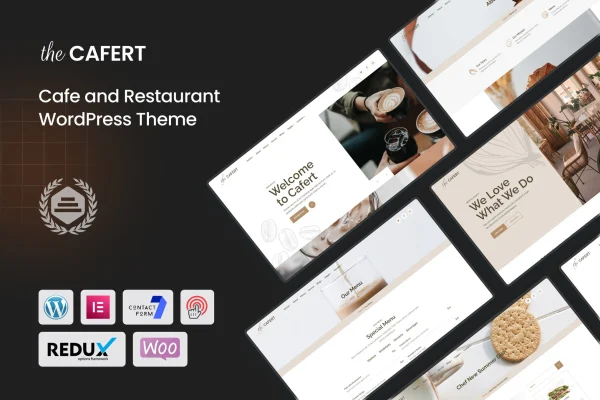
Cafert is a WordPress theme built for cafes, restaurants, bakeries, pubs, pizzerias and other food businesses. It gives you ready layouts for presenting your menu, taking table bookings and introducing your team, all editable in the Elementor drag-and-drop builder.
- Version
- 1.7
- Released
- Aug 14, 2026
- Developer
- shtheme
- Type
- WordPress theme
- Licence
- GPL
- Included in
- Every plan, or $3.99 on its own
What’s new in Cafert 1.7
Version 1.7 · Aug 14, 2026
Latest
What it does
A food business website has a few jobs to do well: show the menu clearly, let guests book a table and give visitors a sense of the place and the people behind it. This theme covers those needs with two home page layouts, a menu sorted into categories with tabs, an integrated booking form and team member profiles. A blog section lets you post news, recipes or event announcements, so the site can stay current without extra tools.
The theme is built on Elementor, so you can rearrange sections, swap images and edit text by dragging and dropping, with no coding required. Layouts are responsive and adapt to desktops, tablets and phones, and graphics are retina ready for sharp display on high-resolution screens. It works with WooCommerce if you want to sell products or take orders online, with WPML for multilingual sites, and with plugins such as Gravity Forms, BuddyPress, bbPress and Easy Digital Downloads.
Best for
- Cafes, coffee shops and bakeries
- Restaurants, pizzerias, bars and pubs
- Food businesses wanting online bookings or ordering
Features
Two home page layouts
Choose between two distinct home page designs as a starting point, then adjust either one to match the look of your cafe or restaurant.
Tabbed menu by category
Food and drinks are grouped into categories with tabs, so visitors can jump straight to breakfast, mains, desserts or beverages without scrolling through everything.
Integrated booking form
Guests can request a reservation directly from your site through a built-in booking form, which keeps table requests in one place.
Elementor drag and drop editing
Pages are built with the Elementor page builder, so you can move sections, change content and adjust styling visually without writing code.
Team member profiles
Introduce your chefs, baristas and staff with profiles that show their names and roles, giving visitors a friendlier view of your business.
Blog for news and recipes
A built-in blog lets you publish updates, recipes, special events and seasonal announcements alongside your menu and booking pages.
WooCommerce and WPML compatible
Add online ordering or a product shop through WooCommerce, and translate your site into other languages using WPML.
Responsive and retina ready
Layouts adjust to desktops, tablets and phones, and graphics stay crisp on high-resolution displays so food photos and text look sharp.
Questions about Cafert
Do I need coding skills to customize Cafert?
No. The theme is built with the Elementor drag-and-drop page builder, so you can edit layouts, text, images and sections visually. That makes it practical for owners who want to manage their own site without hiring a developer for every change.
Can guests book a table through the site?
Yes. The theme includes an integrated booking form that guests can use to request reservations. You can place it on your home page or a dedicated reservations page so visitors find it easily.
Can I sell products or take online orders?
The theme is compatible with WooCommerce, so you can add a shop or online ordering to your site. This works well for selling items such as baked goods, coffee beans, gift cards or takeaway dishes.
Will it work for a multilingual restaurant website?
Yes. The theme supports WPML, which lets you create translated versions of your pages. This is useful for restaurants in tourist areas or businesses serving customers who speak different languages.
Is Cafert free?
The code of Cafert is licensed under the GPL, so anyone may use, change and share it. GPL Feast is a paid service: a plan or a single purchase gives you the download and automatic updates. The developer's own support, licence key and online services are not included.
Which version of Cafert is this?
Version 1.7, released Aug 14, 2026. New versions appear here when the developer publishes them, and members get them as automatic updates.
How do I update Cafert?
Install the free GPL Feast Updater on your site and connect it with your API key. It installs new versions of Cafert automatically and keeps a backup, so you can roll back.