Theme
Updated
Carbone
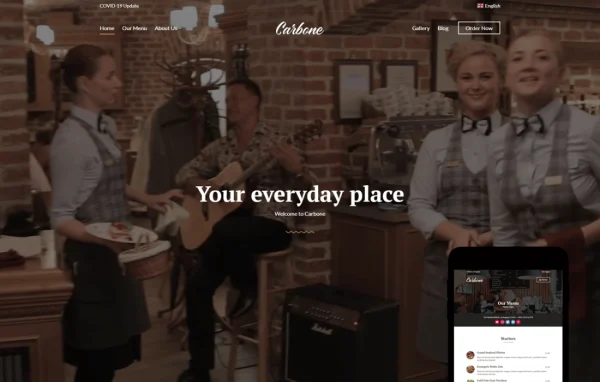
Carbone is a WordPress theme by CSSIgniter built for restaurants, cafes and bars. It gives food and drink businesses a clean, modern site with menus, reservation forms and galleries, plus flexible design controls through the Customizer, the block editor and Elementor.
Install this firstPlease download the Ignition Framework Plugin from here, which is needed by CSS Ignitor Themes.
Go to product- Version
- 1.2.4
- Released
- Sep 17, 2025
- Developer
- CSSIgniter
- Type
- WordPress theme
- Licence
- GPL
- Included in
- Every plan, or $4.79 a year on its own
What’s new in Carbone 1.2.4
Version 1.2.4 · Sep 17, 2025
Latest
- FixedA doing_it_wrong '_load_textdomain_just_in_time' warning would be thrown on the sample content import pages (One Click Demo Import).
- ImprovedVariations' name and description are no longer translatable due to _load_textdomain_just_in_time warning.
- FixedChanged version to 1.2.4.
- ImprovedRequiresIgnition: 3.5.0.
- ImprovedM languages/ci-theme.pot.
- ImprovedM style.css.
- ImprovedM style.min.css.
- ImprovedM style.scss.
What it does
Restaurants, cafes and bars need a website that presents their food, atmosphere and brand clearly, and that works well on phones as much as on desktops. Carbone is designed around that need. It includes customizable menus, reservation forms and galleries for presenting dishes and drinks, and its mobile-friendly layout adapts to different screen sizes. A one-click demo import loads sample content so you can start from a finished layout and replace the text and images with your own.
Design work happens in a few familiar places. The Customizer handles headers, footers, color schemes and Google Fonts with a real-time preview. Pages can be built with the native block editor and the GutenBee blocks collection, or with Elementor if you prefer drag-and-drop editing. A global sections system lets you build a section once and reuse it across pages, and WooCommerce compatibility means you can add an online store for products or merchandise.
Best for
- Restaurants wanting menus and reservation forms on their site
- Cafes and bars presenting food, drinks and atmosphere
- Hospitality businesses selling products through WooCommerce
Features
Flexible header options
Adjust the header's color scheme, layout, fonts and logo in the Customizer, with changes previewed in real time so you can match your brand before publishing.
Customizable footers
Set footer colors, fonts, layout and links through a simple interface, giving every page a consistent finish at the bottom of the screen.
Block editor and GutenBee blocks
Build pages with the native WordPress block editor plus the GutenBee blocks collection, so you can create rich layouts without writing code.
Elementor page building
Use Elementor for drag-and-drop page design when you want more hands-on control over the layout of individual pages.
Reusable global sections
Create a section once in the block editor or Elementor and place it anywhere on your site, keeping styling consistent and saving repeated work.
Custom color schemes
Build and fine-tune your own color palettes in the Customizer, with control over specific theme areas such as the header and footer.
Google Fonts choices
Pick from the Google Fonts library and adjust font properties directly within the Customizer to find a pairing that suits your venue.
One-click demo import
Import a complete demo with sample content to reproduce the preview layout, then swap in your own menus, photos and text.
Carbone older versions
- 1.2.3Nov 1, 202414 improvements, 3 fixes, 1 removal
- 1.2.2Apr 18, 20231 new, 6 improvements
Members and buyers of this product can download older versions.
Questions about Carbone
Can I take table reservations with this theme?
Yes. The theme includes reservation forms alongside customizable menus and galleries, so guests can browse what you offer and request a booking from the same site. You can style these pages with the block editor or Elementor to match the rest of your design.
Do I have to use Elementor to build pages?
No. You can build pages with the native WordPress block editor and the included GutenBee blocks collection. Elementor is supported as an alternative if you prefer drag-and-drop editing, and global sections can be created with either approach.
Can I sell products or gift items online with Carbone?
Yes. Carbone is compatible with WooCommerce, so you can add an online store that handles product listings, inventory and checkout. This works well for selling merchandise, packaged goods or other items next to your restaurant pages.
Will my site look like the theme demo?
A one-click demo import brings in a complete demo with sample content, reproducing the layout shown in the previews. From there you can change colors, fonts, headers and footers in the Customizer and replace the sample content with your own.
Is Carbone free?
The code of Carbone is licensed under the GPL, so anyone may use, change and share it. GPL Feast is a paid service: a plan or a single purchase gives you the download and automatic updates. The developer's own support, licence key and online services are not included.
Which version of Carbone is this?
Version 1.2.4, released Sep 17, 2025. New versions appear here when the developer publishes them, and members get them as automatic updates.
How do I update Carbone?
Install the free GPL Feast Updater on your site and connect it with your API key. It installs new versions of Carbone automatically and keeps a backup, so you can roll back.
More from CSSIgniter