Theme
Updated
Cavin
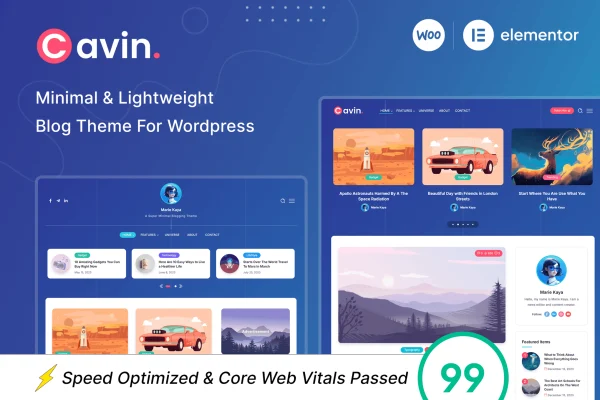
Cavin by RivaxStudio is a minimal WordPress blog theme built around simplicity and lightweight code. It gives bloggers a clean, distraction-free layout that puts posts, photos and ideas front and center, with customizable layouts, colors and typography.
- Version
- 1.9
- Released
- Jun 22, 2026
- Developer
- RivaxStudio
- Type
- WordPress theme
- Licence
- GPL
- Included in
- Every plan, or $3.99 on its own
What’s new in Cavin 1.9
Version 1.9 · Jun 22, 2026
Latest
- NewSingle Post Layout 1,2 Full Size Thumbnail Option
- FixedLong Divider Heading Text In Mobile
- ImprovedCompatibility: WordPress 7.0
- ImprovedCompatibility: WooCommerce 10.8
- ImprovedEnvato Market Plugin 2.0.14
What it does
Many blog themes pile on sliders, widgets and visual effects that pull attention away from the writing. This theme takes the opposite approach with a clean, minimal design that keeps readers focused on your content. The code is kept lightweight, and the layout is fully responsive, so posts display properly on desktops, tablets and phones. It suits writers sharing stories, photographers posting their work, and anyone who wants a refined, modern look for a personal or professional blog.
Minimal does not mean fixed. You can pick from different post styles and arrangements to match how you like to present your blog, and the theme Customizer lets you adjust colors, fonts and site identity without writing code. The markup uses semantic HTML5 for a well-structured site. If you want to add more to your blog later, the theme is compatible with popular plugins including WooCommerce for a shop and Contact Form 7 for contact forms.
Best for
- Personal bloggers who want a clean, minimal look
- Photographers and writers sharing stories or visual work
- Freelancers building simple, content-focused blogs for clients
Features
Minimal, clean design
A distraction-free layout keeps the focus on your posts and images, making articles easy to read and giving the blog a refined, modern look.
Lightweight code
The theme is built with lightweight, optimized code, keeping the design simple and free of unnecessary extras that can weigh a blog down.
Fully responsive layout
Pages adapt to desktops, tablets and mobile devices, so readers get a clean, readable layout no matter which screen they use.
Customizable blog layouts
Choose between different post styles and arrangements to present your articles in a way that fits your personal blogging style.
Theme Customizer controls
Adjust colors, fonts and site identity through the WordPress Customizer, with no coding knowledge needed to match the blog to your brand.
Semantic HTML5 structure
The theme follows semantic HTML5 and common best practices, giving your content a clean, well-organized structure that search engines can read.
Popular plugin compatibility
Works with popular plugins including WooCommerce and Contact Form 7, so you can add a shop or contact forms as your site grows.
Questions about Cavin
Can I change the colors and fonts without coding?
Yes. The theme uses the WordPress Customizer to give you control over colors, fonts and site identity. You can make these changes visually, so there is no need to edit code to match the blog to your brand or personal style.
Will my blog look good on phones and tablets?
The layout is fully responsive and adapts to desktops, tablets and mobile devices. Your posts, images and navigation adjust to each screen size, so readers get a clean, readable experience wherever they visit from.
Can I add a shop or contact form to a Cavin blog?
Yes. Cavin is compatible with popular plugins including WooCommerce and Contact Form 7. That lets you add an online store or contact forms to your blog while keeping the same minimal design.
Are there different layouts for blog posts?
The theme includes customizable blog layouts with different post styles and arrangements. You can choose the presentation that best fits your content, whether your blog leans toward written articles, photography or a mix of both.
Is Cavin free?
The code of Cavin is licensed under the GPL, so anyone may use, change and share it. GPL Feast is a paid service: a plan or a single purchase gives you the download and automatic updates. The developer's own support, licence key and online services are not included.
Which version of Cavin is this?
Version 1.9, released Jun 22, 2026. New versions appear here when the developer publishes them, and members get them as automatic updates.
How do I update Cavin?
Install the free GPL Feast Updater on your site and connect it with your API key. It installs new versions of Cavin automatically and keeps a backup, so you can roll back.