
Theme
Updated
Cleanze
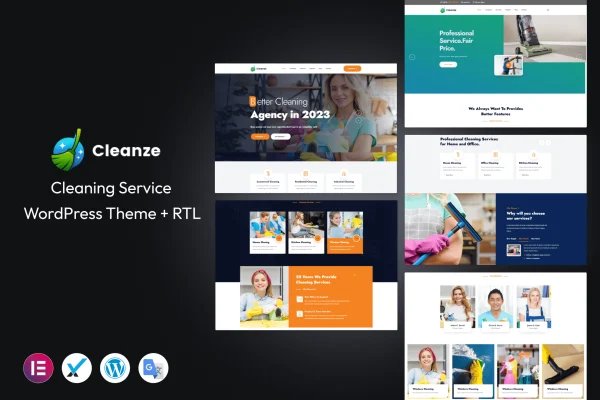
Cleanze is a WordPress theme built for cleaning service businesses, from residential cleaners to commercial crews. It gives you ready layouts for presenting your services, collecting bookings through built-in forms and featuring what past clients have said about your work.
- Version
- 1.0.8
- Released
- Apr 19, 2024
- Developer
- template_path
- Type
- WordPress theme
- Licence
- GPL
- Included in
- Every plan, or $3.99 on its own
What’s new in Cleanze 1.0.8
Version 1.0.8 · Apr 19, 2024
Latest
What it does
A cleaning company website has a few jobs to do: explain what services you offer, show visitors that real customers trust you and make it easy to request an appointment. This theme covers those needs with dedicated templates. Service detail pages hold descriptions, images and pricing for each type of cleaning, a testimonials section displays customer reviews, and booking forms built into the theme let clients schedule appointments and send inquiries without you adding a separate tool.
Setup starts with a one-click demo import that loads pre-designed content you can then edit. From there, you can adjust sections to match your brand without writing code, pick from several header and footer styles and rearrange layouts using compatible drag and drop page builder plugins. The design is responsive, so pages adapt to phones, tablets and desktops. It suits small local cleaning businesses as well as larger operations offering both home and commercial services.
Best for
- Residential house cleaning businesses
- Commercial and office cleaning companies
- Freelancers building sites for local cleaning clients
Features
Built-in booking forms
Customizable booking forms come with the theme, so clients can schedule appointments and you can keep track of incoming requests and inquiries.
Service detail pages
Give each cleaning service its own page with a description, images and pricing so customers can compare options before they book.
Client testimonials section
A dedicated section displays reviews from satisfied customers, giving new visitors a sense of the experience others have had with your business.
Responsive layouts
Pages adjust to different screen sizes, so your site works for visitors on phones, tablets and desktop computers alike.
Page builder compatibility
The theme works with popular drag and drop page builder plugins, letting you change layouts visually without touching any code.
Multiple header and footer styles
Choose from a range of header and footer designs to find a look that fits your company branding and site structure.
One-click demo import
Import the pre-designed demo content in one step, then replace the text and images with your own business details.
No-code section customization
Tailor each section of the site to your brand identity using built-in options, with no coding knowledge required.
Questions about Cleanze
Can customers book a cleaning appointment directly on the site?
Yes. The theme includes booking forms built into its templates. You can customize these forms so clients can schedule appointments and send inquiries, which helps you manage incoming requests from one place on your website.
Can I list prices for each of my cleaning services?
Yes. The customizable service pages let you add detailed descriptions, images and pricing for each service you offer, so visitors can understand what is included before they reach out or book.
Do I need coding skills to customize Cleanze?
No. Sections can be tailored through the theme options without code, and Cleanze is compatible with popular drag and drop page builder plugins for visual layout editing. You can also start from the imported demo content and edit it.
Will the site work on mobile phones?
Yes. The theme uses a fully responsive design, so layouts adapt to phones, tablets and desktop screens. Visitors browsing on the go can still read about your services and use the booking forms.
Is Cleanze free?
The code of Cleanze is licensed under the GPL, so anyone may use, change and share it. GPL Feast is a paid service: a plan or a single purchase gives you the download and automatic updates. The developer's own support, licence key and online services are not included.
Which version of Cleanze is this?
Version 1.0.8, released Apr 19, 2024. New versions appear here when the developer publishes them, and members get them as automatic updates.
How do I update Cleanze?
Install the free GPL Feast Updater on your site and connect it with your API key. It installs new versions of Cleanze automatically and keeps a backup, so you can roll back.






