Theme
Updated
Cliper
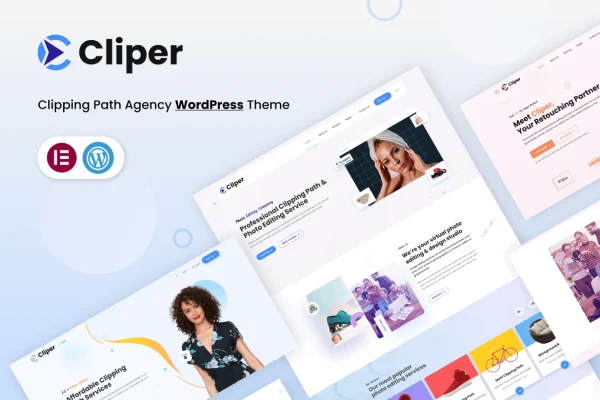
Cliper is a WordPress theme by themeim built for clipping path agencies, freelancers and graphic designers who sell image editing services. It gives you a ready structure to present your portfolio, describe your services and collect quote requests from potential clients.
- Version
- 1.2.5
- Released
- Aug 11, 2026
- Developer
- themeim
- Type
- WordPress theme
- Licence
- GPL
- Included in
- Every plan, or $3.99 on its own
What’s new in Cliper 1.2.4
Version 1.2.4 · Jul 17, 2023
Latest
- ImprovedCheck compatible with elementor and fixed issues.
What it does
Image editing businesses offer very specific services, such as clipping path, ghost mannequin, neck joint and vector conversion, and a generic theme rarely has a natural place for them. This theme is shaped around that kind of work. It includes layouts for service pages and portfolios, plus a custom quote system so visitors can ask for an estimate on their images. An FAQ system that supports images lets you answer common client questions with visual examples.
Setup starts with more than 25 demo layouts that you can import with one click, then adjust to match your brand. You can build and edit pages with Elementor or the Gutenberg block editor, and the theme options cover typography, icons and footer design without requiring code. The layouts are responsive and retina ready, so your before and after images display clearly on phones, tablets and desktop screens.
Best for
- Clipping path and photo retouching agencies
- Freelance graphic designers offering image editing services
- Studios selling ghost mannequin or vector conversion work
Features
Over 25 demo layouts
Choose from more than 25 distinct demo designs built for image editing agencies, giving you several starting points for different styles and business needs.
One-click demo import
Import a demo's content in a single step, then replace the sample text and images with your own services and portfolio work.
Elementor and Gutenberg support
Design and edit your pages with either the Elementor page builder or the built-in Gutenberg block editor, depending on which you prefer.
Custom quote system
Let potential clients request a quotation for their image editing jobs directly on your site, alongside a set of ready widgets for engaging visitors.
FAQ system with images
Build an FAQ section that pairs answers with images, which helps explain services like clipping path or ghost mannequin work visually.
Typography and icon options
Adjust fonts and icons across the site so the look matches your brand identity, all from the theme options without writing code.
Footer customization
Control the footer's design and content so it fits the rest of your site and keeps contact details and links easy to find.
Responsive and retina ready
Layouts adapt to mobiles, tablets and desktops, and support high-resolution screens so portfolio images stay sharp.
Cliper older versions
- 1.2.4Oct 6, 2023
- 1.2.3Jun 19, 2023
Members and buyers of this product can download older versions.
Questions about Cliper
Can I build pages with Elementor using this theme?
Yes. The theme is compatible with Elementor and with the Gutenberg block editor, so you can design and edit pages with whichever builder you are more comfortable using. The demo layouts give you a starting structure to customize.
Can clients request a quote through my site?
Yes. Cliper includes a custom quote system that lets visitors send quotation requests for their image editing jobs. It sits alongside ready widgets you can use to present your services and encourage potential clients to get in touch.
Do I need coding skills to customize the design?
No coding knowledge is required. Theme options cover typography, icons and footer design, and you can arrange page content with drag-and-drop tools in Elementor or with blocks in Gutenberg. Importing a demo with one click gives you a working layout to edit.
Which image editing services does the theme suit?
It is designed for agencies and freelancers offering services such as clipping path, ghost mannequin, neck joint and vector conversion, among similar image editing work. The portfolio layouts and FAQ system with images help you explain each service to clients.
Is Cliper free?
The code of Cliper is licensed under the GPL, so anyone may use, change and share it. GPL Feast is a paid service: a plan or a single purchase gives you the download and automatic updates. The developer's own support, licence key and online services are not included.
Which version of Cliper is this?
Version 1.2.5, released Aug 11, 2026. New versions appear here when the developer publishes them, and members get them as automatic updates.
How do I update Cliper?
Install the free GPL Feast Updater on your site and connect it with your API key. It installs new versions of Cliper automatically and keeps a backup, so you can roll back.