Theme
Updated
Panthar
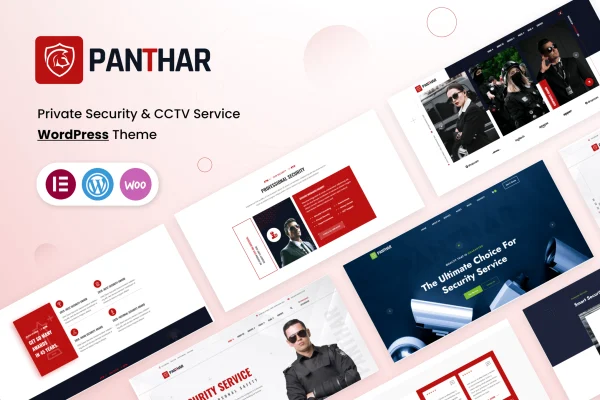
Panthar is a WordPress theme built for security and CCTV service businesses. It gives security consultants, bodyguard services, camera installers, locksmiths and private protection agencies a ready site design with demo content, responsive layouts and page editing through Elementor or Gutenberg.
- Version
- 1.1.3
- Released
- Jul 1, 2024
- Developer
- themeim
- Type
- WordPress theme
- Licence
- GPL
- Included in
- Every plan, or $3.99 on its own
What’s new in Panthar 1.1.3
Version 1.1.3 · Jul 1, 2024
Latest
- RemovedRemoved unused CSS & JS code from theme.
What it does
Security companies need a website that looks professional and makes their services easy to understand. Panthar is designed around that niche, with a clean design that mixes modern and classic styling for guard houses, CCTV installation teams, security consultants and similar providers. A one-click demo import sets up the sample site so you can start by replacing content instead of designing pages from an empty screen.
Once the demo is in place, you can edit pages with drag and drop in Elementor or work in the Gutenberg block editor, with no coding needed. A theme control panel handles look and feel settings, and the footer area has its own customization options for branding and navigation. The layouts are responsive and retina ready, work across major browsers, and use Oswald and Poppins fonts with Font Awesome and Icomoon icons. Documentation is included to guide setup and site management.
Best for
- CCTV and security camera installation companies
- Security consultants, bodyguard services and guard agencies
- Locksmiths and private protection businesses
Features
One-click demo import
Import the demo content in a single step to get a working security service site in place, then swap in your own text, images and details.
Elementor and Gutenberg support
Build and edit pages with drag and drop in Elementor or with the Gutenberg block editor, without writing any code.
Theme control panel
Adjust the look and feel of your site through a control panel with customization options for styling and layout settings.
Responsive, retina ready layouts
Pages adapt to desktops, tablets and smartphones, and the design is prepared for high resolution retina screens.
Fonts and icon sets included
Typography uses the Oswald and Poppins fonts, and the theme includes Font Awesome and Icomoon icon sets for service and contact graphics.
Footer customization
Personalize the footer area with your own branding and navigation links using the theme's dedicated footer options.
Cross-browser compatibility
The theme is built to display and function consistently across the major web browsers your visitors are likely to use.
Usage documentation
Included guides explain how to set up and manage the theme, which helps site owners at different skill levels.
Questions about Panthar
Can I build pages with Elementor in this theme?
Yes. The theme works with Elementor for drag and drop page building, and it also supports the Gutenberg block editor. Both options let you create and edit pages without any coding knowledge.
What kinds of businesses is Panthar designed for?
It targets security service providers, including security consultants, bodyguard services, CCTV installation experts, locksmiths, guard houses and private protection agencies. The design and demo content are shaped around presenting those kinds of services.
Will the site look right on phones and tablets?
The layouts are responsive, so pages adjust to desktops, tablets and smartphones. The design is also retina ready for sharp display on high resolution screens, and it is built to work across major browsers.
Can I change the fonts, icons and footer?
The theme ships with Oswald and Poppins fonts plus Font Awesome and Icomoon icon sets. A control panel offers look and feel options, and the footer has its own customization settings for branding and navigation.
Is Panthar free?
The code of Panthar is licensed under the GPL, so anyone may use, change and share it. GPL Feast is a paid service: a plan or a single purchase gives you the download and automatic updates. The developer's own support, licence key and online services are not included.
Which version of Panthar is this?
Version 1.1.3, released Jul 1, 2024. New versions appear here when the developer publishes them, and members get them as automatic updates.
How do I update Panthar?
Install the free GPL Feast Updater on your site and connect it with your API key. It installs new versions of Panthar automatically and keeps a backup, so you can roll back.