Theme
Updated
Coolex
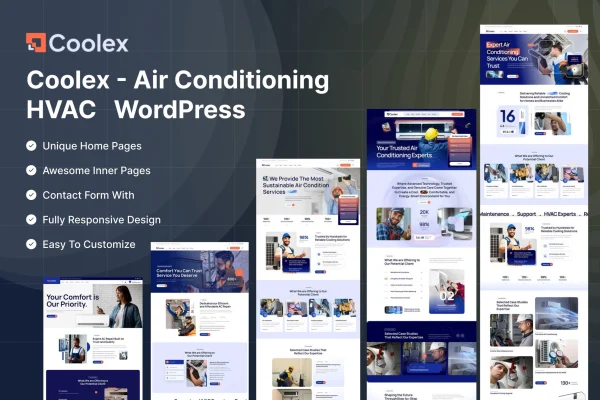
Coolex is a WordPress theme by ThemeMascot built for air conditioning and HVAC companies. It gives service businesses a ready structure for presenting their work, taking appointment requests and sharing customer reviews, all on a responsive layout that works with Elementor.
- Version
- 6.0
- Released
- Feb 11, 2025
- Developer
- ThemeMascot
- Type
- WordPress theme
- Requires
- Elementor
- Licence
- GPL
- Included in
- Every plan, or $3.99 on its own
What’s new in Coolex 6.0
Version 6.0 · Feb 11, 2025
Latest
What it does
HVAC contractors usually need a site that explains their services clearly, shows they can be trusted and makes it easy for customers to book a visit. This theme is designed around that job. It includes a customizable homepage where you can arrange sections for your services, special offers and company strengths, plus a service area that pairs icons with descriptive text so visitors can quickly find the repair or installation they need.
Setup starts with a one-click demo import, which loads pre-built content you can then edit to match your brand. The theme requires Elementor and is compatible with Contact Form 7, so you can adjust layouts and add forms. Built-in appointment booking lets clients schedule service calls through the site, a testimonials section displays customer feedback, and a blog layout gives you a place for HVAC tips and company news. The layout adapts to desktops, tablets and phones.
Best for
- Air conditioning installation and repair companies
- HVAC contractors offering heating and cooling services
- Agencies building websites for local trade businesses
Features
Responsive layout
Pages adjust automatically to desktop, tablet and smartphone screens, so customers looking up a technician on their phone see a usable, readable site.
Customizable homepage sections
Arrange and edit homepage sections to put your HVAC services, special offers and company strengths in the order that suits your business.
Service listings with icons
Present each air conditioning or HVAC service with an icon and descriptive content, making it easy for visitors to scan what you offer.
Built-in appointment booking
Clients can schedule service appointments directly through your website, which cuts down on back-and-forth phone calls to set up a visit.
One-click demo import
Import the pre-built demo content in one step, then replace the text, images and details with your own company information.
Elementor and Contact Form 7 compatibility
The theme works with Elementor for page editing and with Contact Form 7 for adding inquiry and contact forms to your pages.
Customer testimonials section
Display reviews and feedback from past clients in a dedicated section to help new visitors feel confident about hiring you.
Blog layout
Publish HVAC maintenance tips, industry news and company updates using a blog layout designed to match the rest of the theme.
Questions about Coolex
Does this theme need Elementor?
Yes. Elementor is listed as a requirement, and the theme is built to work with it for editing page layouts. It is also compatible with Contact Form 7 if you want to add contact or inquiry forms to your pages.
Can customers book a service visit through the site?
Yes. The theme includes built-in appointment booking, so clients can schedule service appointments directly on your website instead of calling to arrange a time.
Will I have to build every page from scratch?
No. A one-click demo import loads pre-built demo content, including homepage sections for services, offers and testimonials. You then edit that content with your own business details, images and branding.
Is it only suitable for air conditioning companies?
It is designed for the air conditioning and HVAC industry, with service sections, booking and testimonials that fit heating and cooling contractors. Its layout centers on presenting trade services, so it suits businesses in that field.
Is Coolex free?
The code of Coolex is licensed under the GPL, so anyone may use, change and share it. GPL Feast is a paid service: a plan or a single purchase gives you the download and automatic updates. The developer's own support, licence key and online services are not included.
Which version of Coolex is this?
Version 6.0, released Feb 11, 2025. New versions appear here when the developer publishes them, and members get them as automatic updates.
How do I update Coolex?
Install the free GPL Feast Updater on your site and connect it with your API key. It installs new versions of Coolex automatically and keeps a backup, so you can roll back.
What does Coolex need?
Coolex needs Elementor installed and active.