Theme
Updated
Corner Theme
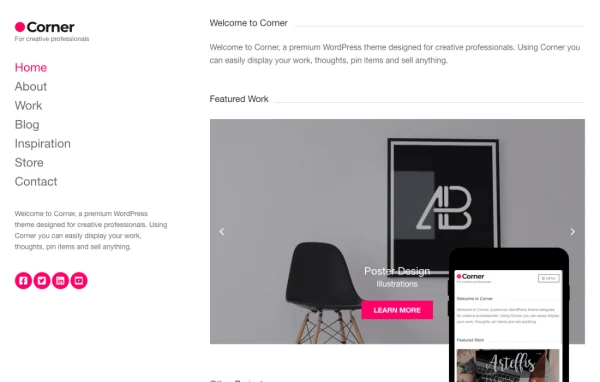
Corner is a WordPress theme by CSSIgniter made for creative professionals who want a clean, minimalist site to present their work. It supports building pages with Gutenberg blocks or Elementor, and it works with WooCommerce if you also want to sell products.
Install this firstPlease download the Ignition Framework Plugin from here, which is needed by CSS Ignitor Themes.
Go to product- Version
- 1.1.4
- Released
- Sep 17, 2025
- Developer
- CSSIgniter
- Type
- WordPress theme
- Licence
- GPL
- Included in
- Every plan, or $4.79 a year on its own
What’s new in Corner Theme 1.1.4
Version 1.1.4 · Sep 17, 2025
Latest
- ImprovedOnboarding v1.3.2 (fixes some sample content import edge cases).
- FixedWrong gettext domain on some strings.
- FixedChanged version to 1.1.4
- FixedRequiresIgnition: 3.5.0
- ImprovedUpdated language and style files.
What it does
Designers, artists, photographers and bloggers often need a site that puts their work first without a lot of visual clutter. This theme takes a minimalist approach, with a customizable homepage, portfolio templates and multiple layout options. A one-click demo import gives you sample content to start from, so you can swap in your own images and text instead of building every page from a blank screen. The layout is responsive, so pages adapt to phones, tablets and desktops.
Page building works two ways. You can use WordPress blocks along with the GutenBee custom blocks, or you can use the Elementor drag-and-drop editor. A global sections system lets you design a section once and reuse it across the site. Headers, footers, colors and Google Fonts are all adjusted in the Customizer with a real-time preview. WooCommerce support means a portfolio site can add a shop for prints, products or other goods later on.
Best for
- Photographers and artists building online portfolios
- Freelance designers who want a minimalist personal site
- Creative bloggers planning to add a WooCommerce shop
Features
Flexible header settings
Adjust the header's color scheme, fonts, layout and logo from the Customizer, with a real-time preview of each change before you publish it.
Customizable footers
Set footer colors, layouts and fonts through Customizer settings, and add the links or contact details you want visitors to see at the bottom of each page.
GutenBee custom blocks
Build pages with standard WordPress blocks plus the GutenBee custom blocks, giving you extra content elements inside the block editor.
Elementor compatibility
Prefer drag-and-drop design? The theme works with Elementor, so you can lay out pages visually instead of using the block editor.
Reusable global sections
Create a section once in the block editor or Elementor, then place it on multiple pages to keep your design consistent across the site.
Custom color schemes
Build a color palette that matches your brand and apply it globally or to selected areas of the theme using built-in Customizer options.
Google Fonts typography
Pick from dozens of Google Fonts and fine-tune typography settings separately for headers, body text and footers.
One-click demo import
Import the demo content in one step to get a ready layout with portfolio templates and a homepage you can edit to suit your work.
Corner Theme older versions
- 1.1.3Oct 24, 20241 improvement, 2 fixes
- 1.1.2Oct 23, 20243 improvements, 2 fixes
- 1.1.1Aug 14, 20233 new, 3 improvements, 3 fixes
- 1.1.0Aug 4, 2023
- 1.0.1Apr 18, 2023
Members and buyers of this product can download older versions.
Questions about Corner Theme
Can I build pages with Elementor instead of the block editor?
Yes. The theme works with both Gutenberg blocks and Elementor, so you can choose whichever method you prefer. The global sections system also supports both, letting you design reusable sections in either editor.
Can I sell products on a site using this theme?
Yes. The theme supports WooCommerce, so you can add a shop to your portfolio site. That makes it a reasonable choice if you want to present your work and also sell prints, products or other items.
How much can I change the look without writing code?
Headers, footers, color schemes and typography are all set in the WordPress Customizer with a real-time preview. You can choose Google Fonts, adjust colors globally or by area, and change header and footer layouts.
Is there a starting layout so I don't begin from scratch?
Yes. A one-click demo import loads sample content, including a customizable homepage and portfolio templates. You can then replace the demo text and images with your own and adjust the layout options as needed.
Is Corner Theme free?
The code of Corner Theme is licensed under the GPL, so anyone may use, change and share it. GPL Feast is a paid service: a plan or a single purchase gives you the download and automatic updates. The developer's own support, licence key and online services are not included.
Which version of Corner Theme is this?
Version 1.1.4, released Sep 17, 2025. New versions appear here when the developer publishes them, and members get them as automatic updates.
How do I update Corner Theme?
Install the free GPL Feast Updater on your site and connect it with your API key. It installs new versions of Corner Theme automatically and keeps a backup, so you can roll back.
More from CSSIgniter