Theme
Updated
Decorist
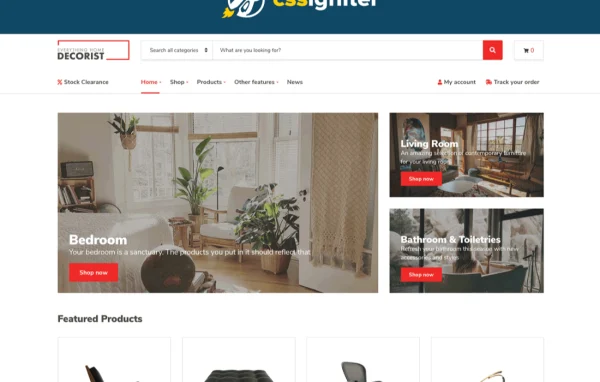
Decorist by CSSIgniter is a minimal WordPress theme built for WooCommerce stores that sell physical products. It suits home decor, fashion and decoration shops, giving them a clean layout with customizable headers, footers, colors and fonts.
Install this firstPlease download the Ignition Framework Plugin from here, which is needed by CSS Ignitor Themes.
Go to product- Version
- 1.5.2
- Released
- Oct 23, 2024
- Developer
- CSSIgniter
- Type
- WordPress theme
- Licence
- GPL
- Included in
- Every plan, or $4.79 a year on its own
What’s new in Decorist 1.5.2
Version 1.5.2 · Oct 23, 2024
Latest
- FixedMake sure WooCommerce pages use shortcodes when installing the sample content.
- ImprovedOnboarding v1.3.1 (fixes import issues)
- ImprovedUpdated language file.
What it does
Shops selling home goods or fashion need a storefront that keeps attention on the products. This theme uses a clean, modern design with plenty of room for product images, and it works with WooCommerce for product management, checkout and inventory. Small boutiques and growing stores can shape the look to match their brand through the Customizer, adjusting header layouts, footer content, color palettes and typography while previewing changes live.
Page building works two ways. You can use native WordPress blocks along with the GutenBee custom blocks collection, or build drag and drop layouts with Elementor. A global sections system lets you design reusable sections once and place them across the site, which keeps repeated elements consistent. A one-click demo import sets up sample content so your site mirrors the demo, giving you a starting point to edit instead of a blank page.
Best for
- Online home decor and furnishing shops
- Small fashion boutiques selling through WooCommerce
- Stores selling decoration items and other physical goods
Features
Flexible header options
Adjust header color schemes, layouts, fonts and logos, and preview each change live in the Customizer before publishing it to your store.
Customizable footers
Tailor the footer's colors, fonts, layout and links so the bottom of every page matches the rest of your brand's design.
Block editor and GutenBee
Build pages with native WordPress blocks plus the GutenBee custom blocks collection, adding content sections without writing any code.
Elementor page building
Design product pages and other layouts with Elementor's drag and drop editor for detailed control over how each page looks.
Reusable global sections
Create global sections in the block editor or Elementor and reuse them across the site to keep repeated design elements consistent.
WooCommerce store support
Run a working online store with WooCommerce handling product management, checkout and inventory, styled to fit the theme's minimal look.
Custom color schemes
Build your own color palettes and apply them globally or to specific areas such as headers, footers and top bars.
Google Fonts and demo import
Pick from dozens of Google Fonts for each section, and import the demo content with one click to start from a finished layout.
Decorist older versions
- 1.5.1Jan 26, 20241 improvement, 1 fix
- 1.5.0Jan 18, 20241 new, 2 improvements, 4 fixes, 1 removal
- 1.4.1Apr 18, 20231 new, 2 improvements, 1 fix
Members and buyers of this product can download older versions.
Questions about Decorist
Does Decorist work with WooCommerce?
Yes. The theme is built for WooCommerce, so you can manage products, run checkout and track inventory. It is designed for stores that sell physical products such as home decor, fashion and decoration items.
Can I build pages with Elementor or the block editor?
Both are supported. You can use Elementor for drag and drop layouts, or the WordPress block editor with native blocks and the GutenBee custom blocks collection. Global sections can be created with either one and reused across the site.
How much can I change the design without coding?
Quite a lot through the Customizer. You can change header layouts, logos, footer content, color palettes for specific areas, and Google Fonts typography for each section, with a live preview as you work.
Is there a quick way to make my site look like the demo?
Yes. A one-click demo import loads the sample content so your site mirrors the demo. You can then swap in your own products, images and text instead of building every page from scratch.
Is Decorist free?
The code of Decorist is licensed under the GPL, so anyone may use, change and share it. GPL Feast is a paid service: a plan or a single purchase gives you the download and automatic updates. The developer's own support, licence key and online services are not included.
Which version of Decorist is this?
Version 1.5.2, released Oct 23, 2024. New versions appear here when the developer publishes them, and members get them as automatic updates.
How do I update Decorist?
Install the free GPL Feast Updater on your site and connect it with your API key. It installs new versions of Decorist automatically and keeps a backup, so you can roll back.
More from CSSIgniter