Theme
Updated
Dilabs
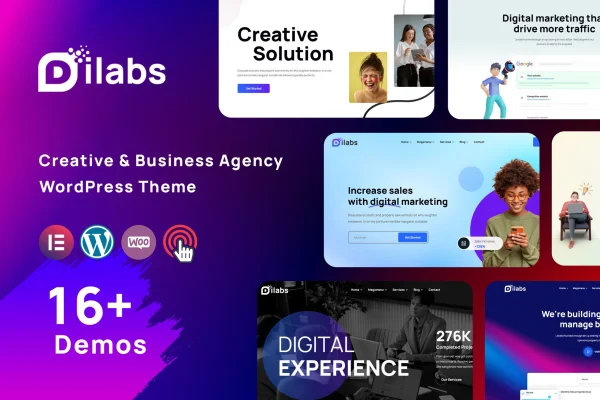
Dilabs is a WordPress theme for creative agencies, startups, digital consultants and freelancers. It gives you a clean, minimal design with responsive layouts, a large set of homepage and inner page designs, and built-in contact and subscription forms so you can build a professional agency site without starting from scratch.
- Version
- 2.0
- Developer
- validthemes
- Type
- WordPress theme
- Licence
- GPL
- Included in
- Every plan, or $3.99 on its own
What’s new in Dilabs 2.0
Version 2.0
Latest
What it does
Building an agency website usually means designing a homepage, service pages, a portfolio and a blog that all feel consistent. This theme handles that groundwork with 15 distinct homepages and more than 35 page variations. You pick the layouts that match your brand, then adjust them to fit your services, case studies and team. The design is clean and minimal, and the layouts are responsive and retina ready, so pages display well on desktops, tablets and phones.
Customization runs through Elementor, which gives you a drag-and-drop editor for changing pages without writing code. The theme is built on the Bootstrap framework and is compatible with WooCommerce, so you can add a shop alongside your portfolio. WPML compatibility lets you run the site in more than one language. For developers, the code is well commented and documented, which makes custom changes and ongoing maintenance easier to manage.
Best for
- Creative and digital agencies presenting services and work
- Freelancers and creative professionals building a portfolio site
- Startups and consultants needing a clean business website
Features
Fifteen homepage designs
Choose from 15 distinct homepage layouts to set the tone for an agency, startup or consultancy site, then adapt the one that fits your brand.
Over 35 page variations
More than 35 inner page variations cover the structure of a full site, giving you options for services, portfolio, blog and other content pages.
Responsive and retina ready
Layouts adjust to different screen sizes and resolutions, so your pages display cleanly on desktops, tablets and smartphones.
Contact and subscription forms
Working contact and subscription forms are included, with spam protection, so visitors can reach you or sign up without extra setup.
Elementor page building
Edit pages with Elementor's drag-and-drop interface, which lets non-technical users change layouts and content without touching code.
WooCommerce compatibility
The theme works with WooCommerce, so you can add an online store to your agency or portfolio site when you need one.
WPML multilingual support
Compatibility with WPML means you can translate your site and serve visitors in several languages from one installation.
Documented Bootstrap codebase
Built on the Bootstrap framework with well-commented, documented code, which helps developers customize and maintain the theme over time.
Questions about Dilabs
Can I build pages with Elementor using this theme?
Yes. The theme supports the Elementor page builder, so you can edit layouts and content with a drag-and-drop interface. This makes it practical for people without coding experience to adjust the included homepages and page variations.
Can I sell products on a site built with Dilabs?
The theme is compatible with WooCommerce, so you can add an online store to your site. That works well if your agency or studio wants to sell products or packaged services next to its portfolio and blog.
Does it work for a multilingual website?
Yes. The theme is compatible with WPML, which lets you translate your content and run the site in more than one language. This suits agencies that work with clients or audiences in different countries.
How many layout options come with the theme?
You get 15 distinct homepages and more than 35 page variations. Together they cover the main parts of an agency site, such as the front page, service and portfolio pages, and blog layouts, so you can mix and match.
Is Dilabs free?
The code of Dilabs is licensed under the GPL, so anyone may use, change and share it. GPL Feast is a paid service: a plan or a single purchase gives you the download and automatic updates. The developer's own support, licence key and online services are not included.
Which version of Dilabs is this?
Version 2.0. New versions appear here when the developer publishes them, and members get them as automatic updates.
How do I update Dilabs?
Install the free GPL Feast Updater on your site and connect it with your API key. It installs new versions of Dilabs automatically and keeps a backup, so you can roll back.